Part 3: Turn Events, Error Handling and Middleware
Routes decide which code answers an activity. Some code has to run for every activity, whichever route answers it: a log line, a check that can turn a request away, a safety net for when something breaks. In this part you add all three to a small bill-splitting agent, and you see exactly what your users get when an agent throws an exception. It's not what most people expect.
This is Part 3 of the Microsoft 365 Agents SDK Fundamentals, a 26-part series.
- Part 1: Activities and the Activity Protocol
- Part 2: Route Activities with AgentApplication
- Part 3: Turn Events, Error Handling and Middleware (you are here)
- Part 4: Conversation, User and Turn State
- Part 5: Send Adaptive Cards and Handle Their Actions
- Part 6: Send Proactive Messages (coming soon)
- Part 7: Stream Responses and Show Progress (coming soon)
- Part 8: Run Your Agent in Microsoft Teams (coming soon)
- Part 9: Universal Actions: Adaptive Cards That Update (coming soon)
- Part 10: Teams Dialogs (coming soon)
- Part 11: Commands, Suggested Actions and Targeted Messages (coming soon)
- Part 12: Mentions, Rosters and Team Events (coming soon)
- Part 13: Meeting Events (coming soon)
- Part 14: Send and Receive Files (coming soon)
- Part 15: Sign People In with SSO and OAuth (coming soon)
- Part 16: Message Extensions and Link Unfurling (coming soon)
- Part 17: AI Labels, Citations and Feedback (coming soon)
- Part 18: Bring Your Agent to Microsoft 365 Copilot (coming soon)
- Part 19: Store State in Azure Blob Storage and Cosmos DB (coming soon)
- Part 20: Telemetry with OpenTelemetry (coming soon)
- Part 21: Web Chat and Direct Line (coming soon)
- Part 22: Reach People in Slack (coming soon)
- Part 23: Call a Copilot Studio Agent (coming soon)
- Part 24: Agent-to-Agent Communication (coming soon)
- Part 25: Keep Conversation Transcripts (coming soon)
- Part 26: Deploy Your Agent to Azure (coming soon)
By the end of this part you'll know what runs before and after your routes on every turn, how to run your own code at those points and how to stop a turn early. You'll also know what happens to an exception your code doesn't catch, how to make sure people only ever see a message you wrote, and how middleware handles activities before your agent sees them. Every step works in VS Code and in Visual Studio; where they differ, the page shows a tab for each. Every output and screenshot on this page is real.
What Runs Around Every Turn
A turn is everything your agent does with one activity: the SDK receives it, your code handles it, and the replies go out. Part 2's routes are the middle of a turn. Around them, the SDK runs code of its own and calls yours at fixed points, in this order:
- Middleware runs first. It lives in the adapter, the
CloudAdapterthat receives the HTTP request and sends your replies, so it sees the activity before your agent does, and it decides whether your agent sees it at all. AgentApplicationloads the turn's state, the data it keeps between turns. Part 4 is about state.- Your before-turn handlers run, in the order you registered them. Any of them can stop the turn here.
- The first route that matches runs, as in Part 2.
- Your after-turn handlers run.
AgentApplicationsaves the state.- Back in the middleware, the code after its call to the next step runs.
When a before-turn handler, a route or an after-turn handler throws an exception, AgentApplication runs your turn error handlers, and then passes the exception on to the adapter's own error handler, the last code that runs.
The Hooks at a Glance
| Hook | You register it with | It runs | Use it for |
|---|---|---|---|
| Middleware | builder.AddAgentMiddleware(...) in Program.cs | For every activity, before and after your agent | Checks and changes that don't belong to one agent |
| Before-turn handler | OnBeforeTurn(...) in your agent | After the state loads, before the routes | Logging and checks; return false to stop the turn |
| After-turn handler | OnAfterTurn(...) | After the routes, before the state is saved | Logging and follow-ups; return false to skip saving the state |
| Turn error handler | OnTurnError(...) | When a before-turn handler, a route or an after-turn handler throws | Telling the user what went wrong, in your agent's words |
| Adapter error handler | An ICloudAdapterErrorHandler service | For every exception that leaves the turn | Logging the error, and a safe reply if nobody has answered |
The last row matters more than it looks. The CloudAdapter comes with an error handler of its own, and by default it sends the exception's message to the user, as an ordinary message, in every channel, Microsoft Teams included. You'll watch it happen, and replace it.
The Example: A Bill Splitter
To see each hook at work, you'll build a bill splitter. Send it split 90 between 3, and it answers That's 30.00 each. It has just two routes, one for split requests and a catch-all for everything else, so the hooks are the only new thing on the page. You'll add them one at a time:
| Step | You add | What you'll see |
|---|---|---|
| 3 | A before-turn and an after-turn handler that log every turn | Each turn's start and end in the terminal, around the route |
| 4 | A before-turn handler that pauses the agent | The agent turning requests away while a setting is on |
| 5 | Nothing: you split a bill between 0 people | The raw exception message, in the chat |
| 6 | A turn error handler | A friendly message, and the raw one after it |
| 7 | A replacement for the adapter's error handler | Only the friendly message |
| 8 | Middleware that limits how long a message can be | Long messages answered before the agent sees them |
The bill splitter has a bug on purpose: it doesn't check for zero people. That's what makes the error handling visible. You'll run it in the Microsoft 365 Agents Playground, as in Parts 1 and 2.
Prerequisites
- The .NET 10 SDK.
dotnet --versionshould print10.0.and a patch number; this page was built with10.0.404. - The Microsoft 365 Agents Playground.
agentsplayground --versionshould print0.2.30. If the command isn't found, install it withnpm install -g @microsoft/m365agentsplayground. - How routes work, from Part 2: Route Activities with AgentApplication.
Step 1: Create the Project
Open a terminal in the folder where you keep your projects and create an empty ASP.NET Core project:
dotnet new web -o BillSplitter
The template "ASP.NET Core Empty" was created successfully.

Processing post-creation actions...
Restoring /Users/you/source/BillSplitter/BillSplitter.csproj:
Restore succeeded.
Then add the Agents SDK's hosting package, which brings the rest of the SDK with it:
cd BillSplitter
dotnet add package Microsoft.Agents.Hosting.AspNetCore --version 1.9.205
info : PackageReference for package 'Microsoft.Agents.Hosting.AspNetCore' version '1.9.205' added to file '/Users/you/source/BillSplitter/BillSplitter.csproj'.
info : Generating MSBuild file /Users/you/source/BillSplitter/obj/BillSplitter.csproj.nuget.g.targets.
info : Writing assets file to disk. Path: /Users/you/source/BillSplitter/obj/project.assets.json
log  : Restored /Users/you/source/BillSplitter/BillSplitter.csproj (in 3.26 sec).
Step 2: Write the Bill Splitter
Create a file called BillSplitterAgent.cs in the project folder:
using System.Globalization;
using System.Text.RegularExpressions;
using Microsoft.Agents.Builder;
using Microsoft.Agents.Builder.App;
using Microsoft.Agents.Builder.State;
using Microsoft.Agents.Core.Models;

namespace BillSplitter;

public class BillSplitterAgent : AgentApplication
{
    private static readonly Regex SplitPattern = new(@"^split\s+(\d{1,7}(?:\.\d{1,2})?)\s+between\s+(\d{1,3})$", RegexOptions.IgnoreCase);

    public BillSplitterAgent(AgentApplicationOptions options) : base(options)
    {
        OnMessage(SplitPattern, SplitAsync);
        OnActivity(ActivityTypes.Message, HelpAsync, rank: RouteRank.Last);
    }

    private async Task SplitAsync(ITurnContext turnContext, ITurnState turnState, CancellationToken cancellationToken)
    {
        Match match = SplitPattern.Match(turnContext.Activity.Text);
        decimal amount = decimal.Parse(match.Groups[1].Value, CultureInfo.InvariantCulture);
        int people = int.Parse(match.Groups[2].Value, CultureInfo.InvariantCulture);

        decimal share = amount / people;

        await turnContext.SendActivityAsync($"That's **{share:0.00}** each.", cancellationToken: cancellationToken);
    }

    private async Task HelpAsync(ITurnContext turnContext, ITurnState turnState, CancellationToken cancellationToken)
    {
        await turnContext.SendActivityAsync("Send me a bill to split, such as **split 90 between 3**.", cancellationToken: cancellationToken);
    }
}
SplitPatternmatchessplit, an amount of up to seven digits with up to two decimals,between, and a number of people of up to three digits, ignoring case. The two groups in brackets capture the amount and the number of people.decimal.Parse(..., CultureInfo.InvariantCulture)reads the amount the way the pattern wrote it, with a dot before the decimals. Without it, a computer set to a language that writes decimals with a comma would read12.50as1250.amount / peopleis the bug:(\d{1,3})accepts0, and dividing by zero throws an exception.- The catch-all with
RouteRank.Lastanswers every other message, as in Part 2.
Replace everything in Program.cs with the same hosting Parts 1 and 2 use, with BillSplitterAgent as the agent:
using BillSplitter;
using Microsoft.Agents.Hosting.AspNetCore;
using Microsoft.Agents.Storage;

var builder = WebApplication.CreateBuilder(args);

builder.AddAgentDefaults()
    .AddAgent<BillSplitterAgent>();
builder.Services.AddSingleton<IStorage, MemoryStorage>();

var app = builder.Build();

app.UseAgents();
app.MapDefaultAgentEndpoints();

app.Run();
Then open Properties/launchSettings.json and set the two applicationUrl lines to port 3978, where the Agents Playground looks by default:
"applicationUrl": "http://localhost:3978",
"applicationUrl": "https://localhost:3979;http://localhost:3978",
Build it:
dotnet build
Restore complete (0.4s)
  BillSplitter net10.0 succeeded (2.5s) → bin/Debug/net10.0/BillSplitter.dll

Build succeeded in 3.3s
And start it:
- VS Code (or any terminal)
- Visual Studio
In the terminal, in the project folder:
dotnet run
Choose Debug → Start Without Debugging (Ctrl+F5). Both launch profiles listen on port 3978. Visual Studio also opens your browser on the agent's GET / page, which you can close.
Using launch settings from /Users/you/source/BillSplitter/Properties/launchSettings.json...
Building...
warn: Microsoft.Agents.Authentication.ConfigurationConnections[0]
      No connections found in configuration.
warn: Microsoft.Agents.Authentication.ConfigurationConnections[0]
      No connections map found in configuration.
info: Microsoft.Agents.Hosting.AspNetCore.BackgroundQueue.HostedActivityService[0]
      Queued Hosted Service is running.
info: Microsoft.Agents.Hosting.AspNetCore.BackgroundQueue.HostedTaskService[0]
      Queued Hosted Service is running.

info: Microsoft.Hosting.Lifetime[14]
      Now listening on: http://localhost:3978
info: Microsoft.Hosting.Lifetime[0]
      Application started. Press Ctrl+C to shut down.
info: Microsoft.Hosting.Lifetime[0]
      Hosting environment: Development
info: Microsoft.Hosting.Lifetime[0]
      Content root path: /Users/you/source/BillSplitter
The two warnings mean the agent has no identity of its own yet, which the Playground doesn't need. Open a second terminal and start the Agents Playground as the emulator channel:
agentsplayground -e http://localhost:3978/api/messages -c emulator
Send split 90 between 3, then hello:
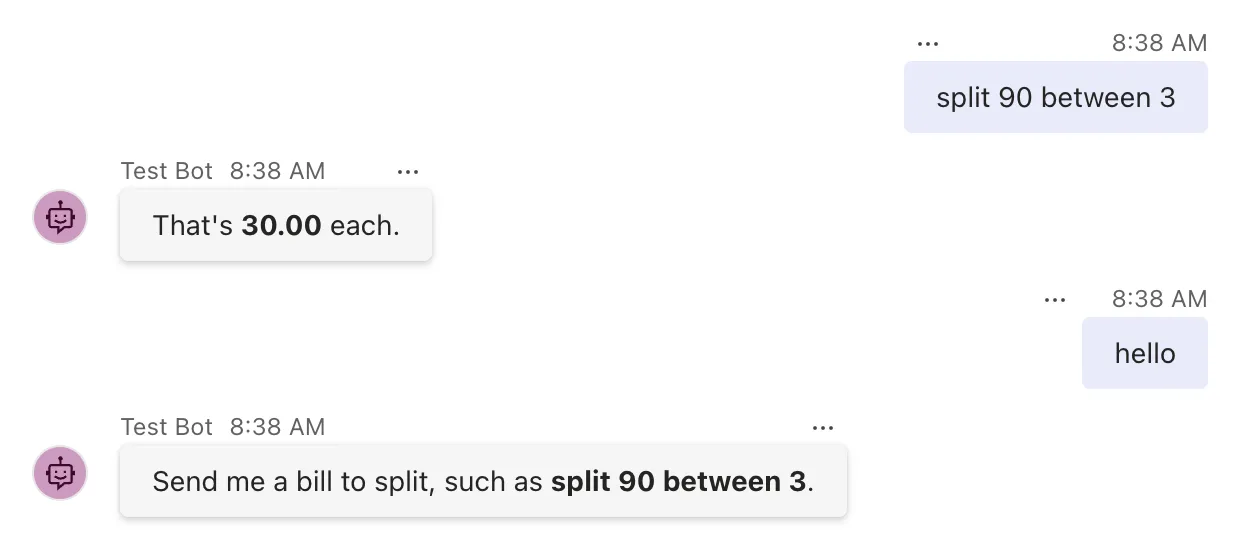
Both routes answer. Now for the code around them.
Step 3: Run Code Before and After Every Turn
Stop the agent with Ctrl+C. Then give the agent a logger and register two turn handlers. The SDK creates a new instance of your agent class for every activity, through ASP.NET Core's dependency injection, so the constructor can ask for an ILogger<T> next to AgentApplicationOptions, like any class ASP.NET Core creates:
    private readonly ILogger<BillSplitterAgent> _logger;

    public BillSplitterAgent(AgentApplicationOptions options, ILogger<BillSplitterAgent> logger) : base(options)
    {
        _logger = logger;

        OnMessage(SplitPattern, SplitAsync);
        OnActivity(ActivityTypes.Message, HelpAsync, rank: RouteRank.Last);

        OnBeforeTurn(LogTurnStartAsync);
        OnAfterTurn(LogTurnEndAsync);
    }
Add the two handlers at the end of the class:
    private Task<bool> LogTurnStartAsync(ITurnContext turnContext, ITurnState turnState, CancellationToken cancellationToken)
    {
        _logger.LogInformation("Turn started: {ActivityType}", turnContext.Activity.Type);
        return Task.FromResult(true);
    }

    private Task<bool> LogTurnEndAsync(ITurnContext turnContext, ITurnState turnState, CancellationToken cancellationToken)
    {
        _logger.LogInformation("Turn finished: {ActivityType}, answered: {Answered}", turnContext.Activity.Type, turnContext.Responded);
        return Task.FromResult(true);
    }
- A turn handler has the same parameters as a route handler, but returns
Task<bool>.truemeans carry on with the turn. These two do no asynchronous work, so they returnTask.FromResult(true)instead of beingasync. OnBeforeTurnandOnAfterTurneach take as many handlers as you register, and run them in that order.turnContext.Respondedistrueonce the agent has sent something in this turn.
Run the agent again with dotnet run. In the second terminal, stop the Playground with Ctrl+C and start it again with the same command, so it opens a new conversation, then send split 90 between 3. The agent's terminal shows two turns:
warn: Microsoft.Agents.Hosting.AspNetCore.CloudAdapter[4]
      Anonymous access is enabled for channel: emulator.
info: BillSplitter.BillSplitterAgent[0]
      Turn started: conversationUpdate
info: BillSplitter.BillSplitterAgent[0]
      Turn finished: conversationUpdate, answered: False
warn: Microsoft.Agents.Hosting.AspNetCore.CloudAdapter[4]
      Anonymous access is enabled for channel: emulator.
info: BillSplitter.BillSplitterAgent[0]
      Turn started: message
info: System.Net.Http.HttpClient.Microsoft.Agents.Builder.RestChannelServiceClientFactory.LogicalHandler[100]
      Start processing HTTP request POST http://localhost:56150/_connector/v3/conversations/2714eaf6-d148-4a9a-85d2-6dc0d5840391/activities/d9e3a961-4470-4764-b037-f7be42868345
info: System.Net.Http.HttpClient.Microsoft.Agents.Builder.RestChannelServiceClientFactory.ClientHandler[100]
      Sending HTTP request POST http://localhost:56150/_connector/v3/conversations/2714eaf6-d148-4a9a-85d2-6dc0d5840391/activities/d9e3a961-4470-4764-b037-f7be42868345
info: System.Net.Http.HttpClient.Microsoft.Agents.Builder.RestChannelServiceClientFactory.ClientHandler[101]
      Received HTTP response headers after 36.9167ms - 201
info: System.Net.Http.HttpClient.Microsoft.Agents.Builder.RestChannelServiceClientFactory.LogicalHandler[101]
      End processing HTTP request after 49.425ms - 201
info: BillSplitter.BillSplitterAgent[0]
      Turn finished: message, answered: True
The first turn is the conversationUpdate the Playground sends when it connects. No route takes it, so it ends with answered: False, but both handlers still ran: every activity gets a turn, and the turn handlers run for all of them. The second turn is your message. The four HttpClient lines between its start and its end are the route sending That's 30.00 each. to the Playground, so the order is exactly as promised: before-turn, route, after-turn.
The warning above each turn appears for every activity that arrives without authentication, which is how an agent with no identity of its own runs on your machine.
Step 4: Stop a Turn from OnBeforeTurn
A before-turn handler that returns false stops the turn: no route runs, and neither do the after-turn handlers. You'll use that for a pause switch: a setting that makes the agent turn requests away, say while you fix something, without stopping the app.
Add the setting to appsettings.json, after "AllowedHosts":
{
  "Logging": {
    "LogLevel": {
      "Default": "Information",
      "Microsoft.AspNetCore": "Warning"
    }
  },
  "AllowedHosts": "*",
  "BillSplitter": {
    "Paused": false
  }
}
In BillSplitterAgent.cs, ask for IConfiguration in the constructor too, and register a second before-turn handler after the first:
    private readonly ILogger<BillSplitterAgent> _logger;
    private readonly IConfiguration _configuration;

    public BillSplitterAgent(AgentApplicationOptions options, ILogger<BillSplitterAgent> logger, IConfiguration configuration) : base(options)
    {
        _logger = logger;
        _configuration = configuration;

        OnMessage(SplitPattern, SplitAsync);
        OnActivity(ActivityTypes.Message, HelpAsync, rank: RouteRank.Last);

        OnBeforeTurn(LogTurnStartAsync);
        OnBeforeTurn(StopWhenPausedAsync);
        OnAfterTurn(LogTurnEndAsync);
    }
Then add the handler, before LogTurnEndAsync:
    private async Task<bool> StopWhenPausedAsync(ITurnContext turnContext, ITurnState turnState, CancellationToken cancellationToken)
    {
        if (!_configuration.GetValue<bool>("BillSplitter:Paused"))
        {
            return true;
        }

        if (turnContext.Activity.Type == ActivityTypes.Message)
        {
            await turnContext.SendActivityAsync("The bill splitter is paused for maintenance. Please try again later.", cancellationToken: cancellationToken);
        }

        return false;
    }
GetValue<bool>("BillSplitter:Paused")reads the setting on every turn. ASP.NET Core reloadsappsettings.jsonwhen the file changes, so a running agent picks up a new value at its next turn.- Only messages get an answer while paused; any other activity is stopped quietly, since nobody is waiting for a reply.
- The order matters. The logging handler is registered first, so even a paused turn is logged before the pause switch stops it.
When a before-turn handler stops a turn, the SDK still saves the turn's state, so your agent can remember why it stopped. Part 4 puts that state to use.
Start the agent again. While it runs, change "Paused": false to "Paused": true in appsettings.json, save the file, and send split 90 between 3 in the Playground. Then set it back to false, save, and send it once more:
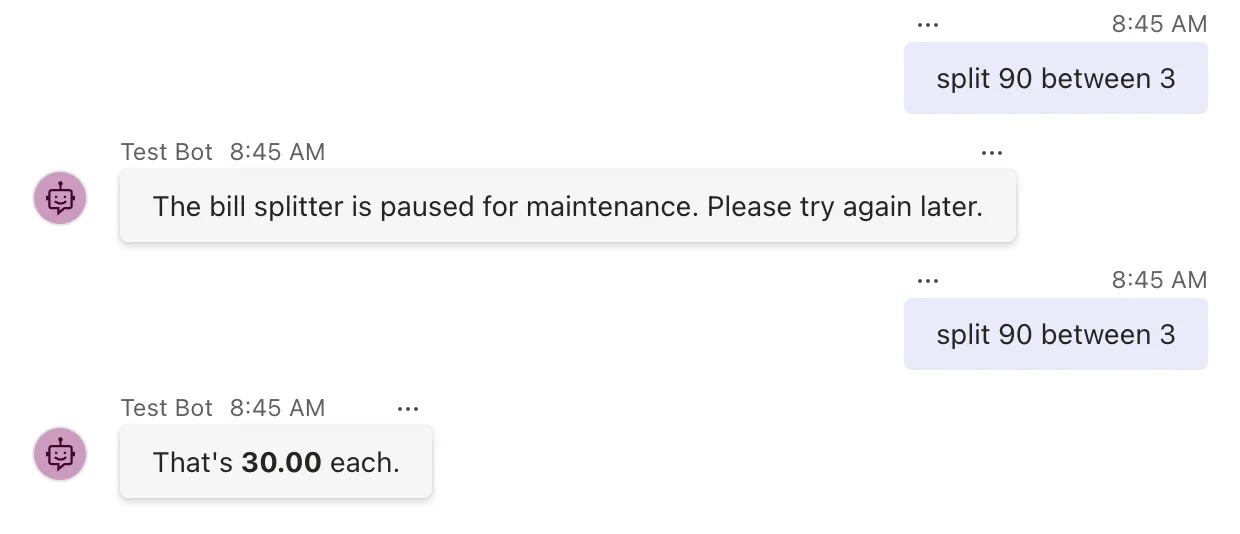
The first request was turned away while the switch was on, and the second went through, without restarting the agent. The terminal shows the difference:
info: BillSplitter.BillSplitterAgent[0]
      Turn started: message
info: System.Net.Http.HttpClient.Microsoft.Agents.Builder.RestChannelServiceClientFactory.LogicalHandler[100]
      Start processing HTTP request POST http://localhost:56150/_connector/v3/conversations/2714eaf6-d148-4a9a-85d2-6dc0d5840391/activities/520be7eb-bcbc-47f6-b95b-7649396d8258
info: System.Net.Http.HttpClient.Microsoft.Agents.Builder.RestChannelServiceClientFactory.ClientHandler[100]
      Sending HTTP request POST http://localhost:56150/_connector/v3/conversations/2714eaf6-d148-4a9a-85d2-6dc0d5840391/activities/520be7eb-bcbc-47f6-b95b-7649396d8258
info: System.Net.Http.HttpClient.Microsoft.Agents.Builder.RestChannelServiceClientFactory.ClientHandler[101]
      Received HTTP response headers after 74.3959ms - 201
info: System.Net.Http.HttpClient.Microsoft.Agents.Builder.RestChannelServiceClientFactory.LogicalHandler[101]
      End processing HTTP request after 96.2811ms - 201
Turn started, the pause message going out, and then nothing: no route, and no Turn finished, because the after-turn handler never ran.
Step 5: See What Your Users Get When the Agent Fails
Now trigger the bug. Send split 90 between 0:
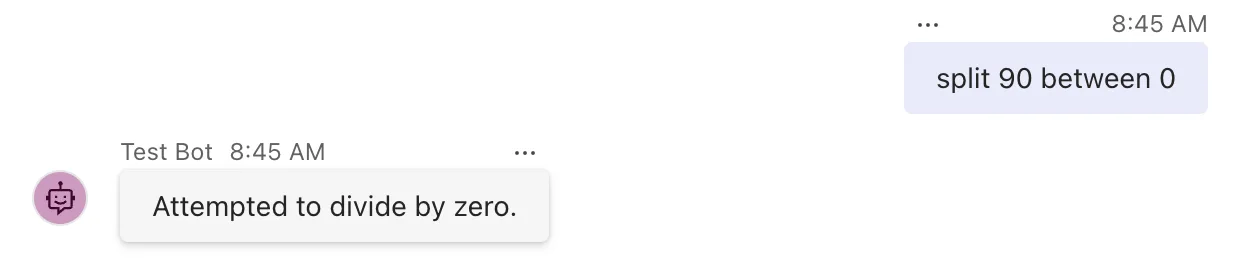
Attempted to divide by zero. is the message of the DivideByZeroException that amount / people threw. Your code never caught it, so it left the turn, and the CloudAdapter's built-in error handler took it. That handler logged the exception, then sent its message to the user:
info: BillSplitter.BillSplitterAgent[0]
      Turn started: message
fail: Microsoft.Agents.Hosting.AspNetCore.CloudAdapter[0]
      Unhandled exception during turn processing. Attempted to divide by zero.
      =====================================
      ErrorCode: -2147352558
      Source: System.Private.CoreLib
      Method: VarDecDiv
      TimeStamp: 2026-11-21T08:45:39.0353550Z
      Error: Attempted to divide by zero.
      HelpLink Url: Not Provided
      =====================================

      System.DivideByZeroException: Attempted to divide by zero.
         at System.Decimal.DecCalc.VarDecDiv(DecCalc& d1, DecCalc& d2)
         at System.Decimal.op_Division(Decimal d1, Decimal d2)
There's no Turn finished this time either: when a turn throws, the after-turn handlers don't run and the state isn't saved.
The Playground's Log Panel shows one more activity after the message: a trace called OnTurnError Trace, which carries the details the log has, such as the source and the method that failed. Trace activities are only delivered to the emulator channel, for developers; in Teams, nobody sees them. The message is different: it goes to every channel.
That's the problem. An exception's message is written for developers. Depending on what failed, it can contain a file path on your server, a server name, part of a database query or a value from someone's data, and the default handler shows it to whoever is chatting with your agent.
Step 6: Handle Errors with OnTurnError
AgentApplication has its own error hook, OnTurnError, which runs when a before-turn handler, a route or an after-turn handler throws. Microsoft Learn's AgentApplication page shows it logging the exception and sending a friendly message, so start with that. Register it at the end of the constructor:
        OnBeforeTurn(LogTurnStartAsync);
        OnBeforeTurn(StopWhenPausedAsync);
        OnAfterTurn(LogTurnEndAsync);
        OnTurnError(HandleErrorAsync);
    }
And add the handler at the end of the class:
    private async Task HandleErrorAsync(ITurnContext turnContext, ITurnState turnState, Exception exception, CancellationToken cancellationToken)
    {
        _logger.LogError(exception, "The bill splitter couldn't finish a turn.");
        await turnContext.SendActivityAsync("Sorry, I couldn't split that bill. Please try again.", cancellationToken: cancellationToken);
    }
A turn error handler gets the same three things a route handler does, plus the exception, and returns a plain Task. Run the agent again and send split 90 between 0:
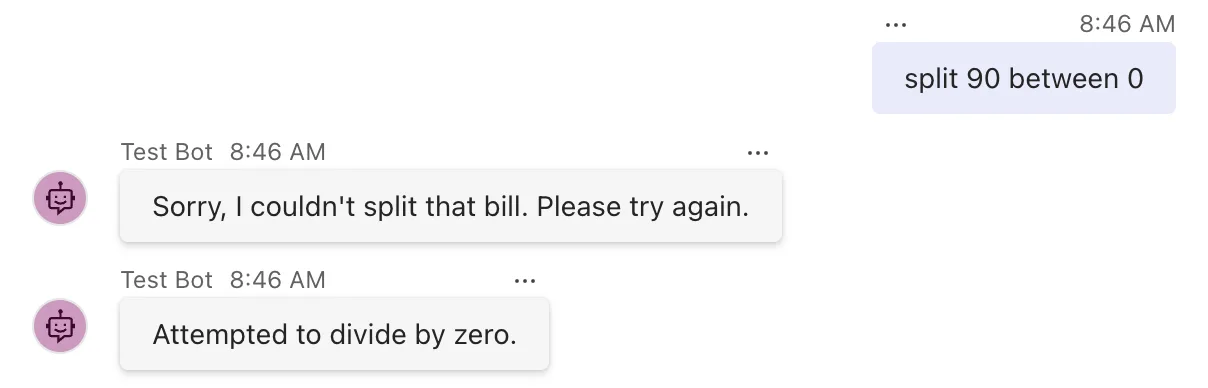
The friendly message arrived, and the raw one arrived right after it. The log shows why. Your handler logged the exception:
info: BillSplitter.BillSplitterAgent[0]
      Turn started: message
fail: BillSplitter.BillSplitterAgent[0]
      The bill splitter couldn't finish a turn.
      System.DivideByZeroException: Attempted to divide by zero.
         at System.Decimal.DecCalc.VarDecDiv(DecCalc& d1, DecCalc& d2)
         at System.Decimal.op_Division(Decimal d1, Decimal d2)
         at BillSplitter.BillSplitterAgent.SplitAsync(ITurnContext turnContext, ITurnState turnState, CancellationToken cancellationToken) in /Users/you/source/BillSplitter/BillSplitterAgent.cs:line 37
         at Microsoft.Agents.Builder.App.AgentApplication.OnTurnAsync(ITurnContext turnContext, CancellationToken cancellationToken)
Then, after the lines for your message going out, the CloudAdapter logged the same exception again, and sent its message as before:
fail: Microsoft.Agents.Hosting.AspNetCore.CloudAdapter[0]
      Unhandled exception during turn processing. Attempted to divide by zero.
AgentApplication doesn't keep the exception after your handler runs. It runs your turn error handlers, then throws the exception again, and it reaches the adapter's error handler as if you'd done nothing. The API reference for OnTurnError says so in one line: Exceptions here will bubble-up to Adapter.OnTurnError. So OnTurnError alone can add a message, but it can't stop the raw one. I wrote this problem up on its own, with everything I checked: Fixed: The Microsoft 365 Agents SDK Sends the Exception Message to the User After OnTurnError.
Step 7: Replace the Adapter's Error Handler
The fix is to replace the adapter's error handler. The SDK has an interface for exactly that, ICloudAdapterErrorHandler: register a class that implements it as a service, and the CloudAdapter uses it instead of its default. Create FriendlyErrorHandler.cs:
using Microsoft.Agents.Builder;
using Microsoft.Agents.Hosting.AspNetCore;

namespace BillSplitter;

// Replaces the CloudAdapter's default error handler, which sends the exception's message to the user.
public class FriendlyErrorHandler(ILogger<FriendlyErrorHandler> logger) : ICloudAdapterErrorHandler
{
    public async Task HandleTurnErrorAsync(ITurnContext turnContext, Exception exception)
    {
        logger.LogError(exception, "A {ActivityType} turn failed.", turnContext.Activity.Type);

        // Say nothing when the turn was cancelled, or when the agent has already told the user.
        if (exception is OperationCanceledException || turnContext.Responded)
        {
            return;
        }

        try
        {
            await turnContext.SendActivityAsync("Sorry, something went wrong. Please try again.", cancellationToken: CancellationToken.None);
        }
        catch (Exception sendException)
        {
            logger.LogWarning(sendException, "Couldn't tell the user that the turn failed.");
        }
    }
}
HandleTurnErrorAsyncgets the turn and the exception. Microsoft's documentation for the interface says a replacement is responsible for both logging the exception and sending any desired response activities: the default's logging goes too, so this handler logs the exception itself, once, with its stack trace.OperationCanceledExceptionmeans the turn was cancelled, for example because the app is shutting down, so there's nobody to answer. The default handler skips those too.turnContext.Respondedistruewhen this turn has already sent something. YourOnTurnErrorhandler sends the friendly message, so this handler stays quiet after it. An exception that never went throughAgentApplication, such as one in middleware, never reachedOnTurnError, so nothing was sent, and this handler answers with its own generic message.- The
tryblock keeps a failure to send, such as a channel that can't be reached, from throwing out of the error handler. It's logged as a warning instead.
The class takes its logger through a primary constructor, the parameter list after the class name. The SDK creates the handler through dependency injection, so it can ask for services like any other class. Register it in Program.cs, below MemoryStorage:
builder.Services.AddSingleton<ICloudAdapterErrorHandler, FriendlyErrorHandler>();
When the SDK creates the CloudAdapter, it looks for this service and, if there is one, uses it as the adapter's error handler. Where you register it in Program.cs doesn't matter.
Finally, take the logging out of HandleErrorAsync in BillSplitterAgent.cs, so each exception is logged once:
    private async Task HandleErrorAsync(ITurnContext turnContext, ITurnState turnState, Exception exception, CancellationToken cancellationToken)
    {
        // FriendlyErrorHandler logs the exception, so this handler only tells the user.
        await turnContext.SendActivityAsync("Sorry, I couldn't split that bill. Please try again.", cancellationToken: cancellationToken);
    }
Run the agent again and send split 90 between 0:
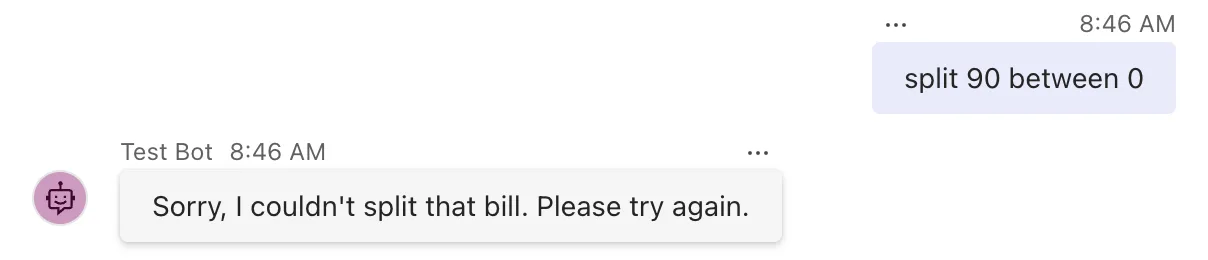
One message, in your words. The log has the exception once, from FriendlyErrorHandler, after the lines for the friendly message going out:
fail: BillSplitter.FriendlyErrorHandler[0]
      A message turn failed.
      System.DivideByZeroException: Attempted to divide by zero.
         at System.Decimal.DecCalc.VarDecDiv(DecCalc& d1, DecCalc& d2)
         at System.Decimal.op_Division(Decimal d1, Decimal d2)
Your users see a message you wrote, and you still get the full exception, stack trace and all, in your log.
Step 8: Add Middleware
Middleware handles activities before your agent does. A middleware is a class that implements the SDK's IMiddleware interface, and you'll write one that answers messages over a length limit itself, so they never reach the agent. A bill-splitting request is short; a 500-word paste is a mistake, and turning it away early costs nothing. Create MessageLengthLimitMiddleware.cs:
using Microsoft.Agents.Builder;
using Microsoft.Agents.Core.Models;
using IMiddleware = Microsoft.Agents.Builder.IMiddleware;

namespace BillSplitter;

// Answers messages that are too long itself, so they never reach the agent.
public class MessageLengthLimitMiddleware(int maxLength) : IMiddleware
{
    public async Task OnTurnAsync(ITurnContext turnContext, NextDelegate next, CancellationToken cancellationToken = default)
    {
        if (turnContext.Activity.Type == ActivityTypes.Message && turnContext.Activity.Text?.Length > maxLength)
        {
            await turnContext.SendActivityAsync($"That message is too long. Please keep it to {maxLength} characters or fewer.", cancellationToken: cancellationToken);
            return;
        }

        await next(cancellationToken);
    }
}
OnTurnAsyncis the one method ofIMiddleware. It gets the turn, andnext, the rest of the pipeline.await next(cancellationToken)passes the activity on, to the next middleware or, after the last one, to your agent. Code you write after this line runs when the agent's whole turn has finished.- Returning without calling
nextends the turn right there. The agent never sees the activity, and its state isn't even loaded. maxLengthcomes in through the primary constructor, so each agent can set its own limit.- The
using IMiddleware = ...line picks the Agents SDK's interface. ASP.NET Core has anIMiddlewareinterface too, and every web project imports its namespace automatically. Without this line the build fails witherror CS0104: 'IMiddleware' is an ambiguous reference, which happened to me while building this page: Fixed: "error CS0104: 'IMiddleware' is an ambiguous reference between 'Microsoft.Agents.Builder.IMiddleware' and 'Microsoft.AspNetCore.Http.IMiddleware'".
Register the middleware in Program.cs, at the end of the AddAgentDefaults() chain:
builder.AddAgentDefaults()
    .AddAgent<BillSplitterAgent>()
    .AddAgentMiddleware(new MessageLengthLimitMiddleware(maxLength: 100));
AddAgentMiddleware adds a middleware object to the adapter's pipeline. Call it once for each middleware; they run in the order you add them.
Run the agent again, paste a long message into the Playground, and then send a normal request:
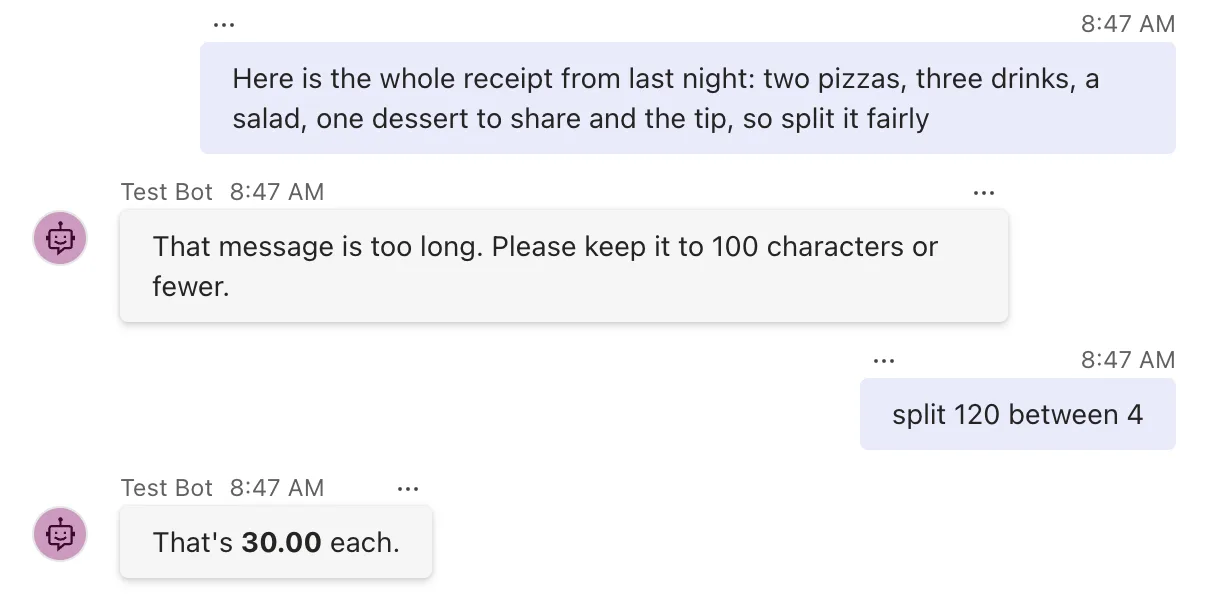
The terminal shows who answered each one. For the long message, there's no Turn started: the middleware sent its reply, and the agent never ran. The bill request went through the agent as usual:
warn: Microsoft.Agents.Hosting.AspNetCore.CloudAdapter[4]
      Anonymous access is enabled for channel: emulator.
info: System.Net.Http.HttpClient.Microsoft.Agents.Builder.RestChannelServiceClientFactory.LogicalHandler[100]
      Start processing HTTP request POST http://localhost:56150/_connector/v3/conversations/2714eaf6-d148-4a9a-85d2-6dc0d5840391/activities/1df3ec5c-288a-49b3-a403-11d158e1c709
info: System.Net.Http.HttpClient.Microsoft.Agents.Builder.RestChannelServiceClientFactory.ClientHandler[100]
      Sending HTTP request POST http://localhost:56150/_connector/v3/conversations/2714eaf6-d148-4a9a-85d2-6dc0d5840391/activities/1df3ec5c-288a-49b3-a403-11d158e1c709
info: System.Net.Http.HttpClient.Microsoft.Agents.Builder.RestChannelServiceClientFactory.ClientHandler[101]
      Received HTTP response headers after 40.7685ms - 201
info: System.Net.Http.HttpClient.Microsoft.Agents.Builder.RestChannelServiceClientFactory.LogicalHandler[101]
      End processing HTTP request after 55.0914ms - 201
warn: Microsoft.Agents.Hosting.AspNetCore.CloudAdapter[4]
      Anonymous access is enabled for channel: emulator.
info: BillSplitter.BillSplitterAgent[0]
      Turn started: message
That's the whole pipeline at work: the middleware first, then, for the activities it lets through, your turn handlers and routes inside AgentApplication.
The Complete Code
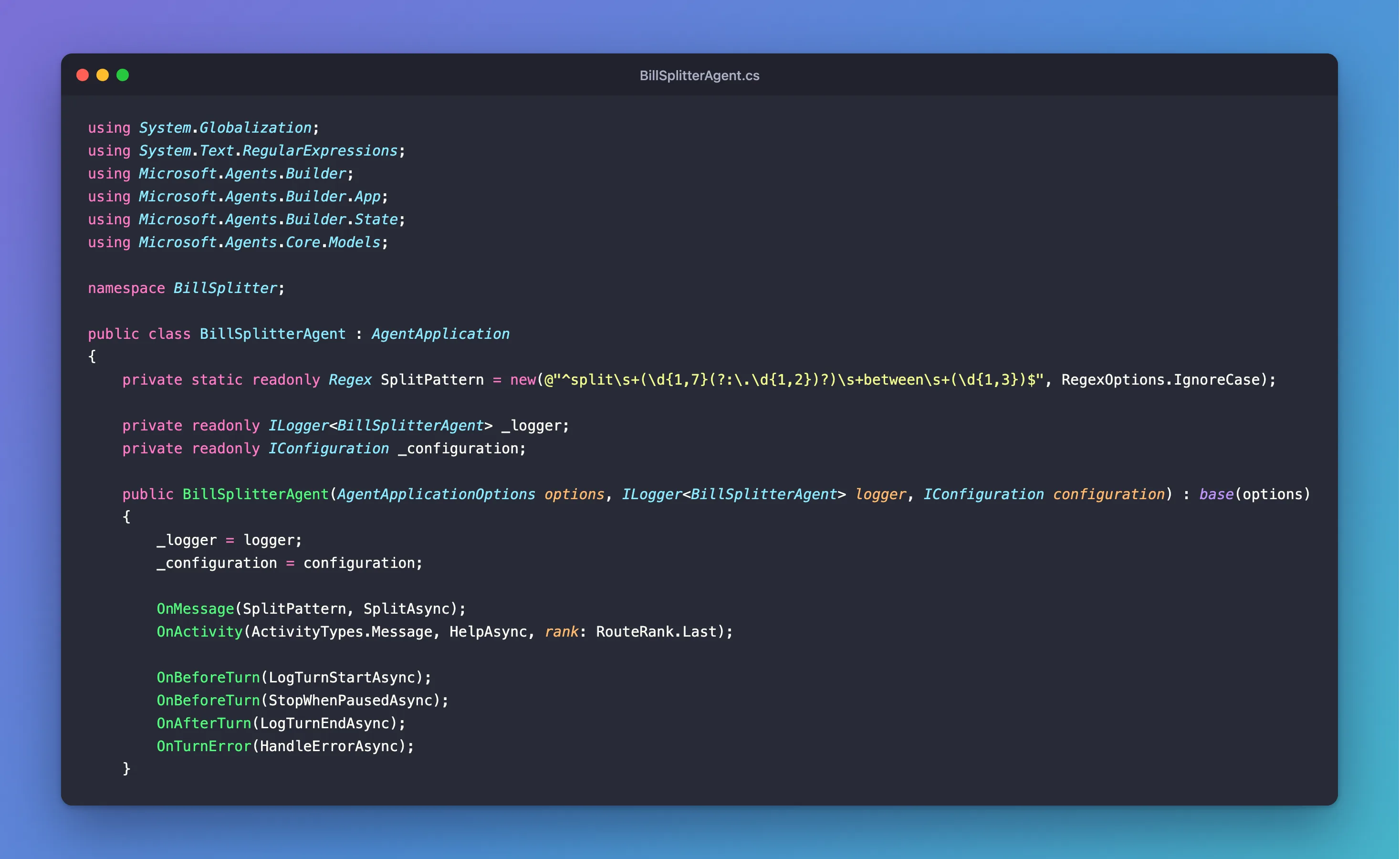
Here is the finished agent:
using System.Globalization;
using System.Text.RegularExpressions;
using Microsoft.Agents.Builder;
using Microsoft.Agents.Builder.App;
using Microsoft.Agents.Builder.State;
using Microsoft.Agents.Core.Models;

namespace BillSplitter;

public class BillSplitterAgent : AgentApplication
{
    private static readonly Regex SplitPattern = new(@"^split\s+(\d{1,7}(?:\.\d{1,2})?)\s+between\s+(\d{1,3})$", RegexOptions.IgnoreCase);

    private readonly ILogger<BillSplitterAgent> _logger;
    private readonly IConfiguration _configuration;

    public BillSplitterAgent(AgentApplicationOptions options, ILogger<BillSplitterAgent> logger, IConfiguration configuration) : base(options)
    {
        _logger = logger;
        _configuration = configuration;

        OnMessage(SplitPattern, SplitAsync);
        OnActivity(ActivityTypes.Message, HelpAsync, rank: RouteRank.Last);

        OnBeforeTurn(LogTurnStartAsync);
        OnBeforeTurn(StopWhenPausedAsync);
        OnAfterTurn(LogTurnEndAsync);
        OnTurnError(HandleErrorAsync);
    }

    private async Task SplitAsync(ITurnContext turnContext, ITurnState turnState, CancellationToken cancellationToken)
    {
        Match match = SplitPattern.Match(turnContext.Activity.Text);
        decimal amount = decimal.Parse(match.Groups[1].Value, CultureInfo.InvariantCulture);
        int people = int.Parse(match.Groups[2].Value, CultureInfo.InvariantCulture);

        decimal share = amount / people;

        await turnContext.SendActivityAsync($"That's **{share:0.00}** each.", cancellationToken: cancellationToken);
    }

    private async Task HelpAsync(ITurnContext turnContext, ITurnState turnState, CancellationToken cancellationToken)
    {
        await turnContext.SendActivityAsync("Send me a bill to split, such as **split 90 between 3**.", cancellationToken: cancellationToken);
    }

    private Task<bool> LogTurnStartAsync(ITurnContext turnContext, ITurnState turnState, CancellationToken cancellationToken)
    {
        _logger.LogInformation("Turn started: {ActivityType}", turnContext.Activity.Type);
        return Task.FromResult(true);
    }

    private async Task<bool> StopWhenPausedAsync(ITurnContext turnContext, ITurnState turnState, CancellationToken cancellationToken)
    {
        if (!_configuration.GetValue<bool>("BillSplitter:Paused"))
        {
            return true;
        }

        if (turnContext.Activity.Type == ActivityTypes.Message)
        {
            await turnContext.SendActivityAsync("The bill splitter is paused for maintenance. Please try again later.", cancellationToken: cancellationToken);
        }

        return false;
    }

    private Task<bool> LogTurnEndAsync(ITurnContext turnContext, ITurnState turnState, CancellationToken cancellationToken)
    {
        _logger.LogInformation("Turn finished: {ActivityType}, answered: {Answered}", turnContext.Activity.Type, turnContext.Responded);
        return Task.FromResult(true);
    }

    private async Task HandleErrorAsync(ITurnContext turnContext, ITurnState turnState, Exception exception, CancellationToken cancellationToken)
    {
        // FriendlyErrorHandler logs the exception, so this handler only tells the user.
        await turnContext.SendActivityAsync("Sorry, I couldn't split that bill. Please try again.", cancellationToken: cancellationToken);
    }
}
And Program.cs, with the error handler and the middleware registered:
using BillSplitter;
using Microsoft.Agents.Hosting.AspNetCore;
using Microsoft.Agents.Storage;

var builder = WebApplication.CreateBuilder(args);

builder.AddAgentDefaults()
    .AddAgent<BillSplitterAgent>()
    .AddAgentMiddleware(new MessageLengthLimitMiddleware(maxLength: 100));
builder.Services.AddSingleton<IStorage, MemoryStorage>();
builder.Services.AddSingleton<ICloudAdapterErrorHandler, FriendlyErrorHandler>();

var app = builder.Build();

app.UseAgents();
app.MapDefaultAgentEndpoints();

app.Run();
FriendlyErrorHandler.cs and MessageLengthLimitMiddleware.cs are as you wrote them in Steps 7 and 8, and appsettings.json is as in Step 4. The bug stays in on purpose, so you can watch the error handlers work. In your own agents, check input you can predict, such as zero people, and answer it in the route; the error handlers are for the failures you didn't predict.
Stop and Clean Up
Press Ctrl+C in both terminals, or use Debug → Stop Debugging (Shift+F5) in Visual Studio. This part created nothing outside your project folder, and nothing in the cloud. The Playground wrote its log to a devTools folder in the folder you started it from; delete it whenever you like. When you've finished with the agent, delete the BillSplitter folder.
What You Can Do Now
- Name the order of a turn: middleware, state, before-turn handlers, the route, after-turn handlers, state again, and the error handlers when something throws.
- Run your own code before and after every turn with
OnBeforeTurnandOnAfterTurn, and stop a turn by returningfalse. - Change an agent's behavior while it runs with a setting in
appsettings.json. - Explain why
OnTurnErroralone doesn't stop the raw exception message from reaching your users. - Replace the
CloudAdapter's error handler with your ownICloudAdapterErrorHandler, so people only see messages you wrote. - Write middleware with
IMiddleware, register it withAddAgentMiddleware, and stop activities before your agent sees them.
Common Mistakes
| Mistake | What happens | Do this instead |
|---|---|---|
Relying on OnTurnError alone to hide exceptions | The raw exception message still reaches the user, after yours | Replace the adapter's error handler with an ICloudAdapterErrorHandler |
| Sending a message from both error handlers, unconditionally | Users get two error messages | Send from one, or check turnContext.Responded in the adapter's handler |
| Logging the exception in both error handlers | Every error is logged twice | Log it once, in the adapter's handler, which sees every error |
A before-turn handler that forgets to return true on the normal path | Every turn stops, and the agent never answers | Return true unless you mean to stop the turn |
| Counting on an after-turn handler after a failure | It doesn't run when the turn throws | Put clean-up that must always happen in the error handlers |
Middleware that never calls next | Your agent never sees any activity | Call await next(cancellationToken) on every path that should reach the agent |
IMiddleware without the using alias in a web project | error CS0104, an ambiguous reference | Add using IMiddleware = Microsoft.Agents.Builder.IMiddleware; |
Troubleshooting
| Symptom | Likely cause | Fix |
|---|---|---|
| Users see Attempted to divide by zero. or another exception message | The default adapter error handler is still in place | Register your ICloudAdapterErrorHandler in Program.cs |
| Users get two error messages | Both error handlers send a message | Check turnContext.Responded before the adapter's handler answers |
| No Turn finished in the log | A before-turn handler returned false, or the turn threw | Check the lines after Turn started for a reply or a fail: entry |
| The pause switch doesn't change anything | The setting's name or section doesn't match, or the file wasn't saved | Use exactly BillSplitter:Paused in the code and the same nesting in appsettings.json |
| The middleware never runs | It isn't registered | Add .AddAgentMiddleware(...) in Program.cs |
error CS0104: 'IMiddleware' is an ambiguous reference | ASP.NET Core's IMiddleware is in scope too | Add the using IMiddleware = ...; alias |
FAQ
Should OnTurnError or the adapter's error handler tell the user?
Exactly one of them for each error. This part lets OnTurnError send the message, because it knows the agent and can say I couldn't split that bill, and makes the adapter's handler answer only when nothing was sent. If one generic message is enough for your agent, leave OnTurnError out and let the adapter's handler always answer.
What happens when middleware throws?
OnTurnError doesn't run, because the exception never passed through AgentApplication. The adapter's error handler gets it directly. I checked this by making the middleware throw for one test message: no Turn started appeared, and FriendlyErrorHandler logged the exception and sent Sorry, something went wrong. Please try again. Errors while loading or saving state take the same path.
Should I use middleware or OnBeforeTurn?
Use middleware for what doesn't belong to one agent and should happen before anything else, such as limits, filters and logging of every activity. It runs before the state is loaded, and you can reuse it in any agent. Use OnBeforeTurn for your agent's own checks, especially ones that need its turn state, which middleware doesn't have.
Can middleware use a logger or other services?
AddAgentMiddleware takes an object you create yourself, so give the middleware what it needs through its constructor, as the SDK's own middleware does: ShowTypingMiddleware takes its timings, and TranscriptLoggerMiddleware takes the store it writes to.
Where do the typing indicator and mention removal happen?
Inside AgentApplication, after the state loads and before your before-turn handlers. Both are options in the AgentApplication section of appsettings.json: StartTypingTimer, off by default, shows a typing indicator while your agent works, and Part 7 uses it. RemoveRecipientMention and NormalizeMentions, on by default, take your agent's @mention out of messages, which Part 12 shows in Teams.
Do I still need try and catch in my routes?
For failures you can predict, yes: check the input, or catch the specific exception, and answer in the route, where you know what went wrong. The error handlers are the safety net for everything else.
Conclusion
Every activity runs through the same pipeline: middleware in the adapter, then AgentApplication, which loads the state, runs your before-turn handlers, the first matching route and your after-turn handlers, and saves the state. A before-turn handler that returns false stops the turn. When something throws, your OnTurnError handlers run and the exception goes on to the adapter's error handler, whose default shows the exception's message to your users. Replace it with an ICloudAdapterErrorHandler, and people only ever see messages you wrote, while your log keeps every detail.
Next: Part 4: Conversation, User and Turn State. Your agent forgets everything between turns, because a new instance answers each activity. Part 4 gives it a memory, the state this part saw loaded and saved around every turn.
Additional Resources
- AgentApplication in Microsoft 365 Agents SDK: Turn lifecycle hooks —
OnBeforeTurn,OnAfterTurnandOnTurnError, with Microsoft's examples. - AgentApplication.OnTurnError method — the turn error hook, and where its exceptions go.
- ICloudAdapterErrorHandler interface — replacing the adapter's default error handler.
- AgentHostExtensions.AddAgentMiddleware method — registering middleware in the adapter's pipeline.
- Configuration in ASP.NET Core — how
appsettings.jsonis read and reloaded.
