Part 6: Send Proactive Messages
Every message your agents have sent so far was an answer: someone wrote, and the agent replied in the same turn. Some of the most useful messages aren't answers at all. A reminder at the time you asked for, a note that your report is ready, an alert from another system: the agent has to speak first. In this part you'll build an agent that does, and find out what an agent needs before it's allowed to.
This is Part 6 of the Microsoft 365 Agents SDK Fundamentals, a 26-part series.
- Part 1: Activities and the Activity Protocol
- Part 2: Route Activities with AgentApplication
- Part 3: Turn Events, Error Handling and Middleware
- Part 4: Conversation, User and Turn State
- Part 5: Send Adaptive Cards and Handle Their Actions
- Part 6: Send Proactive Messages (you are here)
- Part 7: Stream Responses and Show Progress (coming soon)
- Part 8: Run Your Agent in Microsoft Teams (coming soon)
- Part 9: Universal Actions: Adaptive Cards That Update (coming soon)
- Part 10: Teams Dialogs (coming soon)
- Part 11: Commands, Suggested Actions and Targeted Messages (coming soon)
- Part 12: Mentions, Rosters and Team Events (coming soon)
- Part 13: Meeting Events (coming soon)
- Part 14: Send and Receive Files (coming soon)
- Part 15: Sign People In with SSO and OAuth (coming soon)
- Part 16: Message Extensions and Link Unfurling (coming soon)
- Part 17: AI Labels, Citations and Feedback (coming soon)
- Part 18: Bring Your Agent to Microsoft 365 Copilot (coming soon)
- Part 19: Store State in Azure Blob Storage and Cosmos DB (coming soon)
- Part 20: Telemetry with OpenTelemetry (coming soon)
- Part 21: Web Chat and Direct Line (coming soon)
- Part 22: Reach People in Slack (coming soon)
- Part 23: Call a Copilot Studio Agent (coming soon)
- Part 24: Agent-to-Agent Communication (coming soon)
- Part 25: Keep Conversation Transcripts (coming soon)
- Part 26: Deploy Your Agent to Azure (coming soon)
By the end of this part you'll know what an agent has to remember to reach a chat later, and why it needs an identity of its own to do it. You'll store a conversation, send a message from a background task, give the agent its identity and test it in the Agents Playground's authenticated mode, run a proactive turn with the chat's state, and let another program trigger messages over HTTP.
What a Proactive Message Is
Microsoft's guide to proactive messaging puts it in one line: Proactive messaging inverts this pattern. The agent initiates contact with a user or resumes a conversation without waiting for an incoming message. Instead of a reply inside someone else's turn, the agent decides when to speak, or something outside the chat decides for it: a timer, a finished job, another system.
What the Agent Has to Remember: the Conversation
A reply knows where to go, because it belongs to the turn that the incoming message started. A proactive message has no such turn, so the agent has to keep, from an earlier turn, everything it needs to reach the chat again:
| What | Where it comes from |
|---|---|
| The chat's address: the channel, its service URL, the conversation's ID, the user and the agent | The incoming activity, as a ConversationReference |
| The agent's identity in that chat | The claims of the token that came with the incoming message, such as aud, the client ID of the agent's app registration |
The SDK keeps both together in one object, Conversation. new Conversation(turnContext) builds it from the current turn, and Proactive.StoreConversationAsync(turnContext) saves it in the agent's storage, the same IStorage that holds turn state, so it outlives the turn.
The identity is not a detail. To send a message on its own, the agent has to authenticate the call to the channel as itself, with a token for its own app registration, and the aud claim says which registration that is. You'll see in Step 3 what happens without it.
How a Proactive Message Travels
What AgentApplication.Proactive Does
Every AgentApplication has a Proactive property with these operations:
| Operation | What it does |
|---|---|
StoreConversationAsync, GetConversationAsync, DeleteConversationAsync | Keep conversations in storage by their ID |
SendActivityAsync | Sends one activity to a conversation. No turn state and no handlers: just a message |
ContinueConversationAsync | Runs a handler of yours inside the conversation, with the conversation's turn state loaded and saved, as in a turn started by a message |
CreateConversationAsync | Asks the channel to start a brand-new conversation, with someone who never wrote to the agent |
This part uses all but the last, which needs a channel that can start new chats, such as Microsoft Teams.
Two Kinds of Trigger
Microsoft's guide describes two ways a proactive message gets started:
- An internal trigger: the agent queues work in its own process, and when the work is done, sends the result. A reminder timer is one.
- An external trigger: another system, such as a calendar or a build server, calls the agent when something happens, over HTTP or another route such as a Service Bus queue. For HTTP, the SDK can map the endpoints for you.
You'll build both.
The Example: Reminders
The agent for this part is a reminder agent. Ask it to remind me in 30 seconds to stretch, and thirty seconds later it does. Send subscribe, and a calendar system can post meeting reminders into the chat through the agent. You'll build it in steps:
| Step | You add | What you'll see |
|---|---|---|
| 2 | subscribe, which stores the conversation, and a reminder sent from a background task | Nothing yet: it's code |
| 3 | Nothing | The conversation stored, and the reminder failing because the agent has no identity |
| 4 | The agent's identity, and the Playground's authenticated mode | Authentication enabled in the Playground |
| 5 | Nothing | The reminder arriving |
| 6 | A list of waiting reminders that the proactive turn keeps up to date | Turn state in a turn nobody started |
| 7 | Meeting reminders that another program triggers over HTTP, and unsubscribe | Messages from curl or PowerShell, without anyone writing |
| 8 | Nothing | The stored conversation gone, and the next HTTP call refused |
You'll run it in the Microsoft 365 Agents Playground, as in the earlier parts.
Prerequisites
- The .NET 10 SDK.
dotnet --versionshould print10.0.and a patch number; this page was built with10.0.404. - The Microsoft 365 Agents Playground.
agentsplayground --versionshould print0.2.30. If the command isn't found, install it withnpm install -g @microsoft/m365agentsplayground. - A Microsoft Entra tenant where you can register an app and give it a client secret, for Step 4. An app registration costs nothing.
Step 1: Create the Project
Open a terminal in the folder where you keep your projects and create an empty ASP.NET Core project:
dotnet new web -o Reminders
The template "ASP.NET Core Empty" was created successfully.

Processing post-creation actions...
Restoring /Users/you/source/Reminders/Reminders.csproj:
Restore succeeded.
Then add the Agents SDK's hosting package:
cd Reminders
dotnet add package Microsoft.Agents.Hosting.AspNetCore --version 1.9.205
info : PackageReference for package 'Microsoft.Agents.Hosting.AspNetCore' version '1.9.205' added to file '/Users/you/source/Reminders/Reminders.csproj'.
info : Generating MSBuild file /Users/you/source/Reminders/obj/Reminders.csproj.nuget.g.targets.
info : Writing assets file to disk. Path: /Users/you/source/Reminders/obj/project.assets.json
log  : Restored /Users/you/source/Reminders/Reminders.csproj (in 869 ms).
Replace everything in Program.cs with the same hosting as the earlier parts:
using Microsoft.Agents.Hosting.AspNetCore;
using Microsoft.Agents.Storage;
using Reminders;

var builder = WebApplication.CreateBuilder(args);

builder.AddAgentDefaults()
    .AddAgent<ReminderAgent>();
builder.Services.AddSingleton<IStorage, MemoryStorage>();

var app = builder.Build();

app.UseAgents();
app.MapDefaultAgentEndpoints();

app.Run();
MemoryStorage now holds two things: the turn state from Part 4, and the conversations the agent stores. Open Properties/launchSettings.json and set the two applicationUrl lines to port 3978:
"applicationUrl": "http://localhost:3978",
"applicationUrl": "https://localhost:3979;http://localhost:3978",
Step 2: Store a Conversation and Send a Reminder Later
Create ReminderAgent.cs with the first version of the agent:
using System.Text.RegularExpressions;
using Microsoft.Agents.Builder;
using Microsoft.Agents.Builder.App;
using Microsoft.Agents.Builder.App.Proactive;
using Microsoft.Agents.Builder.State;
using Microsoft.Agents.Core.Models;
using Microsoft.Agents.Hosting.AspNetCore.BackgroundQueue;

namespace Reminders;

public partial class ReminderAgent : AgentApplication
{
    private readonly IBackgroundTaskQueue _backgroundTaskQueue;
    private readonly ILogger<ReminderAgent> _logger;

    public ReminderAgent(AgentApplicationOptions options, IBackgroundTaskQueue backgroundTaskQueue, ILogger<ReminderAgent> logger)
        : base(options)
    {
        _backgroundTaskQueue = backgroundTaskQueue;
        _logger = logger;

        OnMessage(RemindMePattern(), RemindMeAsync);
        OnMessage("subscribe", SubscribeAsync);
        OnActivity(ActivityTypes.Message, HelpAsync, rank: RouteRank.Last);
    }

    private async Task SubscribeAsync(ITurnContext turnContext, ITurnState turnState, CancellationToken cancellationToken)
    {
        string conversationId = await Proactive.StoreConversationAsync(turnContext, cancellationToken);
        _logger.LogInformation("Stored conversation {ConversationId} for meeting reminders", conversationId);

        await turnContext.SendActivityAsync("You're subscribed. I'll post meeting reminders in this chat.", cancellationToken: cancellationToken);
    }

    private async Task RemindMeAsync(ITurnContext turnContext, ITurnState turnState, CancellationToken cancellationToken)
    {
        Match match = RemindMePattern().Match(turnContext.Activity.Text);
        int seconds = int.Parse(match.Groups["seconds"].Value);
        string task = match.Groups["task"].Value.Trim();

        Conversation conversation = new(turnContext);
        IChannelAdapter adapter = turnContext.Adapter;

        _backgroundTaskQueue.QueueBackgroundWorkItem(async stoppingToken =>
        {
            try
            {
                await Task.Delay(TimeSpan.FromSeconds(seconds), stoppingToken);
                await Proactive.SendActivityAsync(adapter, conversation, MessageFactory.Text($"⏰ Reminder: time to {task}."), stoppingToken);
            }
            catch (OperationCanceledException)
            {
                _logger.LogWarning("The agent stopped before the reminder to {Task} was due", task);
            }
            catch (Exception ex)
            {
                _logger.LogError(ex, "Couldn't send the reminder to {Task}", task);
            }
        });

        await turnContext.SendActivityAsync($"OK, I'll remind you to {task} in {seconds} seconds.", cancellationToken: cancellationToken);
    }

    private Task HelpAsync(ITurnContext turnContext, ITurnState turnState, CancellationToken cancellationToken)
        => turnContext.SendActivityAsync("Try **remind me in 30 seconds to stretch**, or **subscribe** for meeting reminders.", cancellationToken: cancellationToken);

    [GeneratedRegex(@"^remind me in (?<seconds>\d{1,4}) seconds? to (?<task>.+)$", RegexOptions.IgnoreCase)]
    private static partial Regex RemindMePattern();
}
Reading it from the top:
IBackgroundTaskQueueis the SDK's queue for work that runs after a turn has ended. It comes with the hosting package:AddAgentDefaultsregisters it with a hosted service that runs each queued item. The agent asks for it in its constructor, like the logger.RemindMePatternmatches remind me in 30 seconds to stretch and captures the number and the task.[GeneratedRegex]builds the regular expression when the project compiles, which is why the class ispartial. Part 2 introduced regular-expression routes.SubscribeAsynccallsProactive.StoreConversationAsync, which saves the current conversation in storage and returns its ID. The agent logs the ID, because whoever wants to reach this chat later needs it.RemindMeAsyncanswers straight away and does the waiting in the background. Before it queues the work, it captures what the work will need:new Conversation(turnContext), the chat's address and identity, andturnContext.Adapter, the object that sends activities. Microsoft's guide explains why: The ITurnContext is disposed after the turn completes and isn't safe to use in a background thread.Proactive.SendActivityAsync(adapter, conversation, activity, ...)sends one message into that conversation. It's a static method: it needs nothing from the turn.- The
catchblocks log what goes wrong in the background. A failing work item has no turn whose error handling could report it, so without them a failure would simply vanish. The stopping token is cancelled when the agent stops, which ends the wait early.
Step 3: Run It, and Watch the Reminder Fail
Build and start the agent:
- VS Code (or any terminal)
- Visual Studio
In the terminal, in the project folder:
dotnet run
Choose Debug → Start Without Debugging (Ctrl+F5). Both launch profiles listen on port 3978. Visual Studio also opens your browser on the agent's GET / page, which you can close.
Open a second terminal and start the Agents Playground as in the earlier parts:
agentsplayground -e http://localhost:3978/api/messages -c emulator
Send subscribe:
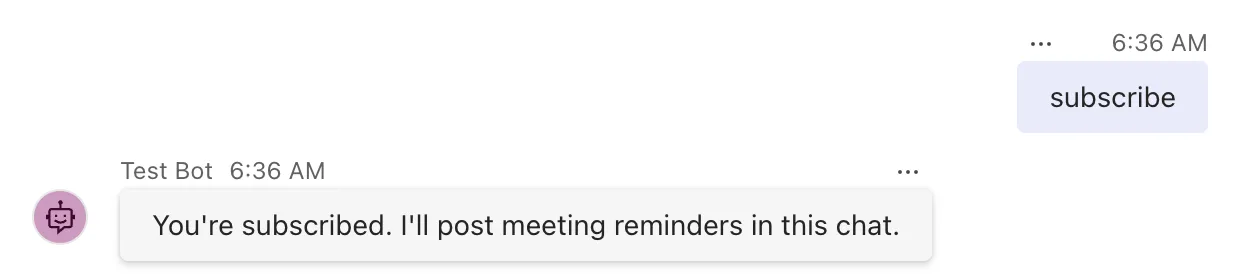
The agent's terminal shows the stored conversation's ID, a value the Playground made up for this chat:
warn: Microsoft.Agents.Authentication.ConfigurationConnections[0]
      No connections found in configuration.
warn: Microsoft.Agents.Authentication.ConfigurationConnections[0]
      No connections map found in configuration.
...
warn: Microsoft.Agents.Hosting.AspNetCore.CloudAdapter[4]
      Anonymous access is enabled for channel: emulator.
info: Reminders.ReminderAgent[0]
      Stored conversation 00000000-0000-0000-0000-000000000000 for meeting reminders
Storing worked. Now send remind me in 10 seconds to stretch, and wait:
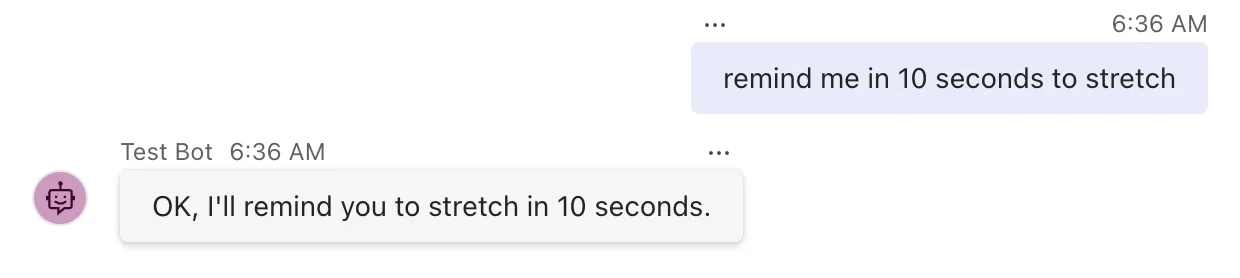
The answer came, the reminder never did. Ten seconds later, the agent's terminal logged the exception the catch had caught:
fail: Reminders.ReminderAgent[0]
      Couldn't send the reminder to stretch
      System.ArgumentException: An instance of type 'Conversation' contains invalid values: aud claim is required in Claims
         at Microsoft.Agents.Builder.App.Proactive.ProactiveValidationExtensions.Validate(Conversation conversation, Boolean validateConversation)
         at Microsoft.Agents.Builder.App.Proactive.Proactive.SendActivityAsync(IChannelAdapter adapter, Conversation conversation, IActivity activity, CancellationToken cancellationToken)
         at Reminders.ReminderAgent.<>c__DisplayClass4_0.<<RemindMeAsync>b__0>d.MoveNext() in /Users/you/source/Reminders/ReminderAgent.cs:line 49
The Conversation the agent captured has no aud claim, so the SDK refused to send anything. The terminal had been saying why from the start. No connections found in configuration. means the agent has no identity of its own, and Anonymous access is enabled for channel: emulator. means the Playground sends its messages without a token, so a conversation captured from one has no claims at all (Fixed: "Anonymous access is enabled for channel: emulator" explains the warning). Replies never needed either, because a reply goes out in the turn of the message it answers, and the Playground accepts it without a token. A proactive message has no such turn, and the SDK checks every Conversation for the aud claim before it sends. Fixed: An instance of type 'Conversation' contains invalid values: aud claim is required in Claims follows the whole investigation. The way out is the one Microsoft's Playground documentation gives: its authenticated mode, with a Microsoft Entra app registration.
Stop the agent and the Playground with Ctrl+C.
Step 4: Give the Agent an Identity
The agent needs an app registration in Microsoft Entra ID, and the Playground needs to send tokens for it. Four things, each covered in a guide of its own:
- Register an app called Reminder Agent, single tenant and without a redirect URI, as How to Register a Web API in Microsoft Entra ID shows, and note its Application (client) ID and Directory (tenant) ID.
- Create a client secret for it, as How to Create a Client Secret for an App Registration in Microsoft Entra ID shows, and copy its value.
- Give the agent its connection.
- Start the Playground with the same app, as How to Test an Agent with Authentication in the Microsoft 365 Agents Playground explains in full.
For the connection, add the SDK's authentication package:
dotnet add package Microsoft.Agents.Authentication.Msal --version 1.9.205
info : PackageReference for package 'Microsoft.Agents.Authentication.Msal' version '1.9.205' added to file '/Users/you/source/Reminders/Reminders.csproj'.
info : Writing assets file to disk. Path: /Users/you/source/Reminders/obj/project.assets.json
log  : Restored /Users/you/source/Reminders/Reminders.csproj (in 1.91 sec).
Replace appsettings.json, with your client ID and tenant ID in place of the 2222… and 1111… placeholders:
{
  "Logging": {
    "LogLevel": {
      "Default": "Information",
      "Microsoft.AspNetCore": "Warning"
    }
  },
  "AllowedHosts": "*",
  "Connections": {
    "ServiceConnection": {
      "Settings": {
        "AuthType": "ClientSecret",
        "ClientId": "22222222-2222-2222-2222-222222222222",
        "AuthorityEndpoint": "https://login.microsoftonline.com/11111111-1111-1111-1111-111111111111",
        "Scopes": [
          "https://api.botframework.com/.default"
        ]
      }
    }
  },
  "ConnectionsMap": [
    {
      "ServiceUrl": "*",
      "Connection": "ServiceConnection"
    }
  ]
}
Connections gives the agent an identity it can get tokens with, and ConnectionsMap says which connection to use for which channel. I left the map out at first, and the agent kept starting with No connections map found in configuration.: Fixed: "No connections map found in configuration" explains it. The client secret stays out of the file, in .NET user secrets (How to Store Secrets with .NET C# User Secrets Instead of appsettings.json):
dotnet user-secrets init
dotnet user-secrets set "Connections:ServiceConnection:Settings:ClientSecret" "<your client secret>"
Set UserSecretsId to '00000000-0000-0000-0000-000000000000' for MSBuild project '/Users/you/source/Reminders/Reminders.csproj'.
Successfully saved Connections:ServiceConnection:Settings:ClientSecret to the secret store.
Start the agent again with dotnet run. Its start is quieter now:
info: Microsoft.Agents.Authentication.ConfigurationConnections[0]
      No assembly name given in config for connection `ServiceConnection`.  Using default assembly lib: `Microsoft.Agents.Authentication.Msal`
info: Microsoft.Agents.Authentication.ConfigurationConnections[0]
      No type name given in config for connection `ServiceConnection`.  Using default type name: `MsalAuth`
No warnings: the two info lines say the connection uses the Msal package you just added. In the second terminal, start the Playground with the same app's values, your own in the first three lines:
- macOS / Linux
- Windows (PowerShell)
export AUTH_CLIENT_ID="22222222-2222-2222-2222-222222222222"
export AUTH_CLIENT_SECRET="<your client secret>"
export AUTH_TENANT_ID="11111111-1111-1111-1111-111111111111"
agentsplayground -e http://localhost:3978/api/messages -c emulator
$env:AUTH_CLIENT_ID = "22222222-2222-2222-2222-222222222222"
$env:AUTH_CLIENT_SECRET = "<your client secret>"
$env:AUTH_TENANT_ID = "11111111-1111-1111-1111-111111111111"
agentsplayground -e http://localhost:3978/api/messages -c emulator
The Playground's Log Panel confirms the mode:
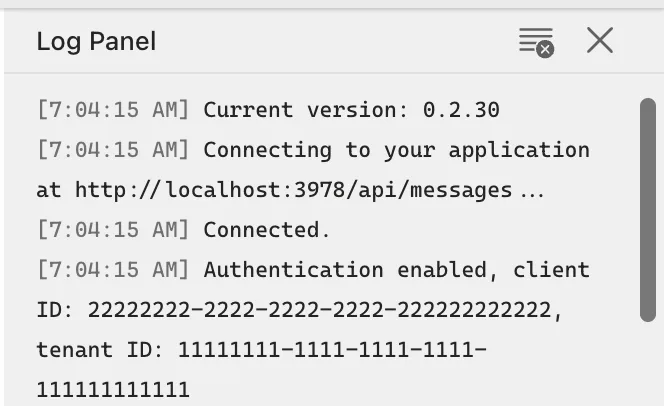
From now on, every message reaches the agent with a token whose aud is the agent's own client ID.
Step 5: Try the Reminder Again
Send remind me in 10 seconds to stretch:
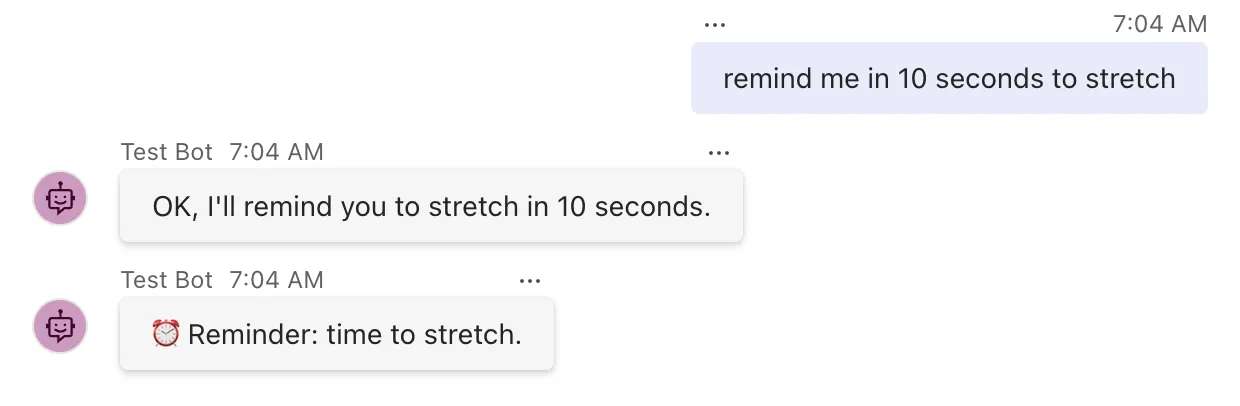
Ten seconds after the answer, the reminder arrived as a message of its own, with no message from you to answer. The conversation captured this time had the aud claim, so the SDK got a token for the agent's app registration and sent the message to the Playground with it. The agent's terminal no longer says Anonymous access is enabled.
Step 6: Keep State in a Proactive Turn
SendActivityAsync sends a message and nothing more. Often the agent also needs the chat's state, here to keep a list of reminders that haven't fired yet, so you can ask for it with reminders. Proactive.ContinueConversationAsync does that: it runs a handler of yours inside the stored conversation, with the conversation's turn state loaded before and saved after, as in a turn started by a message. Microsoft's guide: TurnState loads relative to the original conversation and user, the same state the user's reactive turns see.
Add a name for the list at the top of the class, and a record for a reminder at the end of the file:
private const string PendingKey = "pendingReminders";
public record Reminder(string Id, string Task, DateTimeOffset DueAt);
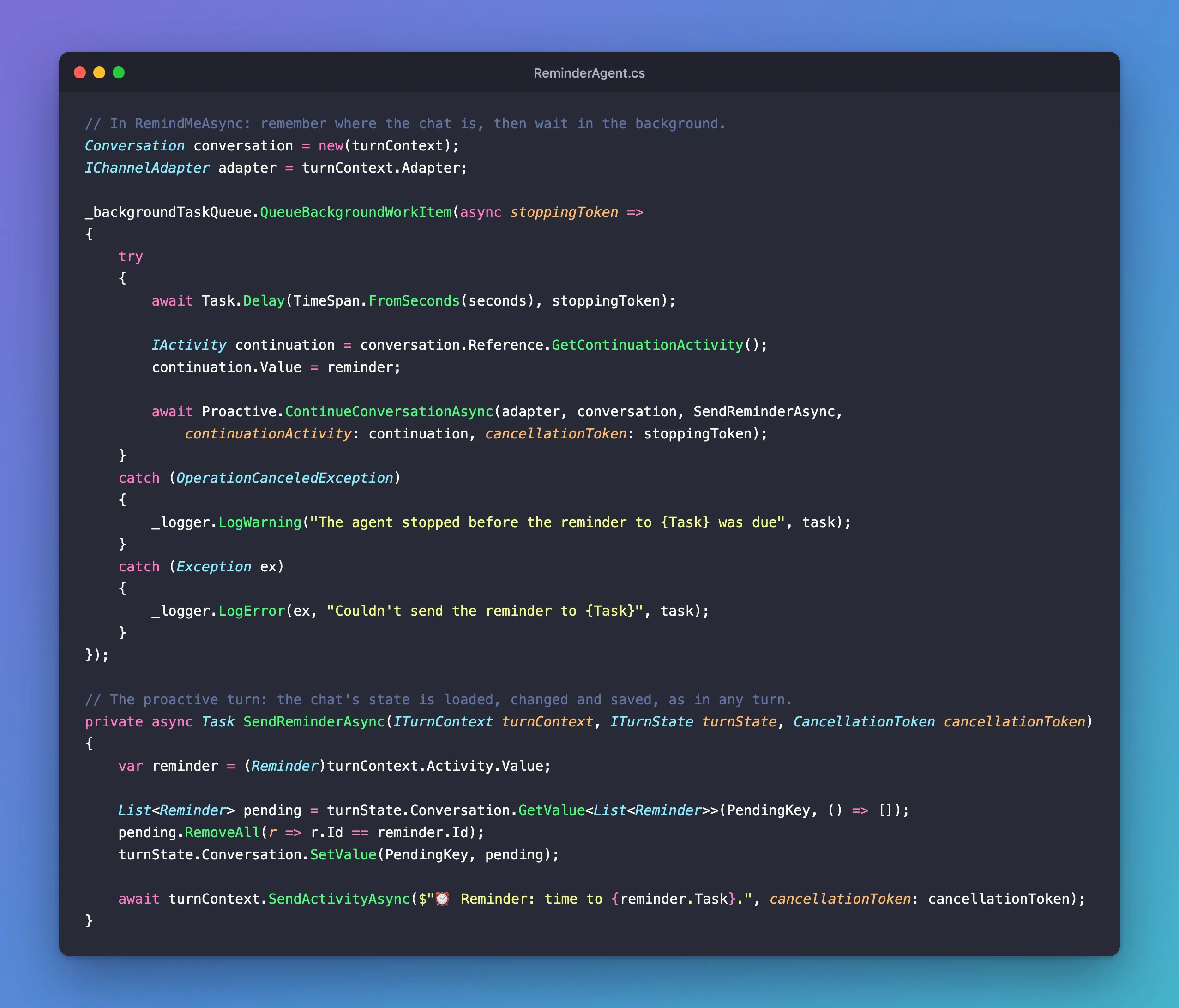
In RemindMeAsync, add each reminder to the list, and have the background work continue the conversation instead of only sending to it:
    private async Task RemindMeAsync(ITurnContext turnContext, ITurnState turnState, CancellationToken cancellationToken)
    {
        Match match = RemindMePattern().Match(turnContext.Activity.Text);
        int seconds = int.Parse(match.Groups["seconds"].Value);
        string task = match.Groups["task"].Value.Trim();

        var reminder = new Reminder(Guid.NewGuid().ToString("N"), task, DateTimeOffset.UtcNow.AddSeconds(seconds));
        List<Reminder> pending = turnState.Conversation.GetValue<List<Reminder>>(PendingKey, () => []);
        pending.Add(reminder);
        turnState.Conversation.SetValue(PendingKey, pending);

        Conversation conversation = new(turnContext);
        IChannelAdapter adapter = turnContext.Adapter;

        _backgroundTaskQueue.QueueBackgroundWorkItem(async stoppingToken =>
        {
            try
            {
                await Task.Delay(TimeSpan.FromSeconds(seconds), stoppingToken);

                IActivity continuation = conversation.Reference.GetContinuationActivity();
                continuation.Value = reminder;

                await Proactive.ContinueConversationAsync(adapter, conversation, SendReminderAsync,
                    continuationActivity: continuation, cancellationToken: stoppingToken);
            }
            catch (OperationCanceledException)
            {
                _logger.LogWarning("The agent stopped before the reminder to {Task} was due", task);
            }
            catch (Exception ex)
            {
                _logger.LogError(ex, "Couldn't send the reminder to {Task}", task);
            }
        });

        await turnContext.SendActivityAsync($"OK, I'll remind you to {task} in {seconds} seconds.", cancellationToken: cancellationToken);
    }
The handler that runs when the time comes:
    private async Task SendReminderAsync(ITurnContext turnContext, ITurnState turnState, CancellationToken cancellationToken)
    {
        var reminder = (Reminder)turnContext.Activity.Value;

        List<Reminder> pending = turnState.Conversation.GetValue<List<Reminder>>(PendingKey, () => []);
        pending.RemoveAll(r => r.Id == reminder.Id);
        turnState.Conversation.SetValue(PendingKey, pending);

        await turnContext.SendActivityAsync($"⏰ Reminder: time to {reminder.Task}.", cancellationToken: cancellationToken);
    }
- The list lives in conversation state, which Part 4 introduced.
RemindMeAsyncadds to it in an ordinary turn. GetContinuationActivity()creates the activity a proactive turn starts with: aneventnamedContinueConversation, addressed to the stored chat. ItsValuecarries data into the handler, here the reminder itself.ContinueConversationAsync(adapter, conversation, SendReminderAsync, ...)starts a turn in that conversation, with no incoming message, and runsSendReminderAsyncin it.SendReminderAsyncis an ordinary handler. ItsturnStateis the chat's own state, so it can take the reminder off the list, and the SDK saves the change when it returns.
And a route that reads the list. Register it in the constructor, after the remind me route:
OnMessage("reminders", ListRemindersAsync);
The handler:
    private async Task ListRemindersAsync(ITurnContext turnContext, ITurnState turnState, CancellationToken cancellationToken)
    {
        List<Reminder> pending = turnState.Conversation.GetValue<List<Reminder>>(PendingKey, () => []);
        if (pending.Count == 0)
        {
            await turnContext.SendActivityAsync("You have no reminders waiting.", cancellationToken: cancellationToken);
            return;
        }

        IEnumerable<string> items = pending
            .OrderBy(r => r.DueAt)
            .Select(r => $"{r.Task} (in {Math.Max(0, (int)Math.Ceiling((r.DueAt - DateTimeOffset.UtcNow).TotalSeconds))} seconds)");
        await turnContext.SendActivityAsync($"Reminders waiting: {string.Join(", ", items)}.", cancellationToken: cancellationToken);
    }
The help text names the new command too:
    private Task HelpAsync(ITurnContext turnContext, ITurnState turnState, CancellationToken cancellationToken)
        => turnContext.SendActivityAsync("Try **remind me in 30 seconds to stretch**, **reminders**, or **subscribe** for meeting reminders.", cancellationToken: cancellationToken);
Restart the agent. Ask for two reminders, 20 and 40 seconds away, then reminders, and once both have fired, reminders again:
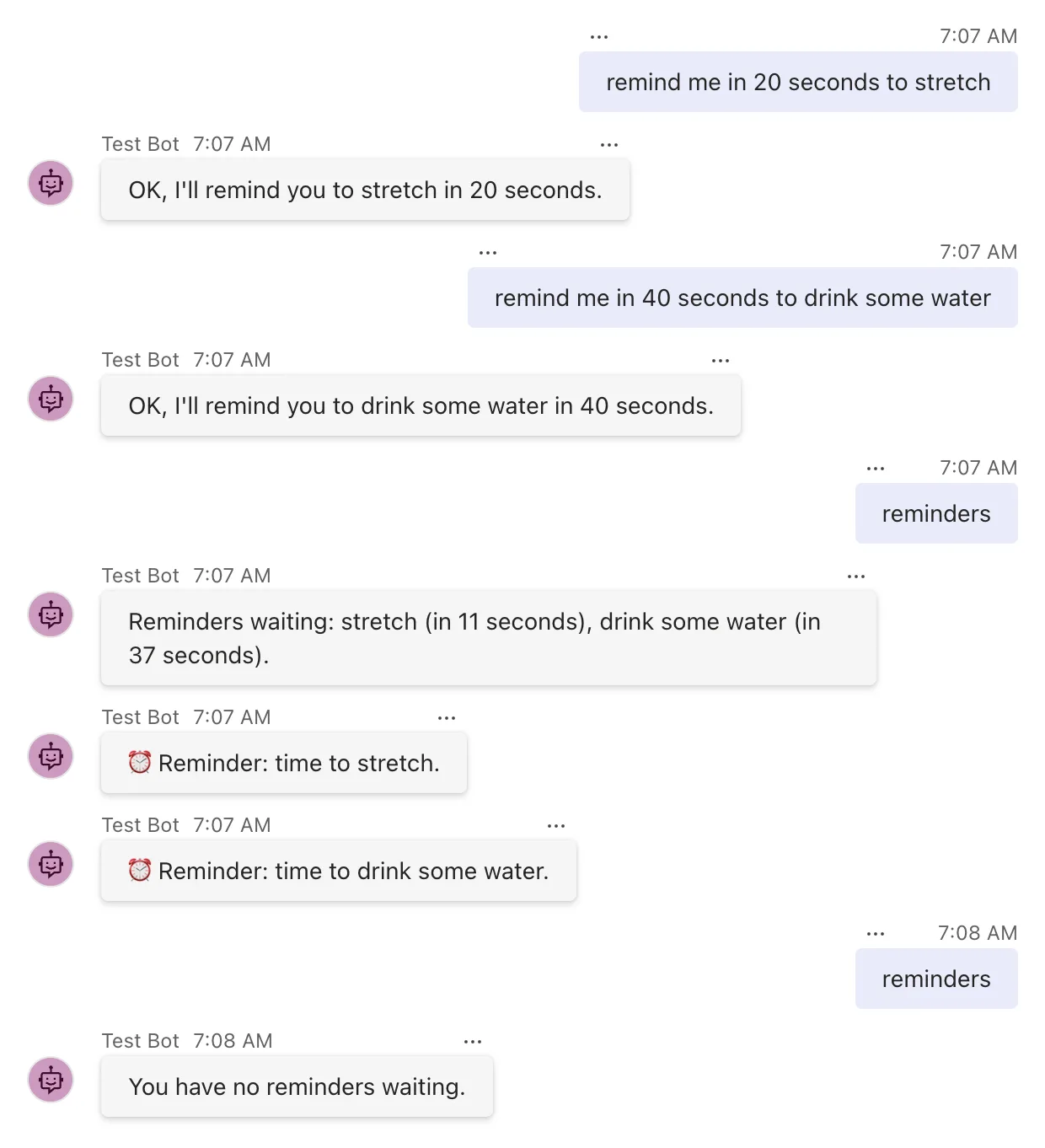
The first reminders saw both. Each proactive turn removed its own reminder from the list, and the SDK saved the state after it, so the second reminders found it empty.
Step 7: Let Another Program Trigger a Message
So far the agent triggered its own messages. A calendar system knows when meetings start, so let it make the agent post meeting reminders. The SDK maps HTTP endpoints for exactly this. Add the mapping to Program.cs, before app.Run();:
if (app.Environment.IsDevelopment())
{
    // Open to anyone who can reach this port, so only map them on your own machine.
    app.MapAgentProactiveEndpoints<ReminderAgent>(requireAuth: false);
}
MapAgentProactiveEndpoints maps endpoints under /proactive for the agent's stored conversations. Its requireAuth parameter is true by default, and then the endpoints need the same authentication as the agent's message endpoint. Without authentication, anyone who can reach the agent could post into its chats, so this code maps them only in the Development environment, on your own machine.
Add the handler the calendar system will run:
    [ContinueConversation("meeting")]
    public async Task MeetingReminderAsync(ITurnContext turnContext, ITurnState turnState, CancellationToken cancellationToken)
    {
        var values = turnContext.Activity.Value as IDictionary<string, string> ?? new Dictionary<string, string>();

        if (!values.TryGetValue("title", out string? title) || string.IsNullOrWhiteSpace(title))
        {
            throw new ArgumentException("Add the meeting's title to the address, as title=...");
        }

        if (!values.TryGetValue("minutes", out string? minutesText) || !int.TryParse(minutesText, out int minutes) || minutes is < 1 or > 1440)
        {
            throw new ArgumentException("Add the minutes until the meeting starts, from 1 to 1440, as minutes=...");
        }

        await turnContext.SendActivityAsync($"📅 {title} starts in {minutes} minutes.", cancellationToken: cancellationToken);
    }
[ContinueConversation("meeting")]makes the method the handler forPOST /proactive/continue/meeting/<conversation ID>. It runs in the stored conversation, likeSendReminderAsync.turnContext.Activity.Valueholds the request's query string as a dictionary of strings, as Microsoft's guide describes: forward them to the handler as turnContext.Activity.Value (a key/value dictionary).ArgumentExceptionturns a bad request into a400for the caller, with the exception's message, and nothing reaches the chat.
People who subscribe should be able to leave again. A stored conversation stays in storage until something deletes it, so add an unsubscribe command. Register it in the constructor, after the subscribe route:
OnMessage("unsubscribe", UnsubscribeAsync);
The handler deletes the conversation by its ID, with Proactive.DeleteConversationAsync:
    private async Task UnsubscribeAsync(ITurnContext turnContext, ITurnState turnState, CancellationToken cancellationToken)
    {
        await Proactive.DeleteConversationAsync(turnContext.Activity.Conversation.Id, cancellationToken);
        _logger.LogInformation("Removed conversation {ConversationId} from meeting reminders", turnContext.Activity.Conversation.Id);

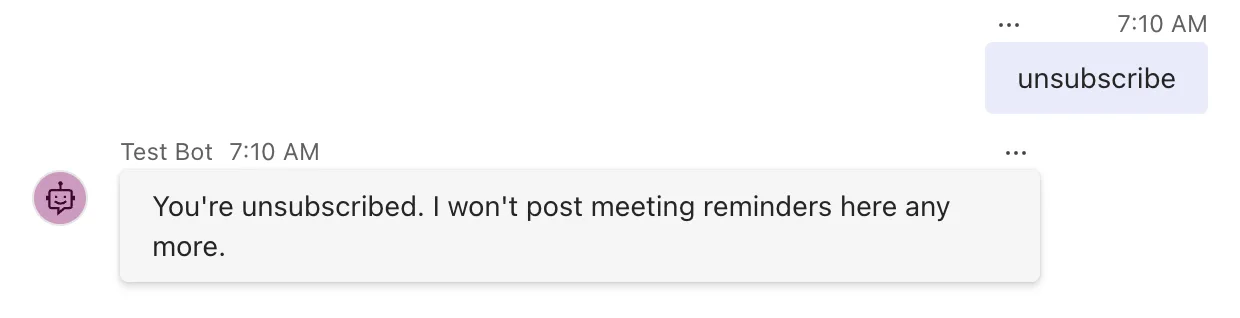
        await turnContext.SendActivityAsync("You're unsubscribed. I won't post meeting reminders here any more.", cancellationToken: cancellationToken);
    }
And the help text names every command:
    private Task HelpAsync(ITurnContext turnContext, ITurnState turnState, CancellationToken cancellationToken)
        => turnContext.SendActivityAsync("Try **remind me in 30 seconds to stretch**, **reminders**, **subscribe** or **unsubscribe**.", cancellationToken: cancellationToken);
Restart the agent. To make the commands below work as written, give the Playground a fixed conversation ID with --conversation-id, in the terminal where you set the AUTH_ variables:
agentsplayground -e http://localhost:3978/api/messages -c emulator --conversation-id reminders-chat
Send subscribe. The agent's terminal shows the ID it stored:
info: Reminders.ReminderAgent[0]
      Stored conversation reminders-chat for meeting reminders
Now be the calendar system. In a third terminal, call the endpoint with the meeting in the query string. How to Send a POST Request to a Web API with curl and PowerShell explains these commands:
- macOS / Linux
- Windows (PowerShell)
curl -i -X POST "http://localhost:3978/proactive/continue/meeting/reminders-chat?title=Design%20review&minutes=5"
HTTP/1.1 200 OK
Content-Length: 0
Date: Tue, 24 Nov 2026 07:09:28 GMT
Server: Kestrel
(Invoke-WebRequest -Method Post -Uri "http://localhost:3978/proactive/continue/meeting/reminders-chat?title=Design%20review&minutes=5" -ContentType "application/json").StatusCode
200
Keep -ContentType "application/json" even though the request has no body. I left it out the first time, and PowerShell answered:
Invoke-WebRequest: Response status code does not indicate success: 415 (Unsupported Media Type).
PowerShell labels a POST as a form unless you say otherwise, and the endpoint accepts only JSON. Fixed: 415 (Unsupported Media Type) from Invoke-WebRequest follows the investigation.
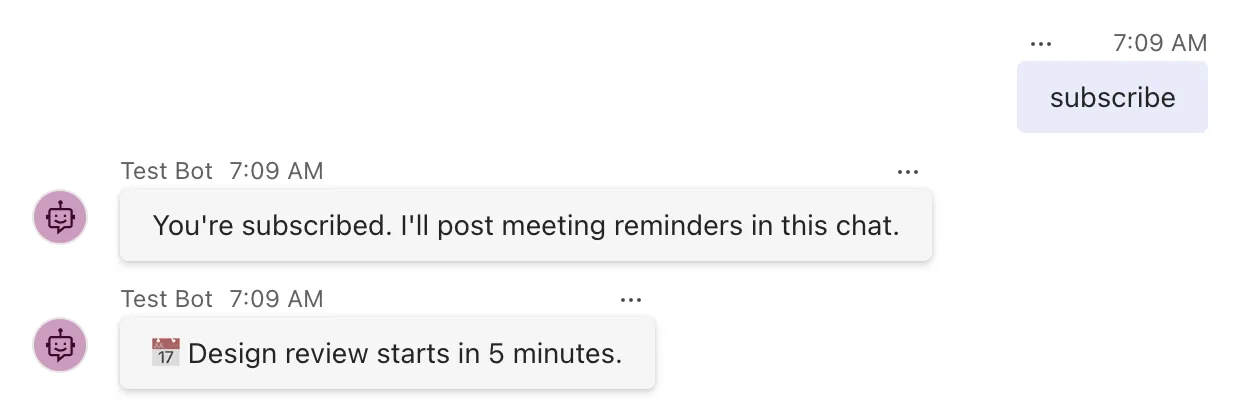
The reminder appeared in the chat, and nobody wrote anything. A call without minutes shows what a mistake looks like to the caller:
- macOS / Linux
- Windows (PowerShell)
curl -i -X POST "http://localhost:3978/proactive/continue/meeting/reminders-chat?title=Design%20review"
HTTP/1.1 400 Bad Request
Content-Type: application/json; charset=utf-8
Date: Tue, 24 Nov 2026 07:09:39 GMT
Server: Kestrel
Transfer-Encoding: chunked

{"error":{"code":"-2147024809","message":"Add the minutes until the meeting starts, from 1 to 1440, as minutes=...","helpLink":null}}
Invoke-WebRequest -Method Post -Uri "http://localhost:3978/proactive/continue/meeting/reminders-chat?title=Design%20review" -ContentType "application/json"
Invoke-WebRequest:
{
  "error": {
    "code": "-2147024809",
    "message": "Add the minutes until the meeting starts, from 1 to 1440, as minutes=...",
    "helpLink": null
  }
}
The answer carries the handler's own message, and the chat stayed quiet.
When the caller already has the exact message, it doesn't need a handler at all. POST /proactive/sendactivity/<conversation ID> sends the activity in its body:
- macOS / Linux
- Windows (PowerShell)
curl -i -X POST http://localhost:3978/proactive/sendactivity/reminders-chat -H "Content-Type: application/json" -d '{"type":"message","text":"The design review has moved to room 4."}'
HTTP/1.1 200 OK
Content-Type: application/json
Date: Tue, 24 Nov 2026 07:09:42 GMT
Server: Kestrel
Transfer-Encoding: chunked

{"id":"1795504182402"}
Invoke-RestMethod -Method Post -Uri "http://localhost:3978/proactive/sendactivity/reminders-chat" -ContentType "application/json" -Body '{"type":"message","text":"The design review has moved to room 4."}'
id
--
1795504329638
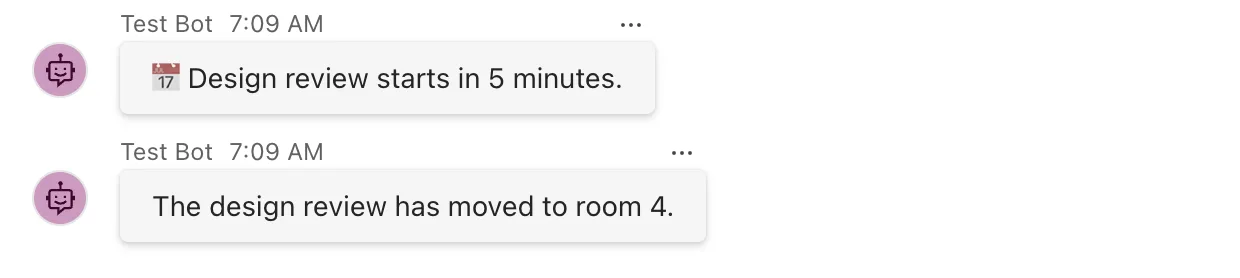
The answer is the new message's id. sendactivity suits plain notifications; continue suits anything the agent should decide, or that needs the chat's state.
Step 8: Unsubscribe, and See the Next Call Refused
In the same chat, send unsubscribe:
The agent's terminal confirms it:
info: Reminders.ReminderAgent[0]
      Removed conversation reminders-chat from meeting reminders
Then make the calendar system's call again:
- macOS / Linux
- Windows (PowerShell)
curl -i -X POST "http://localhost:3978/proactive/continue/meeting/reminders-chat?title=Design%20review&minutes=5"
HTTP/1.1 404 Not Found
Content-Type: application/json; charset=utf-8
Date: Tue, 24 Nov 2026 07:10:38 GMT
Server: Kestrel
Transfer-Encoding: chunked

{"error":{"code":"-50034","message":"Conversation not found for conversationId 'reminders-chat'.","helpLink":"https://aka.ms/M365AgentsErrorCodes/#-50034"}}
Invoke-WebRequest -Method Post -Uri "http://localhost:3978/proactive/continue/meeting/reminders-chat?title=Design%20review&minutes=5" -ContentType "application/json"
Invoke-WebRequest:
{
  "error": {
    "code": "-50034",
    "message": "Conversation not found for conversationId 'reminders-chat'.",
    "helpLink": "https://aka.ms/M365AgentsErrorCodes/#-50034"
  }
}
The conversation is gone, so the endpoint answers 404 and the chat stays quiet. A caller that gets this answer should stop calling for that conversation.
The Complete Code
using System.Text.RegularExpressions;
using Microsoft.Agents.Builder;
using Microsoft.Agents.Builder.App;
using Microsoft.Agents.Builder.App.Proactive;
using Microsoft.Agents.Builder.State;
using Microsoft.Agents.Core.Models;
using Microsoft.Agents.Hosting.AspNetCore.BackgroundQueue;

namespace Reminders;

public partial class ReminderAgent : AgentApplication
{
    private const string PendingKey = "pendingReminders";

    private readonly IBackgroundTaskQueue _backgroundTaskQueue;
    private readonly ILogger<ReminderAgent> _logger;

    public ReminderAgent(AgentApplicationOptions options, IBackgroundTaskQueue backgroundTaskQueue, ILogger<ReminderAgent> logger)
        : base(options)
    {
        _backgroundTaskQueue = backgroundTaskQueue;
        _logger = logger;

        OnMessage(RemindMePattern(), RemindMeAsync);
        OnMessage("reminders", ListRemindersAsync);
        OnMessage("subscribe", SubscribeAsync);
        OnMessage("unsubscribe", UnsubscribeAsync);
        OnActivity(ActivityTypes.Message, HelpAsync, rank: RouteRank.Last);
    }

    private async Task SubscribeAsync(ITurnContext turnContext, ITurnState turnState, CancellationToken cancellationToken)
    {
        string conversationId = await Proactive.StoreConversationAsync(turnContext, cancellationToken);
        _logger.LogInformation("Stored conversation {ConversationId} for meeting reminders", conversationId);

        await turnContext.SendActivityAsync("You're subscribed. I'll post meeting reminders in this chat.", cancellationToken: cancellationToken);
    }

    private async Task UnsubscribeAsync(ITurnContext turnContext, ITurnState turnState, CancellationToken cancellationToken)
    {
        await Proactive.DeleteConversationAsync(turnContext.Activity.Conversation.Id, cancellationToken);
        _logger.LogInformation("Removed conversation {ConversationId} from meeting reminders", turnContext.Activity.Conversation.Id);

        await turnContext.SendActivityAsync("You're unsubscribed. I won't post meeting reminders here any more.", cancellationToken: cancellationToken);
    }

    [ContinueConversation("meeting")]
    public async Task MeetingReminderAsync(ITurnContext turnContext, ITurnState turnState, CancellationToken cancellationToken)
    {
        var values = turnContext.Activity.Value as IDictionary<string, string> ?? new Dictionary<string, string>();

        if (!values.TryGetValue("title", out string? title) || string.IsNullOrWhiteSpace(title))
        {
            throw new ArgumentException("Add the meeting's title to the address, as title=...");
        }

        if (!values.TryGetValue("minutes", out string? minutesText) || !int.TryParse(minutesText, out int minutes) || minutes is < 1 or > 1440)
        {
            throw new ArgumentException("Add the minutes until the meeting starts, from 1 to 1440, as minutes=...");
        }

        await turnContext.SendActivityAsync($"📅 {title} starts in {minutes} minutes.", cancellationToken: cancellationToken);
    }

    private async Task RemindMeAsync(ITurnContext turnContext, ITurnState turnState, CancellationToken cancellationToken)
    {
        Match match = RemindMePattern().Match(turnContext.Activity.Text);
        int seconds = int.Parse(match.Groups["seconds"].Value);
        string task = match.Groups["task"].Value.Trim();

        var reminder = new Reminder(Guid.NewGuid().ToString("N"), task, DateTimeOffset.UtcNow.AddSeconds(seconds));
        List<Reminder> pending = turnState.Conversation.GetValue<List<Reminder>>(PendingKey, () => []);
        pending.Add(reminder);
        turnState.Conversation.SetValue(PendingKey, pending);

        Conversation conversation = new(turnContext);
        IChannelAdapter adapter = turnContext.Adapter;

        _backgroundTaskQueue.QueueBackgroundWorkItem(async stoppingToken =>
        {
            try
            {
                await Task.Delay(TimeSpan.FromSeconds(seconds), stoppingToken);

                IActivity continuation = conversation.Reference.GetContinuationActivity();
                continuation.Value = reminder;

                await Proactive.ContinueConversationAsync(adapter, conversation, SendReminderAsync,
                    continuationActivity: continuation, cancellationToken: stoppingToken);
            }
            catch (OperationCanceledException)
            {
                _logger.LogWarning("The agent stopped before the reminder to {Task} was due", task);
            }
            catch (Exception ex)
            {
                _logger.LogError(ex, "Couldn't send the reminder to {Task}", task);
            }
        });

        await turnContext.SendActivityAsync($"OK, I'll remind you to {task} in {seconds} seconds.", cancellationToken: cancellationToken);
    }

    private async Task SendReminderAsync(ITurnContext turnContext, ITurnState turnState, CancellationToken cancellationToken)
    {
        var reminder = (Reminder)turnContext.Activity.Value;

        List<Reminder> pending = turnState.Conversation.GetValue<List<Reminder>>(PendingKey, () => []);
        pending.RemoveAll(r => r.Id == reminder.Id);
        turnState.Conversation.SetValue(PendingKey, pending);

        await turnContext.SendActivityAsync($"⏰ Reminder: time to {reminder.Task}.", cancellationToken: cancellationToken);
    }

    private async Task ListRemindersAsync(ITurnContext turnContext, ITurnState turnState, CancellationToken cancellationToken)
    {
        List<Reminder> pending = turnState.Conversation.GetValue<List<Reminder>>(PendingKey, () => []);
        if (pending.Count == 0)
        {
            await turnContext.SendActivityAsync("You have no reminders waiting.", cancellationToken: cancellationToken);
            return;
        }

        IEnumerable<string> items = pending
            .OrderBy(r => r.DueAt)
            .Select(r => $"{r.Task} (in {Math.Max(0, (int)Math.Ceiling((r.DueAt - DateTimeOffset.UtcNow).TotalSeconds))} seconds)");
        await turnContext.SendActivityAsync($"Reminders waiting: {string.Join(", ", items)}.", cancellationToken: cancellationToken);
    }

    private Task HelpAsync(ITurnContext turnContext, ITurnState turnState, CancellationToken cancellationToken)
        => turnContext.SendActivityAsync("Try **remind me in 30 seconds to stretch**, **reminders**, **subscribe** or **unsubscribe**.", cancellationToken: cancellationToken);

    [GeneratedRegex(@"^remind me in (?<seconds>\d{1,4}) seconds? to (?<task>.+)$", RegexOptions.IgnoreCase)]
    private static partial Regex RemindMePattern();
}

public record Reminder(string Id, string Task, DateTimeOffset DueAt);
using Microsoft.Agents.Hosting.AspNetCore;
using Microsoft.Agents.Storage;
using Reminders;

var builder = WebApplication.CreateBuilder(args);

builder.AddAgentDefaults()
    .AddAgent<ReminderAgent>();
builder.Services.AddSingleton<IStorage, MemoryStorage>();

var app = builder.Build();

app.UseAgents();
app.MapDefaultAgentEndpoints();

if (app.Environment.IsDevelopment())
{
    // Open to anyone who can reach this port, so only map them on your own machine.
    app.MapAgentProactiveEndpoints<ReminderAgent>(requireAuth: false);
}

app.Run();
appsettings.json is the one from Step 4, and the client secret is in user secrets.
Stop and Clean Up
Stop the agent and the Playground with Ctrl+C. The stored conversations, the reminders and the list lived in MemoryStorage and the background queue, both in the agent's memory, so they went when it stopped.
The app registration stays in Microsoft Entra ID until you remove it. If you won't use it again, delete it, as the Delete a Registration section of How to Register a Web API in Microsoft Entra ID shows, and remove the secret from user secrets with dotnet user-secrets clear in the project folder. Delete the Reminders folder if you don't want to keep it.
What You Can Do Now
- Explain what an agent must keep to reach a chat later, and why that includes its own identity.
- Store, look up and delete conversations with
AgentApplication.Proactive. - Send a message from background work with
IBackgroundTaskQueueandProactive.SendActivityAsync, capturing the conversation before the turn ends. - Give an agent its Microsoft Entra identity and test proactive messages in the Agents Playground's authenticated mode.
- Run a proactive turn with the chat's state using
Proactive.ContinueConversationAsync, and carry data into it on the continuation activity. - Let other programs trigger messages over HTTP with
MapAgentProactiveEndpointsand[ContinueConversation], and keep those endpoints private.
Common Mistakes
| Mistake | What happens | Do this instead |
|---|---|---|
| Testing proactive messages in the Playground's anonymous mode | aud claim is required in Claims, and nothing is sent | Give the agent an identity and use the Playground's authenticated mode |
Using turnContext inside background work | It belongs to a turn that has ended; Microsoft's guide says it isn't safe to use | Capture new Conversation(turnContext) and turnContext.Adapter before queuing the work |
No try/catch around background work | A failure vanishes, and the message just never comes | Catch and log every exception |
Changing state with SendActivityAsync in mind | It doesn't load or save state | Use ContinueConversationAsync with a handler |
| Mapping the proactive endpoints without authentication everywhere | Anyone who can reach the agent can post into its chats | Map them with requireAuth: false only on your own machine |
| Expecting reminders to survive a restart | The queue and MemoryStorage live in memory | Store work that must survive in durable storage, as in production |
Troubleshooting
| Symptom | Likely cause | Fix |
|---|---|---|
| The reminder never comes, and the terminal shows aud claim is required in Claims | The conversation was captured from an anonymous message | Fixed: aud claim is required in Claims |
| Anonymous access is enabled for channel: emulator. for every message | The Playground runs in its anonymous mode, so the turns have no identity | Fixed: "Anonymous access is enabled for channel: emulator" |
| No connections map found in configuration. at start | Connections without ConnectionsMap | Fixed: "No connections map found in configuration" |
415 Unsupported Media Type from PowerShell | Invoke-WebRequest labels a POST as a form unless told otherwise | Fixed: 415 (Unsupported Media Type) from Invoke-WebRequest |
404 and Conversation not found | The conversation was never stored, was deleted, or the agent restarted and MemoryStorage was emptied | Send subscribe again |
400 with your exception's message | The handler threw ArgumentException for a bad query string | Check the values in the address |
FAQ
Can an agent message someone who has never written to it?
Yes, with Proactive.CreateConversationAsync, which asks the channel to start a new conversation. It needs a channel that can start new chats, such as Microsoft Teams. For Teams it also needs the person's Microsoft Entra object ID, your tenant ID and a service URL, for which the SDK has constants. The Agents Playground only has the chats it opens itself.
Why does the stored conversation include claims?
Because the agent sends as itself. Microsoft's guide says a Conversation holds the JSON Web Token (JWT) claims needed to authenticate the outbound call. The aud claim names the app registration whose token the agent gets.
Should I use SendActivityAsync or ContinueConversationAsync?
SendActivityAsync for a plain message: it's quick and touches nothing else. ContinueConversationAsync when the agent should run its own logic in the chat, read or change its state, or use the sign-in tokens Part 15 will cover.
Can a proactive message be an Adaptive Card?
Yes. Both methods send whatever activity you give them, so the message with a card attachment from Part 5 is sent the same way.
Will my reminders survive a restart?
Not in this agent. The background queue and MemoryStorage both live in memory. A production agent keeps conversations in durable storage, which Part 19 covers, and schedules long-lived work somewhere that survives a restart.
Conclusion
A proactive message is one the agent starts. To send one, the agent needs the conversation it wants to reach, captured during an earlier turn, and an identity of its own, because it has to authenticate the call itself. With both in place, SendActivityAsync sends a message into the chat, ContinueConversationAsync runs a full turn there with the chat's state, and MapAgentProactiveEndpoints lets other programs ask for either over HTTP. Store conversations when people subscribe, delete them when they leave, catch every error in background work, and keep the HTTP endpoints behind authentication anywhere other than your own machine.
Next: Part 7: Stream Responses and Show Progress (coming soon). Your agents send whole messages so far. Part 7 sends long answers a piece at a time, and shows that the agent is working while it thinks.
Additional Resources
- Proactive messaging in the Agents SDK — the concepts, every proactive operation, and the HTTP endpoints.
- Proactive class — the API reference.
- Test your agent locally in Microsoft 365 Agents Playground — anonymous and authenticated modes.
- Configure authentication in your agent — the connection settings for a client secret and the other credential types.
