Part 2: Route Activities with AgentApplication
Your agent receives many kinds of activities, and each one needs the right code: help should get the help text, a new member a welcome, a reaction a thank-you. AgentApplication makes that decision for every activity with routes. In this part you build a help desk agent with six routes, watch which one answers each activity, and read the order the SDK tries them in, straight from its own log.
This is Part 2 of the Microsoft 365 Agents SDK Fundamentals, a 26-part series.
- Part 1: Activities and the Activity Protocol
- Part 2: Route Activities with AgentApplication (you are here)
- Part 3: Turn Events, Error Handling and Middleware
- Part 4: Conversation, User and Turn State
- Part 5: Send Adaptive Cards and Handle Their Actions
- Part 6: Send Proactive Messages (coming soon)
- Part 7: Stream Responses and Show Progress (coming soon)
- Part 8: Run Your Agent in Microsoft Teams (coming soon)
- Part 9: Universal Actions: Adaptive Cards That Update (coming soon)
- Part 10: Teams Dialogs (coming soon)
- Part 11: Commands, Suggested Actions and Targeted Messages (coming soon)
- Part 12: Mentions, Rosters and Team Events (coming soon)
- Part 13: Meeting Events (coming soon)
- Part 14: Send and Receive Files (coming soon)
- Part 15: Sign People In with SSO and OAuth (coming soon)
- Part 16: Message Extensions and Link Unfurling (coming soon)
- Part 17: AI Labels, Citations and Feedback (coming soon)
- Part 18: Bring Your Agent to Microsoft 365 Copilot (coming soon)
- Part 19: Store State in Azure Blob Storage and Cosmos DB (coming soon)
- Part 20: Telemetry with OpenTelemetry (coming soon)
- Part 21: Web Chat and Direct Line (coming soon)
- Part 22: Reach People in Slack (coming soon)
- Part 23: Call a Copilot Studio Agent (coming soon)
- Part 24: Agent-to-Agent Communication (coming soon)
- Part 25: Keep Conversation Transcripts (coming soon)
- Part 26: Deploy Your Agent to Azure (coming soon)
By the end of this part you'll know what a route is, which route methods the SDK offers and what exactly each one matches, the order routes are tried in and how to change it, and how to let more than one route handle the same activity. You'll also know how to see your agent's route order in its log, which is the fastest way to find out why the wrong handler answered. Every step works in VS Code and in Visual Studio; where they differ, the page shows a tab for each. Every output and screenshot on this page is real.
What a Route Is
A route is a pair: a selector, a function that looks at the incoming activity and answers yes, I want this one or no, and a handler, the method that runs when the answer is yes. Your agent's constructor registers its routes, and AgentApplication keeps them in a list.
When an activity arrives, the SDK walks that list in order and asks each route's selector. The first route that says yes runs its handler, and routing for that activity is over. If no route says yes, nothing runs: the activity was accepted, and nobody answers it.
The non-terminal branch is the exception to first match wins: a route marked non-terminal runs its handler and lets the routes after it be tried too. You'll use one in this part.
The Route Methods
You rarely write selectors yourself. AgentApplication has a method for each common case, and each one builds the selector for you:
| Method | Matches | Example |
|---|---|---|
OnMessage("help", ...) | A message whose whole text is help, ignoring case | help, HELP; not help me |
OnMessage(new Regex(...), ...) | A message whose text matches a regular expression | ticket 1234 |
OnActivity(ActivityTypes.Message, ...) | Every activity of a type | every message |
OnConversationUpdate(ConversationUpdateEvents.MembersAdded, ...) | A conversationUpdate that adds at least one member; MembersRemoved for members leaving | someone joining |
OnEvent("themeChanged", ...) | An event activity with that name, ignoring case | a signal from a web page |
OnMessageReactionsAdded(...), OnMessageReactionsRemoved(...) | A messageReaction that adds or removes reactions | a like |
AddRoute(...) with a route builder | Whatever your own selector function says, with every option | anything you can check in code |
Later parts add more, such as routes for Adaptive Card actions. Each On... method is a shortcut: it builds the route with one of the SDK's route builders, such as MessageRouteBuilder, and adds it with AddRoute. You use a builder yourself when you need an option the shortcut doesn't have, as you will here.
The Order Routes Are Tried In
The list isn't kept in the order you register routes. The SDK sorts it when each route is added, by three rules:
- Invoke routes come first. An
invokeactivity waits for its answer in the response to its own request, as Part 1 explained, so its routes are tried before all others. Routes for agentic requests from Microsoft Agent 365 get groups of their own too; this part doesn't use them. - Then by rank. Every route has a number from
0to65535, and lower numbers are tried first. - Equal ranks keep the order you registered them in.
You set the rank with a rank argument or the builders' WithOrderRank, using the RouteRank constants:
| Constant | Value | Use it for |
|---|---|---|
RouteRank.First | 0 | A route that must be tried before all others |
RouteRank.Unspecified | 32767 | Everything else; the default when you give no rank |
RouteRank.Last | 65535 | A catch-all, tried only after every other route |
Most routes keep the default. The rank matters for routes that overlap: a catch-all that takes every message must come after the routes for specific messages, and this part shows what happens when it doesn't.
The Example: A Help Desk Agent
To see routes at work, you'll build a small help desk agent with six routes, one for each kind of rule:
| When | The agent | Route |
|---|---|---|
| Someone joins the conversation | Welcomes them | Conversation update |
You send help | Lists what it understands | Exact text |
You send ticket 1234 | Reads the ticket number from your message | Regular expression |
| You react to one of its messages | Says thanks | Reactions |
| Your message mentions urgent | Flags it, and lets another route answer too | Your own selector, ranked first, non-terminal |
| You send anything else | Logs it as a new request | Catch-all, ranked last |
It has no AI and no ticket system, so the routes are the only new thing on the page. You'll run it in the Microsoft 365 Agents Playground, as in Part 1.
Prerequisites
- The .NET 10 SDK.
dotnet --versionshould print10.0.and a patch number; this page was built with10.0.404. - The Microsoft 365 Agents Playground.
agentsplayground --versionshould print0.2.30. If the command isn't found, install it withnpm install -g @microsoft/m365agentsplayground. - What an activity is, from Part 1: Activities and the Activity Protocol.
Step 1: Create the Project
Open a terminal in the folder where you keep your projects and create an empty ASP.NET Core project, as in Part 1:
dotnet new web -o HelpDesk
The template "ASP.NET Core Empty" was created successfully.

Processing post-creation actions...
Restoring /Users/you/source/HelpDesk/HelpDesk.csproj:
Restore succeeded.
Then add the Agents SDK's hosting package, which brings the rest of the SDK with it:
cd HelpDesk
dotnet add package Microsoft.Agents.Hosting.AspNetCore --version 1.9.205
info : PackageReference for package 'Microsoft.Agents.Hosting.AspNetCore' version '1.9.205' added to file '/Users/you/source/HelpDesk/HelpDesk.csproj'.
info : Generating MSBuild file /Users/you/source/HelpDesk/obj/HelpDesk.csproj.nuget.g.targets.
info : Writing assets file to disk. Path: /Users/you/source/HelpDesk/obj/project.assets.json
log  : Restored /Users/you/source/HelpDesk/HelpDesk.csproj (in 926 ms).
Step 2: Write the Help Desk Agent
Create a file called HelpDeskAgent.cs in the project folder. You'll write the routes first, then their handlers, then see the whole file.
The Routes
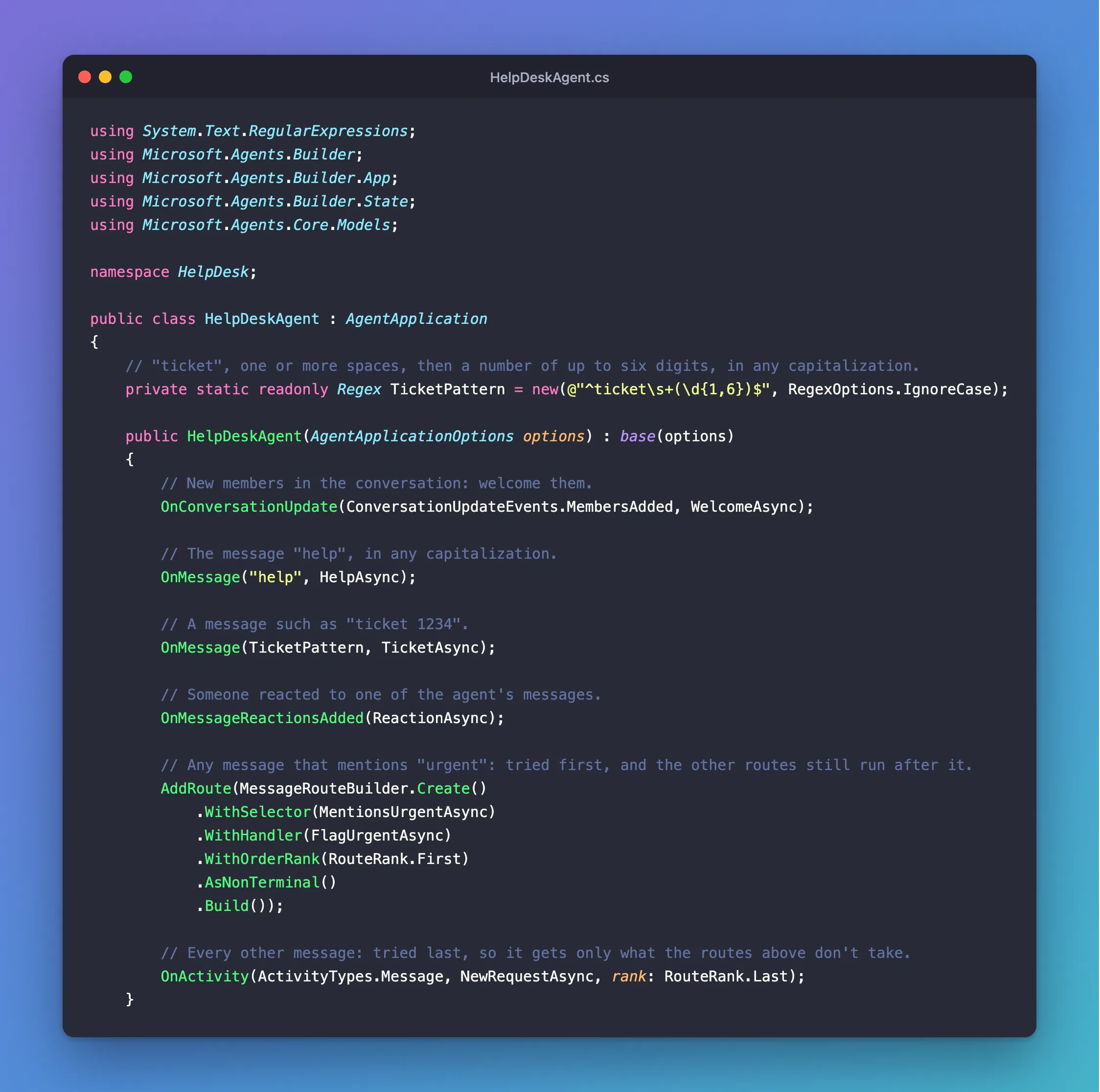
The constructor registers all six routes:
using System.Text.RegularExpressions;
using Microsoft.Agents.Builder;
using Microsoft.Agents.Builder.App;
using Microsoft.Agents.Builder.State;
using Microsoft.Agents.Core.Models;

namespace HelpDesk;

public class HelpDeskAgent : AgentApplication
{
    // "ticket", one or more spaces, then a number of up to six digits, in any capitalization.
    private static readonly Regex TicketPattern = new(@"^ticket\s+(\d{1,6})$", RegexOptions.IgnoreCase);

    public HelpDeskAgent(AgentApplicationOptions options) : base(options)
    {
        // New members in the conversation: welcome them.
        OnConversationUpdate(ConversationUpdateEvents.MembersAdded, WelcomeAsync);

        // The message "help", in any capitalization.
        OnMessage("help", HelpAsync);

        // A message such as "ticket 1234".
        OnMessage(TicketPattern, TicketAsync);

        // Someone reacted to one of the agent's messages.
        OnMessageReactionsAdded(ReactionAsync);

        // Any message that mentions "urgent": tried first, and the other routes still run after it.
        AddRoute(MessageRouteBuilder.Create()
            .WithSelector(MentionsUrgentAsync)
            .WithHandler(FlagUrgentAsync)
            .WithOrderRank(RouteRank.First)
            .AsNonTerminal()
            .Build());

        // Every other message: tried last, so it gets only what the routes above don't take.
        OnActivity(ActivityTypes.Message, NewRequestAsync, rank: RouteRank.Last);
    }
OnConversationUpdate(ConversationUpdateEvents.MembersAdded, WelcomeAsync)matches aconversationUpdateactivity with at least one member inMembersAdded.OnMessage("help", HelpAsync)matches a message whose whole text ishelp, in any capitalization. It doesn't look for the word inside a longer message.OnMessage(TicketPattern, TicketAsync)matches a message whose text fits the regular expression.^and$pin the pattern to the start and end of the text,\s+is one or more spaces,(\d{1,6})captures a number of up to six digits, andRegexOptions.IgnoreCaseacceptsTicketandTICKETas well. The pattern isstatic readonly, so it's built once, not on every message.OnMessageReactionsAdded(ReactionAsync)matches amessageReactionactivity that adds at least one reaction.- The urgent route uses a route builder, because it needs two options the shortcuts don't have.
MessageRouteBuilderbuilds routes for messages only..WithSelector(MentionsUrgentAsync)gives it your own selector function,.WithOrderRank(RouteRank.First)puts it before all other routes, and.AsNonTerminal()lets the routes after it be tried too..Build()returns the route, andAddRouteregisters it. OnActivity(ActivityTypes.Message, NewRequestAsync, rank: RouteRank.Last)matches every message, but with the last rank, so it gets only the messages no other route took.
The routes are registered in this order, but the urgent route will be tried first and the catch-all last: the ranks decide, as Step 5 shows.
The Handlers
Each handler has the same signature you met in Part 1: the turn's context, its state and a cancellation token.
    private async Task WelcomeAsync(ITurnContext turnContext, ITurnState turnState, CancellationToken cancellationToken)
    {
        foreach (ChannelAccount member in turnContext.Activity.MembersAdded)
        {
            // The agent is one of the members added; don't welcome it.
            if (member.Id != turnContext.Activity.Recipient.Id)
            {
                await turnContext.SendActivityAsync("Hi! I'm the help desk agent. Type **help** to see what I can do.", cancellationToken: cancellationToken);
            }
        }
    }

    private async Task HelpAsync(ITurnContext turnContext, ITurnState turnState, CancellationToken cancellationToken)
    {
        await turnContext.SendActivityAsync(
            "Here's what I understand:\n\n" +
            "- **help**: this list\n" +
            "- **ticket** and a number, such as **ticket 1234**: ask about a ticket\n" +
            "- anything else: a new request for the help desk",
            cancellationToken: cancellationToken);
    }

    private async Task TicketAsync(ITurnContext turnContext, ITurnState turnState, CancellationToken cancellationToken)
    {
        // The route matched, so the pattern matches: read the number from its first group.
        string ticketNumber = TicketPattern.Match(turnContext.Activity.Text).Groups[1].Value;
        await turnContext.SendActivityAsync($"You asked about ticket **{ticketNumber}**. A real help desk would look it up now.", cancellationToken: cancellationToken);
    }

    private async Task ReactionAsync(ITurnContext turnContext, ITurnState turnState, CancellationToken cancellationToken)
    {
        string reactions = string.Join(", ", turnContext.Activity.ReactionsAdded.Select(reaction => reaction.Type));
        await turnContext.SendActivityAsync($"Thanks for the {reactions}!", cancellationToken: cancellationToken);
    }

    // The selector of the urgent route: true when the message's text contains "urgent", in any capitalization.
    private static Task<bool> MentionsUrgentAsync(ITurnContext turnContext, CancellationToken cancellationToken)
    {
        bool mentionsUrgent = turnContext.Activity.Text?.Contains("urgent", StringComparison.OrdinalIgnoreCase) == true;
        return Task.FromResult(mentionsUrgent);
    }

    private async Task FlagUrgentAsync(ITurnContext turnContext, ITurnState turnState, CancellationToken cancellationToken)
    {
        await turnContext.SendActivityAsync("I've marked this as **urgent**.", cancellationToken: cancellationToken);
    }

    private async Task NewRequestAsync(ITurnContext turnContext, ITurnState turnState, CancellationToken cancellationToken)
    {
        await turnContext.SendActivityAsync($"Thanks, I've logged a new request: \"{turnContext.Activity.Text}\"", cancellationToken: cancellationToken);
    }
}
WelcomeAsyncloops overMembersAdded, because one update can add several people. The agent itself is one of the members added, so it skips the member whoseIdis the agent's own,Recipient.Id.TicketAsyncruns the pattern again to read the number.Groups[1]is the part inside the first pair of brackets,(\d{1,6}).MentionsUrgentAsyncis a selector: it gets the turn's context and returnstrueorfalse, wrapped in aTaskbecause selectors may be asynchronous. It has noITurnState, because it only decides; the handler does the work.MessageRouteBuilderalready checks that the activity is a message, so the selector only looks at the text.?.and== truehandle a message with no text.
TicketAsync and MentionsUrgentAsync are the only places that read the message text in code. The routing itself is all in the constructor.
The Complete File
using System.Text.RegularExpressions;
using Microsoft.Agents.Builder;
using Microsoft.Agents.Builder.App;
using Microsoft.Agents.Builder.State;
using Microsoft.Agents.Core.Models;

namespace HelpDesk;

public class HelpDeskAgent : AgentApplication
{
    // "ticket", one or more spaces, then a number of up to six digits, in any capitalization.
    private static readonly Regex TicketPattern = new(@"^ticket\s+(\d{1,6})$", RegexOptions.IgnoreCase);

    public HelpDeskAgent(AgentApplicationOptions options) : base(options)
    {
        // New members in the conversation: welcome them.
        OnConversationUpdate(ConversationUpdateEvents.MembersAdded, WelcomeAsync);

        // The message "help", in any capitalization.
        OnMessage("help", HelpAsync);

        // A message such as "ticket 1234".
        OnMessage(TicketPattern, TicketAsync);

        // Someone reacted to one of the agent's messages.
        OnMessageReactionsAdded(ReactionAsync);

        // Any message that mentions "urgent": tried first, and the other routes still run after it.
        AddRoute(MessageRouteBuilder.Create()
            .WithSelector(MentionsUrgentAsync)
            .WithHandler(FlagUrgentAsync)
            .WithOrderRank(RouteRank.First)
            .AsNonTerminal()
            .Build());

        // Every other message: tried last, so it gets only what the routes above don't take.
        OnActivity(ActivityTypes.Message, NewRequestAsync, rank: RouteRank.Last);
    }

    private async Task WelcomeAsync(ITurnContext turnContext, ITurnState turnState, CancellationToken cancellationToken)
    {
        foreach (ChannelAccount member in turnContext.Activity.MembersAdded)
        {
            // The agent is one of the members added; don't welcome it.
            if (member.Id != turnContext.Activity.Recipient.Id)
            {
                await turnContext.SendActivityAsync("Hi! I'm the help desk agent. Type **help** to see what I can do.", cancellationToken: cancellationToken);
            }
        }
    }

    private async Task HelpAsync(ITurnContext turnContext, ITurnState turnState, CancellationToken cancellationToken)
    {
        await turnContext.SendActivityAsync(
            "Here's what I understand:\n\n" +
            "- **help**: this list\n" +
            "- **ticket** and a number, such as **ticket 1234**: ask about a ticket\n" +
            "- anything else: a new request for the help desk",
            cancellationToken: cancellationToken);
    }

    private async Task TicketAsync(ITurnContext turnContext, ITurnState turnState, CancellationToken cancellationToken)
    {
        // The route matched, so the pattern matches: read the number from its first group.
        string ticketNumber = TicketPattern.Match(turnContext.Activity.Text).Groups[1].Value;
        await turnContext.SendActivityAsync($"You asked about ticket **{ticketNumber}**. A real help desk would look it up now.", cancellationToken: cancellationToken);
    }

    private async Task ReactionAsync(ITurnContext turnContext, ITurnState turnState, CancellationToken cancellationToken)
    {
        string reactions = string.Join(", ", turnContext.Activity.ReactionsAdded.Select(reaction => reaction.Type));
        await turnContext.SendActivityAsync($"Thanks for the {reactions}!", cancellationToken: cancellationToken);
    }

    // The selector of the urgent route: true when the message's text contains "urgent", in any capitalization.
    private static Task<bool> MentionsUrgentAsync(ITurnContext turnContext, CancellationToken cancellationToken)
    {
        bool mentionsUrgent = turnContext.Activity.Text?.Contains("urgent", StringComparison.OrdinalIgnoreCase) == true;
        return Task.FromResult(mentionsUrgent);
    }

    private async Task FlagUrgentAsync(ITurnContext turnContext, ITurnState turnState, CancellationToken cancellationToken)
    {
        await turnContext.SendActivityAsync("I've marked this as **urgent**.", cancellationToken: cancellationToken);
    }

    private async Task NewRequestAsync(ITurnContext turnContext, ITurnState turnState, CancellationToken cancellationToken)
    {
        await turnContext.SendActivityAsync($"Thanks, I've logged a new request: \"{turnContext.Activity.Text}\"", cancellationToken: cancellationToken);
    }
}
Step 3: Host and Run the Agent
Replace everything in Program.cs with the same hosting Part 1 uses, with HelpDeskAgent as the agent:
using HelpDesk;
using Microsoft.Agents.Hosting.AspNetCore;
using Microsoft.Agents.Storage;

var builder = WebApplication.CreateBuilder(args);

builder.AddAgentDefaults()
    .AddAgent<HelpDeskAgent>();
builder.Services.AddSingleton<IStorage, MemoryStorage>();

var app = builder.Build();

app.UseAgents();
app.MapDefaultAgentEndpoints();

app.Run();
Then open Properties/launchSettings.json and set the two applicationUrl lines to port 3978, where the Agents Playground looks by default:
"applicationUrl": "http://localhost:3978",
"applicationUrl": "https://localhost:3979;http://localhost:3978",
Build it:
dotnet build
Restore complete (0.3s)
  HelpDesk net10.0 succeeded (1.4s) → bin/Debug/net10.0/HelpDesk.dll

Build succeeded in 2.3s
And start it:
- VS Code (or any terminal)
- Visual Studio
In the terminal, in the project folder:
dotnet run
Choose Debug → Start Without Debugging (Ctrl+F5). Both launch profiles listen on port 3978. Visual Studio also opens your browser on the agent's GET / page, which you can close.
Using launch settings from /Users/you/source/HelpDesk/Properties/launchSettings.json...
Building...
warn: Microsoft.Agents.Authentication.ConfigurationConnections[0]
      No connections found in configuration.
warn: Microsoft.Agents.Authentication.ConfigurationConnections[0]
      No connections map found in configuration.
info: Microsoft.Agents.Hosting.AspNetCore.BackgroundQueue.HostedActivityService[0]
      Queued Hosted Service is running.
info: Microsoft.Agents.Hosting.AspNetCore.BackgroundQueue.HostedTaskService[0]
      Queued Hosted Service is running.

info: Microsoft.Hosting.Lifetime[14]
      Now listening on: http://localhost:3978
info: Microsoft.Hosting.Lifetime[0]
      Application started. Press Ctrl+C to shut down.
info: Microsoft.Hosting.Lifetime[0]
      Hosting environment: Development
info: Microsoft.Hosting.Lifetime[0]
      Content root path: /Users/you/source/HelpDesk
The two warnings mean the agent has no identity of its own yet, which the Playground doesn't need. Leave the agent running.
Step 4: Watch Each Route Answer
Open a second terminal and start the Agents Playground as the emulator channel:
agentsplayground -e http://localhost:3978/api/messages -c emulator
The Playground connects and sends a conversationUpdate that adds you and the agent. The members-added route takes it, skips the agent, and welcomes you:

Exact Text
Send help, then HELP, then help me:
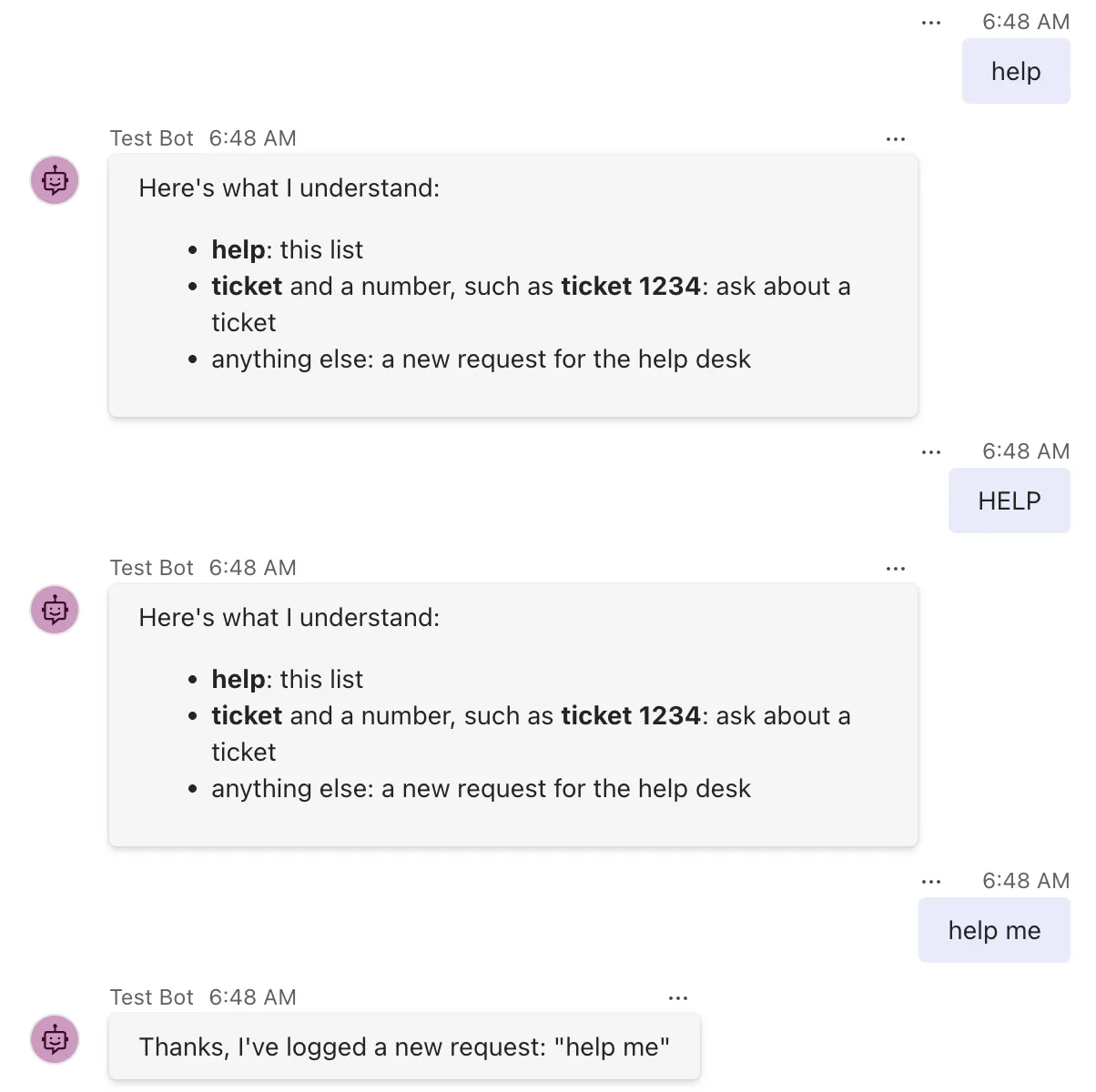
help and HELP both reached the help route: it compares the whole text and ignores case. help me didn't, because its text isn't exactly help, so it fell through to the catch-all.
A Regular Expression
Send ticket 1234, then ticket abc:
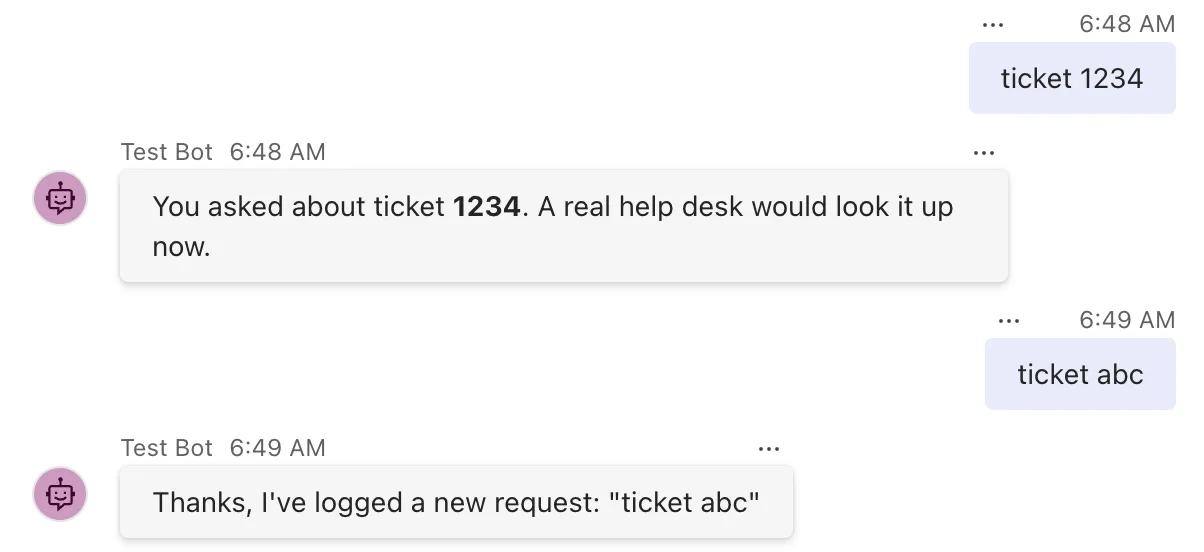
The pattern matched ticket 1234, and the handler read 1234 from the pattern's group. abc isn't a number, so ticket abc matched nothing but the catch-all.
A Non-Terminal Route
Send Urgent: my laptop won't start. You get two answers:
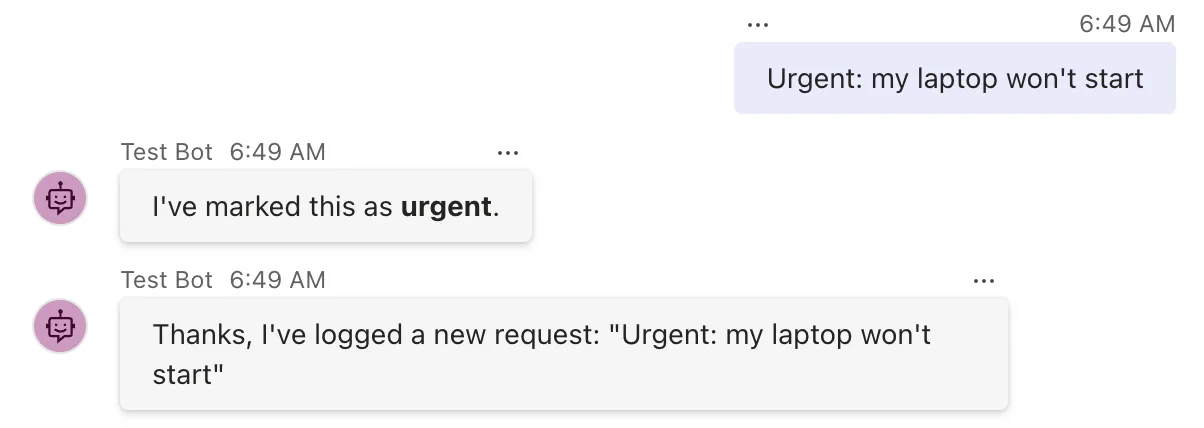
The urgent route was tried first and its selector said yes, so its handler flagged the message. Because the route is non-terminal, the SDK went on down the list: help and ticket didn't match, and the catch-all logged the request. Without .AsNonTerminal(), the flag would have been the only answer.
A Reaction
A reaction isn't something you type. Send one from the Playground the way Part 1 did: copy the id of the agent's latest reply from the Response tab of its message 201 line in the Log Panel, choose Mock an Activity → Custom activity, and replace the "type": "<custom-activity-type>" line with these three, using your own id (the whole procedure is in How to Send a Custom Activity from the Microsoft 365 Agents Playground):
"type": "messageReaction",
"reactionsAdded": [{ "type": "like" }],
"replyToId": "1795243744918"
Select Send activity. The reaction route answers:
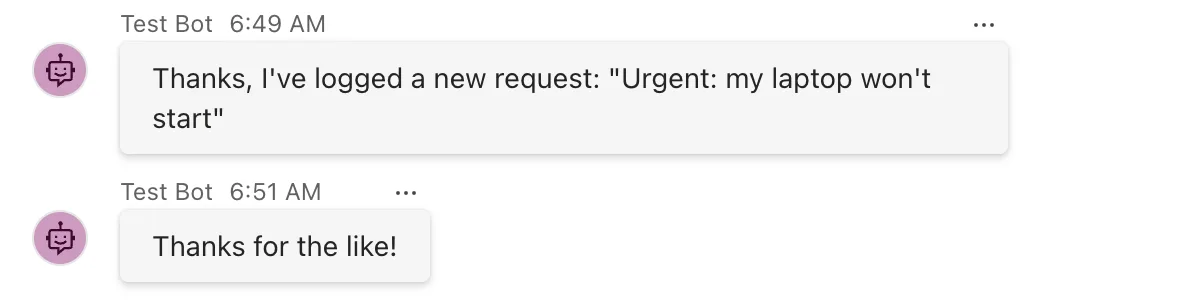
Every kind of activity found its route. Next, you'll see the list the SDK walked to find them.
Step 5: See the Order the SDK Tries Your Routes In
AgentApplication writes its sorted route list to the log on every turn, just before it tries the routes, at the Debug level. ASP.NET Core only shows Information and above by default, so turn on Debug for the SDK's routing code. Replace appsettings.Development.json with this:
{
  "Logging": {
    "LogLevel": {
      "Default": "Information",
      "Microsoft.AspNetCore": "Warning",
      "Microsoft.Agents.Builder.App": "Debug"
    }
  }
}
Microsoft.Agents.Builder.App is the namespace of AgentApplication and its routes, so only their Debug messages are turned on; everything else stays as it was. dotnet run uses the Development environment, which is why this file applies. Stop the agent with Ctrl+C, start it again with dotnet run, and send help in the Playground. The agent's terminal now shows the list before the turn's other lines:
warn: Microsoft.Agents.Hosting.AspNetCore.CloudAdapter[4]
      Anonymous access is enabled for channel: emulator.
dbug: Microsoft.Agents.Builder.App.AgentApplication[1]
      AgentApplication route evaluation order (6 routes): [{"Index":0,"Handler":"HelpDeskAgent.FlagUrgentAsync","Flags":"NonTerminal","Rank":0,"Channel":"*"},{"Index":1,"Handler":"HelpDeskAgent.WelcomeAsync","Flags":"None","Rank":32767,"Channel":"*"},{"Index":2,"Handler":"HelpDeskAgent.HelpAsync","Flags":"None","Rank":32767,"Channel":"*"},{"Index":3,"Handler":"HelpDeskAgent.TicketAsync","Flags":"None","Rank":32767,"Channel":"*"},{"Index":4,"Handler":"HelpDeskAgent.ReactionAsync","Flags":"None","Rank":32767,"Channel":"*"},{"Index":5,"Handler":"HelpDeskAgent.NewRequestAsync","Flags":"None","Rank":65535,"Channel":"*"}]
The list is one line of JSON. Laid out as a table:
| Index | Handler | Flags | Rank |
|---|---|---|---|
| 0 | FlagUrgentAsync | NonTerminal | 0 |
| 1 | WelcomeAsync | None | 32767 |
| 2 | HelpAsync | None | 32767 |
| 3 | TicketAsync | None | 32767 |
| 4 | ReactionAsync | None | 32767 |
| 5 | NewRequestAsync | None | 65535 |
That's exactly the order the routes were tried in Step 4. The urgent route was registered fifth but comes first, because of its rank 0. The four routes with the default rank keep the order the constructor registered them in. The catch-all comes last because of its rank 65535. Channel is * for routes that match activities from every channel.
The warning above the list is logged for every activity that arrives without authentication, which is how an agent with no identity runs on your machine. Part 8, which runs the agent in Teams, gives it one.
Step 6: Send an Activity No Route Matches
None of the six routes handles event activities. Open Mock an Activity → Custom activity again and replace the type line with an event:
"type": "event",
"name": "pageOpened"
Select Send activity. Nothing comes back, and the Log Panel shows why it's not an error:
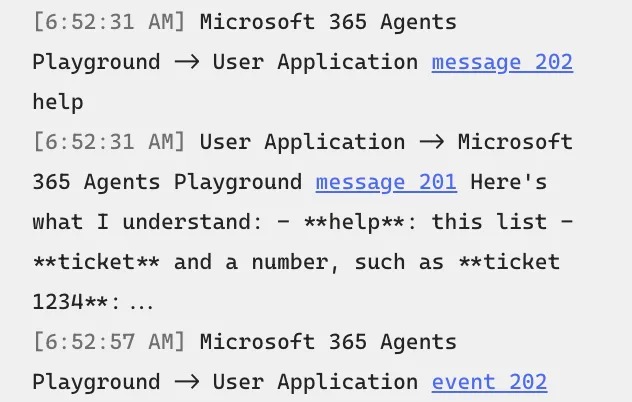
The agent accepted the event with 202, as it accepts every activity, and sent nothing. Its terminal says so:
dbug: Microsoft.Agents.Builder.App.AgentApplication[2]
      No route matched for ActivityType=event
That line, again at the Debug level, is the first thing to look for when your agent stays silent: it means the activity arrived, but no route wanted it.
Step 7: See What Happens Without RouteRank.Last
The catch-all's rank is what keeps it from swallowing everything. To see that, move its line to the top of the constructor and remove the rank:
    public HelpDeskAgent(AgentApplicationOptions options) : base(options)
    {
        // The catch-all, registered first and without a rank.
        OnActivity(ActivityTypes.Message, NewRequestAsync);
Restart the agent with dotnet run and send help:
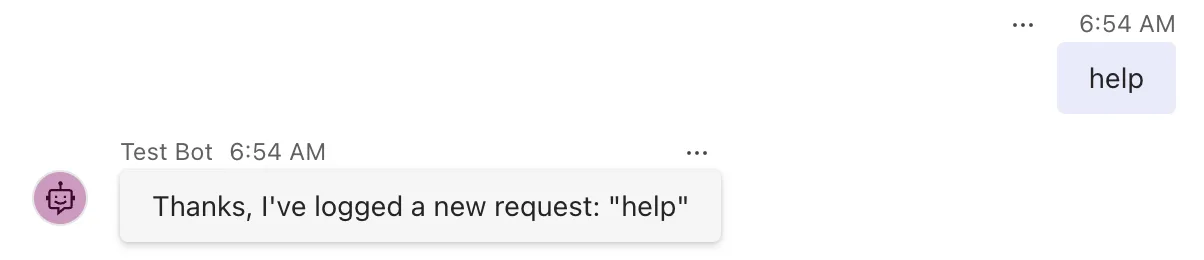
The route list shows why:
dbug: Microsoft.Agents.Builder.App.AgentApplication[1]
      AgentApplication route evaluation order (6 routes): [{"Index":0,"Handler":"HelpDeskAgent.FlagUrgentAsync","Flags":"NonTerminal","Rank":0,"Channel":"*"},{"Index":1,"Handler":"HelpDeskAgent.NewRequestAsync","Flags":"None","Rank":32767,"Channel":"*"},{"Index":2,"Handler":"HelpDeskAgent.WelcomeAsync","Flags":"None","Rank":32767,"Channel":"*"},{"Index":3,"Handler":"HelpDeskAgent.HelpAsync","Flags":"None","Rank":32767,"Channel":"*"},{"Index":4,"Handler":"HelpDeskAgent.TicketAsync","Flags":"None","Rank":32767,"Channel":"*"},{"Index":5,"Handler":"HelpDeskAgent.ReactionAsync","Flags":"None","Rank":32767,"Channel":"*"}]
Without a rank, the catch-all has the default 32767, like the help route, and it was registered first, so it's tried first. Its selector says yes to every message, and routing stops there: the help route never gets asked. Put the line back where it was, with rank: RouteRank.Last, and restart the agent before you go on.
Step 8: Register Routes with Attributes
The constructor isn't the only place to register routes. The SDK also has route attributes: you put one on the handler method, and the SDK registers the route for you. These three attributes do the same as three lines of the constructor, which you'd remove:
    [MembersAddedRoute]
    private async Task WelcomeAsync(ITurnContext turnContext, ITurnState turnState, CancellationToken cancellationToken)
    {
        // ... the same body as before
    }

    [MessageRoute("help")]
    private async Task HelpAsync(ITurnContext turnContext, ITurnState turnState, CancellationToken cancellationToken)
    {
        // ... the same body as before
    }

    [MessageReactionsAddedRoute]
    private async Task ReactionAsync(ITurnContext turnContext, ITurnState turnState, CancellationToken cancellationToken)
    {
        // ... the same body as before
    }
Only the attribute line above each method is new. With these three attributes, and the OnConversationUpdate, OnMessage("help", ...) and OnMessageReactionsAdded lines removed from the constructor, help and ticket 42 get the same answers as before, but the route list changes:
dbug: Microsoft.Agents.Builder.App.AgentApplication[1]
      AgentApplication route evaluation order (6 routes): [{"Index":0,"Handler":"HelpDeskAgent.FlagUrgentAsync","Flags":"NonTerminal","Rank":0,"Channel":"*"},{"Index":1,"Handler":"HelpDeskAgent.WelcomeAsync","Flags":"None","Rank":32767,"Channel":"*"},{"Index":2,"Handler":"HelpDeskAgent.HelpAsync","Flags":"None","Rank":32767,"Channel":"*"},{"Index":3,"Handler":"HelpDeskAgent.ReactionAsync","Flags":"None","Rank":32767,"Channel":"*"},{"Index":4,"Handler":"HelpDeskAgent.TicketAsync","Flags":"None","Rank":32767,"Channel":"*"},{"Index":5,"Handler":"HelpDeskAgent.NewRequestAsync","Flags":"None","Rank":65535,"Channel":"*"}]
The reaction route now comes before the ticket route, although the constructor used to register it after. The SDK adds attribute routes when AgentApplication's own constructor runs, which is before the code in yours. So with equal ranks, attribute routes are tried before constructor routes, in the order the methods appear in the class. Here that changes nothing, because the two routes never match the same activity; with overlapping routes, give them ranks.
Use whichever style you prefer, and keep one agent to one style where you can, so its order is easy to read. The rest of this course registers routes in the constructor. Every attribute, and the pitfall in their regular expressions, is in How to Define Routes with Attributes in the Microsoft 365 Agents SDK in C#.
Stop and Clean Up
Press Ctrl+C in both terminals, or use Debug → Stop Debugging (Shift+F5) in Visual Studio. This part created nothing outside your project folder, and nothing in the cloud. The Playground wrote its log to a devTools folder in the folder you started it from; delete it whenever you like. When you've finished with the agent, delete the HelpDesk folder.
What You Can Do Now
- Register routes for exact text, regular expressions, activity types, conversation updates, events and reactions.
- Write your own selector function and register it with a route builder.
- Predict the order routes are tried in from their kind, their rank and the order you registered them.
- Add a catch-all that only gets what other routes don't take.
- Let more than one route handle an activity with
AsNonTerminal(). - Turn on the SDK's Debug log to see your agent's route list, and recognize No route matched when an activity goes unanswered.
- Register routes with attributes, and know where they land in the order.
Common Mistakes
| Mistake | What happens | Do this instead |
|---|---|---|
A catch-all without RouteRank.Last | Registered before the specific routes, it answers every message | Give every catch-all rank: RouteRank.Last |
Expecting OnMessage("help", ...) to match help me | Only the whole text help matches, ignoring case | Use a regular expression for anything longer |
A regular expression without ^ and $ | new Regex("ticket") also matches my ticket is late | Pin the pattern to the start and end of the text |
Welcoming every member in MembersAdded | The agent welcomes itself | Skip the member whose Id equals Recipient.Id |
| Expecting every matching route to run | Only the first matching route runs | Mark the earlier route .AsNonTerminal() |
| Mixing attribute and constructor routes with the same rank | Attribute routes are tried first, whatever order the code suggests | Give overlapping routes explicit ranks |
Troubleshooting
| Symptom | Likely cause | Fix |
|---|---|---|
| The catch-all answers a message that has its own route | The catch-all comes earlier in the route list | Turn on the Debug log, check the list, and give the catch-all RouteRank.Last |
No answer, and the Log Panel shows 202 | No route matched the activity | Look for No route matched for ActivityType=... in the Debug log, then add a route for that type |
| Only the urgent answer comes back | The urgent route isn't marked non-terminal | Add .AsNonTerminal() to its builder |
| The route list doesn't appear | Debug isn't on for Microsoft.Agents.Builder.App, or the app isn't in the Development environment | Check appsettings.Development.json and the Hosting environment line at startup |
error CS0104: 'RouteBuilder' is an ambiguous reference | You used the general RouteBuilder in a web project | Add the using RouteBuilder = ...; alias, or use a typed builder such as MessageRouteBuilder |
FAQ
IntelliSense says OnMessage's text is a "substring". Which is it?
The whole text. The method's documentation comment calls the parameter a substring, but the SDK compares the complete message text with it, ignoring case, as Microsoft Learn's AgentApplication page says and Step 4 showed: help me didn't match help.
Will help still match in a Teams channel, where people @mention the agent?
The SDK is built for it: before routing a message, it removes the mention of your agent from the text, an option called RemoveRecipientMention that is on by default. Part 12 shows mentions in real Teams.
Where do invoke activities go?
To invoke routes, which are tried before all others because the sender is waiting for the answer. Part 9, on Universal Actions, and Part 10, on Teams dialogs, handle the first ones.
Can a route match activities from one channel only?
Yes. Route builders have a WithChannelId option, and the route list's Channel column shows the channel each route is limited to; * means every channel.
Should the Debug log stay on in production?
No. It writes the route list for every activity. Turn it on while you work out a routing problem, and back off afterwards; appsettings.Development.json only applies in the Development environment anyway.
Conclusion
A route is a selector and a handler. AgentApplication tries your routes in a fixed order, invoke routes first, then by rank, then in the order you registered them, and runs the first one whose selector says yes, unless that route is non-terminal. The On... methods cover the common cases, route builders give you every option, and attributes are a second way to register the same routes. When the wrong handler answers, or none does, the Debug log shows you the list the SDK walked.
Next: Part 3: Turn Events, Error Handling and Middleware. Routes decide which handler runs; Part 3 covers the code that runs around every handler, before and after each turn and when something goes wrong.
Additional Resources
- AgentApplication in Microsoft 365 Agents SDK — routes, route evaluation order and turn lifecycle hooks.
- AgentApplication class — every route method and its parameters.
- MessageRouteAttribute class — the message route attribute, with examples.
- Regular expression language quick reference — the syntax of .NET regular expressions.
