Part 4: Conversation, User and Turn State
Every agent in this series so far has forgotten everything the moment it answered. Ask one to add a coffee to the round, then ask what's in the round, and it has no idea. In this part you give an agent a memory: what a conversation has built up, what each person has told it, and what a single turn needs only while it runs. You'll also see exactly who shares each of those, and where the SDK keeps them.
This is Part 4 of the Microsoft 365 Agents SDK Fundamentals, a 26-part series.
- Part 1: Activities and the Activity Protocol
- Part 2: Route Activities with AgentApplication
- Part 3: Turn Events, Error Handling and Middleware
- Part 4: Conversation, User and Turn State (you are here)
- Part 5: Send Adaptive Cards and Handle Their Actions
- Part 6: Send Proactive Messages (coming soon)
- Part 7: Stream Responses and Show Progress (coming soon)
- Part 8: Run Your Agent in Microsoft Teams (coming soon)
- Part 9: Universal Actions: Adaptive Cards That Update (coming soon)
- Part 10: Teams Dialogs (coming soon)
- Part 11: Commands, Suggested Actions and Targeted Messages (coming soon)
- Part 12: Mentions, Rosters and Team Events (coming soon)
- Part 13: Meeting Events (coming soon)
- Part 14: Send and Receive Files (coming soon)
- Part 15: Sign People In with SSO and OAuth (coming soon)
- Part 16: Message Extensions and Link Unfurling (coming soon)
- Part 17: AI Labels, Citations and Feedback (coming soon)
- Part 18: Bring Your Agent to Microsoft 365 Copilot (coming soon)
- Part 19: Store State in Azure Blob Storage and Cosmos DB (coming soon)
- Part 20: Telemetry with OpenTelemetry (coming soon)
- Part 21: Web Chat and Direct Line (coming soon)
- Part 22: Reach People in Slack (coming soon)
- Part 23: Call a Copilot Studio Agent (coming soon)
- Part 24: Agent-to-Agent Communication (coming soon)
- Part 25: Keep Conversation Transcripts (coming soon)
- Part 26: Deploy Your Agent to Azure (coming soon)
By the end of this part you'll know why an agent can't remember anything in its own fields, how to keep values for a conversation and for each person with turn state, and how to hand a value from one handler to the next within a turn. You'll also know how to clear state and where the SDK stores it all, which explains what happens to it when the agent restarts. Every step works in VS Code and in Visual Studio; where they differ, the page shows a tab for each. Every output and screenshot on this page is real.
What State Is and Where It Lives
An agent keeps nothing in memory from one activity to the next. Part 3 showed why: the SDK creates a new instance of your agent class for every activity, so a value you put in a field is gone by the next message. Microsoft's state documentation compares agents to web apps: inherently stateless, and a different instance of the agent may handle any turn of a conversation.
What an agent has to remember, it keeps in state: named values the SDK loads before your handlers run and saves after them. Every handler receives the turn's state as its ITurnState parameter, the turnState you've passed along since Part 1 without using it. Its values are grouped into scopes, and the scope decides who shares a value and how long it lives:
| Scope | You use it as | Shared by | Kept |
|---|---|---|---|
| Conversation | turnState.Conversation | Everyone in one conversation | Between turns |
| User | turnState.User | One person, in every conversation with the agent on that channel | Between turns |
| Temp | turnState.Temp | One turn | Only while the turn runs; never saved |
| Private conversation | turnState.Private | One person in one conversation | Between turns, once you add the scope, which isn't there by default |
The private scope needs a few lines of setup before you can use it, so it has a post of its own: How to Use Private Conversation State in the Microsoft 365 Agents SDK in C#. This part uses the other three.
When State Is Loaded and Saved
AgentApplication handles state at fixed points in every turn:
- It loads the conversation's and the user's state from storage, before your before-turn handlers run.
- Your handlers read and change values with
GetValueandSetValue. The changes stay in memory for now. - After your after-turn handlers, it saves each scope whose values changed, and leaves the others alone.
Part 3's turn events decide whether the save happens. A before-turn handler that returns false stops the turn, but the state is still saved. An after-turn handler that returns false skips the save, and so does an exception your code doesn't catch.
Where State Is Stored
The SDK keeps state in an IStorage, a key-value store. All of a scope's values are saved together, under one key that the SDK builds from the activity:
| Scope | Storage key |
|---|---|
| Conversation | {channelId}/conversations/{conversationId} |
| User | {channelId}/users/{userId} |
| Private conversation | {channelId}/conversations/{conversationId}/users/{userId} |
The channel is part of every key. In Microsoft's words, user state and conversation state are scoped by channel: the same person in Teams and on a website is two users to your agent, with two separate user states.
The agents in this series use MemoryStorage, which keeps everything in the agent's own memory. It's made for development: Microsoft describes it as intended for local testing only since this storage is volatile and temporary. The data is cleared each time the agent restarts. Part 19 replaces it with Azure Blob Storage and Azure Cosmos DB, which keep state through restarts and share it between servers.
The Example: A Coffee Round
To see each scope at work, you'll build a coffee round agent, for the person who collects everyone's order. Send it add flat white, and it adds the drink to the round. Send round, and it lists the round. Tell it my usual is flat white once, and from then on add my usual is enough. You'll build it one scope at a time:
| Step | You add | What you'll see |
|---|---|---|
| 2 | The round in a field | The agent forgetting every drink |
| 3 | The round in conversation state | The round remembered between messages |
| 4 | Each person's usual drink in user state | add my usual working |
| 5 | Nothing: a group chat and a second person | Which state each chat and each person shares |
| 6 | A turn timer in temp state | How long each turn took, in the terminal |
| 7 | A new round command | The round cleared, the usual kept |
| 8 | Nothing: a restart | Where all of it was kept |
You'll run it in the Microsoft 365 Agents Playground, as in the earlier parts.
Prerequisites
- The .NET 10 SDK.
dotnet --versionshould print10.0.and a patch number; this page was built with10.0.404. - The Microsoft 365 Agents Playground.
agentsplayground --versionshould print0.2.30. If the command isn't found, install it withnpm install -g @microsoft/m365agentsplayground. - Turn handlers, from Part 3: Turn Events, Error Handling and Middleware.
Step 1: Create the Project
Open a terminal in the folder where you keep your projects and create an empty ASP.NET Core project:
dotnet new web -o CoffeeRound
The template "ASP.NET Core Empty" was created successfully.

Processing post-creation actions...
Restoring /Users/you/source/CoffeeRound/CoffeeRound.csproj:
Restore succeeded.
Then add the Agents SDK's hosting package, which brings the rest of the SDK with it:
cd CoffeeRound
dotnet add package Microsoft.Agents.Hosting.AspNetCore --version 1.9.205
info : PackageReference for package 'Microsoft.Agents.Hosting.AspNetCore' version '1.9.205' added to file '/Users/you/source/CoffeeRound/CoffeeRound.csproj'.
info : Generating MSBuild file /Users/you/source/CoffeeRound/obj/CoffeeRound.csproj.nuget.g.targets.
info : Writing assets file to disk. Path: /Users/you/source/CoffeeRound/obj/project.assets.json
log  : Restored /Users/you/source/CoffeeRound/CoffeeRound.csproj (in 2.73 sec).
Step 2: Try Remembering the Round in a Field
Start with what an order is. Create a file called CoffeeOrder.cs in the project folder:
namespace CoffeeRound;

public record CoffeeOrder(string Name, string Drink);
A record is a short way to write a class whose values are set once: this one holds who the drink is for and what it is.
Then create CoffeeRoundAgent.cs, and keep the round where most people would first put it, in a field:
using System.Text.RegularExpressions;
using Microsoft.Agents.Builder;
using Microsoft.Agents.Builder.App;
using Microsoft.Agents.Builder.State;
using Microsoft.Agents.Core.Models;

namespace CoffeeRound;

public class CoffeeRoundAgent : AgentApplication
{
    private static readonly Regex AddPattern = new(@"^add\s+(.{1,40})$", RegexOptions.IgnoreCase);

    private readonly List<CoffeeOrder> _round = [];

    public CoffeeRoundAgent(AgentApplicationOptions options) : base(options)
    {
        OnMessage(AddPattern, AddDrinkAsync);
        OnMessage("round", ShowRoundAsync);
        OnActivity(ActivityTypes.Message, HelpAsync, rank: RouteRank.Last);
    }

    private async Task AddDrinkAsync(ITurnContext turnContext, ITurnState turnState, CancellationToken cancellationToken)
    {
        string drink = AddPattern.Match(turnContext.Activity.Text).Groups[1].Value.Trim();
        string name = turnContext.Activity.From.Name ?? "Someone";

        _round.Add(new CoffeeOrder(name, drink));

        await turnContext.SendActivityAsync($"Added **{drink}** for {name}. Drinks in this round: {_round.Count}.", cancellationToken: cancellationToken);
    }

    private async Task ShowRoundAsync(ITurnContext turnContext, ITurnState turnState, CancellationToken cancellationToken)
    {
        if (_round.Count == 0)
        {
            await turnContext.SendActivityAsync("This round is empty.", cancellationToken: cancellationToken);
            return;
        }

        string lines = string.Join("\n", _round.Select(order => $"- {order.Name}: {order.Drink}"));
        await turnContext.SendActivityAsync($"This round:\n\n{lines}", cancellationToken: cancellationToken);
    }

    private async Task HelpAsync(ITurnContext turnContext, ITurnState turnState, CancellationToken cancellationToken)
    {
        await turnContext.SendActivityAsync("Add a drink to the round, such as **add flat white**, or send **round** to see it.", cancellationToken: cancellationToken);
    }
}
AddPatternmatchesadd, then a drink of 1 to 40 characters, ignoring case. The group in brackets captures the drink.turnContext.Activity.From.Nameis the display name of whoever sent the message. A channel doesn't have to send one, so the code falls back toSomeone._roundis the field that's supposed to hold the round.ShowRoundAsyncsends the round as a Markdown list: each line starts with-, after an empty line.
Replace everything in Program.cs with the same hosting the earlier parts use, with CoffeeRoundAgent as the agent:
using CoffeeRound;
using Microsoft.Agents.Hosting.AspNetCore;
using Microsoft.Agents.Storage;

var builder = WebApplication.CreateBuilder(args);

builder.AddAgentDefaults()
    .AddAgent<CoffeeRoundAgent>();
builder.Services.AddSingleton<IStorage, MemoryStorage>();

var app = builder.Build();

app.UseAgents();
app.MapDefaultAgentEndpoints();

app.Run();
The IStorage line has been in every part so far; Step 8 shows what it does. Open Properties/launchSettings.json and set the two applicationUrl lines to port 3978, where the Agents Playground looks by default:
"applicationUrl": "http://localhost:3978",
"applicationUrl": "https://localhost:3979;http://localhost:3978",
Build it:
dotnet build
Restore complete (0.2s)
  CoffeeRound net10.0 succeeded (1.7s) → bin/Debug/net10.0/CoffeeRound.dll

Build succeeded in 2.3s
And start it:
- VS Code (or any terminal)
- Visual Studio
In the terminal, in the project folder:
dotnet run
Choose Debug → Start Without Debugging (Ctrl+F5). Both launch profiles listen on port 3978. Visual Studio also opens your browser on the agent's GET / page, which you can close.
Using launch settings from /Users/you/source/CoffeeRound/Properties/launchSettings.json...
Building...
warn: Microsoft.Agents.Authentication.ConfigurationConnections[0]
      No connections found in configuration.
warn: Microsoft.Agents.Authentication.ConfigurationConnections[0]
      No connections map found in configuration.
info: Microsoft.Agents.Hosting.AspNetCore.BackgroundQueue.HostedActivityService[0]
      Queued Hosted Service is running.
info: Microsoft.Agents.Hosting.AspNetCore.BackgroundQueue.HostedTaskService[0]
      Queued Hosted Service is running.

info: Microsoft.Hosting.Lifetime[14]
      Now listening on: http://localhost:3978
info: Microsoft.Hosting.Lifetime[0]
      Application started. Press Ctrl+C to shut down.
info: Microsoft.Hosting.Lifetime[0]
      Hosting environment: Development
info: Microsoft.Hosting.Lifetime[0]
      Content root path: /Users/you/source/CoffeeRound
The two warnings mean the agent has no identity of its own yet, which the Playground doesn't need. Open a second terminal and start the Agents Playground as the emulator channel:
agentsplayground -e http://localhost:3978/api/messages -c emulator
Send add flat white, then add tea, then round:
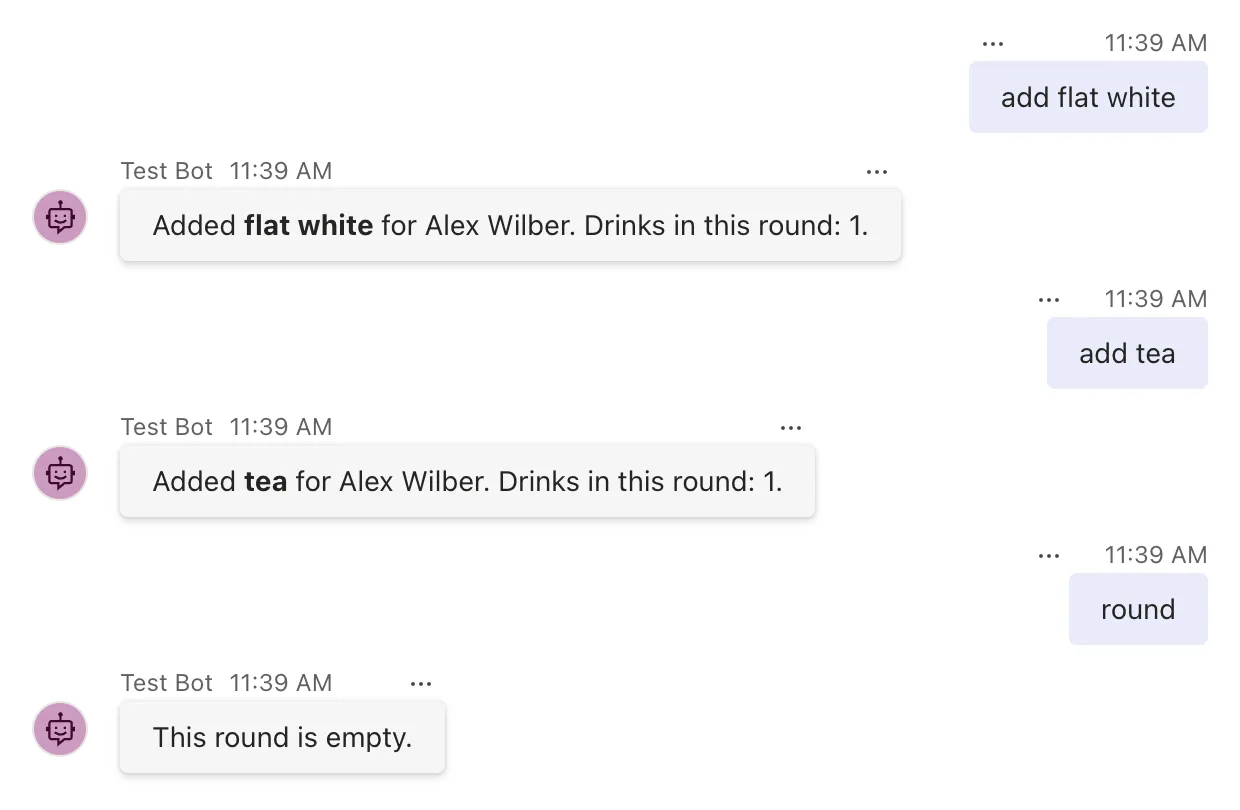
Every add reports a round of one drink, and round finds nothing at all. The SDK created a new CoffeeRoundAgent for each of the three messages, each with its own empty _round. Alex Wilber is the Playground's made-up user, the sender of everything you type.
Making the field static would keep the list between messages, but it would be one list for every conversation and every person the agent ever talks to, it would vanish whenever the agent restarts, and a second copy of the agent on another server would have a list of its own. Values that belong to a conversation or a person go in state.
Step 3: Keep the Round in Conversation State
Stop the agent with Ctrl+C. In CoffeeRoundAgent.cs, replace the _round field with a name for the round's value:
private const string RoundKey = "round";
Then read and write the round through the conversation's state. AddDrinkAsync becomes:
    private async Task AddDrinkAsync(ITurnContext turnContext, ITurnState turnState, CancellationToken cancellationToken)
    {
        string drink = AddPattern.Match(turnContext.Activity.Text).Groups[1].Value.Trim();
        string name = turnContext.Activity.From.Name ?? "Someone";

        List<CoffeeOrder> round = turnState.Conversation.GetValue<List<CoffeeOrder>>(RoundKey, () => []);
        round.Add(new CoffeeOrder(name, drink));
        turnState.Conversation.SetValue(RoundKey, round);

        await turnContext.SendActivityAsync($"Added **{drink}** for {name}. Drinks in this round: {round.Count}.", cancellationToken: cancellationToken);
    }
And ShowRoundAsync reads the same value:
    private async Task ShowRoundAsync(ITurnContext turnContext, ITurnState turnState, CancellationToken cancellationToken)
    {
        List<CoffeeOrder> round = turnState.Conversation.GetValue<List<CoffeeOrder>>(RoundKey, () => []);

        if (round.Count == 0)
        {
            await turnContext.SendActivityAsync("This round is empty.", cancellationToken: cancellationToken);
            return;
        }

        string lines = string.Join("\n", round.Select(order => $"- {order.Name}: {order.Drink}"));
        await turnContext.SendActivityAsync($"This round:\n\n{lines}", cancellationToken: cancellationToken);
    }
turnState.Conversation.GetValue<T>(name, defaultValueFactory)reads the value calledroundfrom this conversation's state. When there isn't one yet, it calls the function you pass,() => [], and keeps the empty list that function returns as the value.turnState.Conversation.SetValue(name, value)stores the list under that name. Nothing is written to storage yet: the SDK saves the conversation's state when the turn ends.RoundKeyis a constant, so the code that reads the round and the code that writes it can't disagree about the name.- Values are saved as JSON. Records such as
CoffeeOrder, lists and plain classes with public properties all work. When you read a value back,GetValue<T>turns the JSON into the type you ask for.
Start the agent again with dotnet run. The Playground can stay open: it sends your next message to the restarted agent. Send the same three messages:
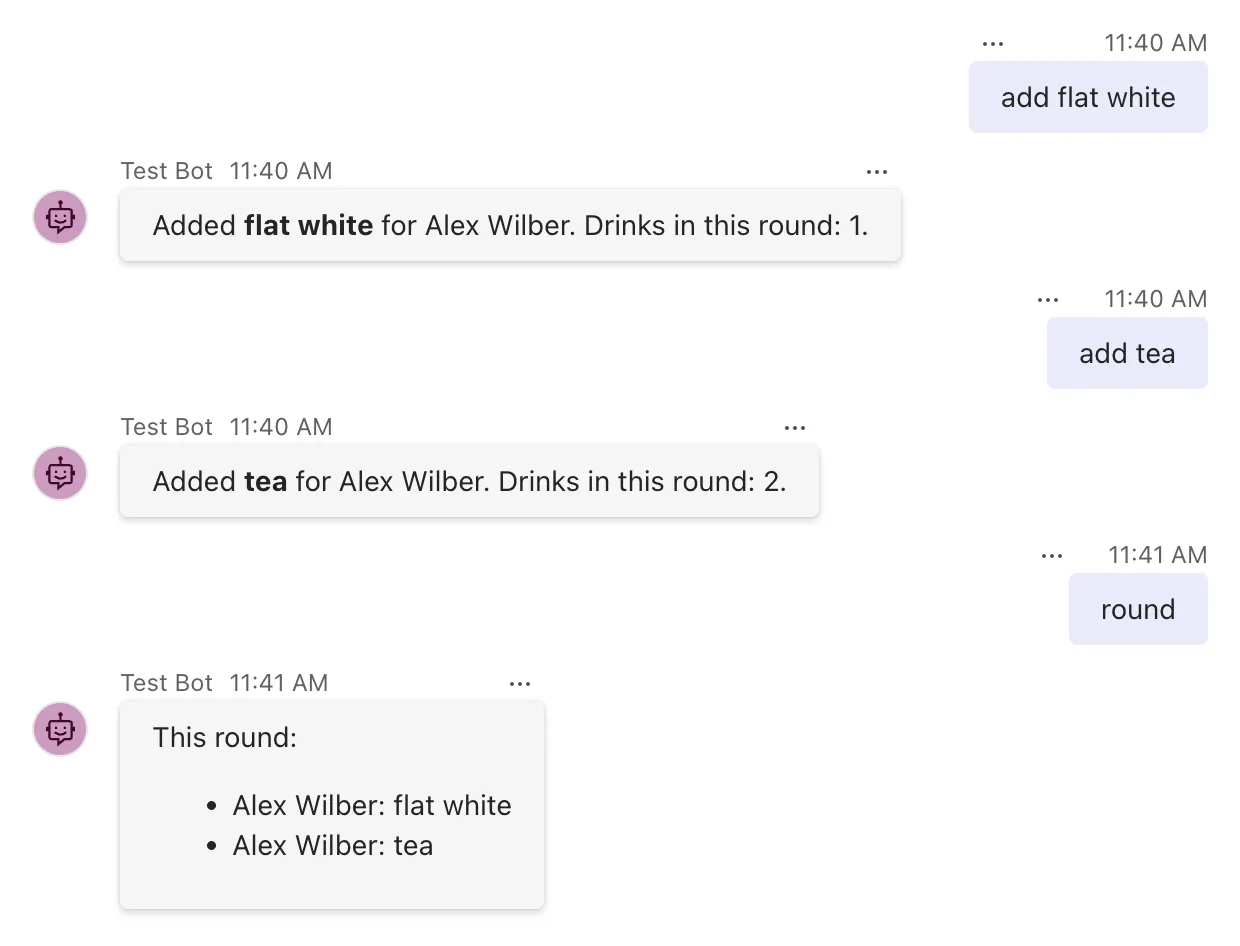
This time the second drink makes two, and round lists both. Each turn got a brand-new agent, as before, but the round came from the conversation's state, which the SDK loaded at the start of the turn and saved at the end.
Step 4: Remember Each Person's Usual in User State
A person's usual drink doesn't belong to one conversation: it should work in any chat they use the agent in. That's what user state is for. Stop the agent, and add a second name and a pattern for my usual is ... next to the first ones:
    private const string UsualKey = "usual";

    private static readonly Regex UsualPattern = new(@"^my usual is\s+(.{1,40})$", RegexOptions.IgnoreCase);
Register two more routes at the top of the constructor:
    public CoffeeRoundAgent(AgentApplicationOptions options) : base(options)
    {
        OnMessage(UsualPattern, SaveUsualAsync);
        OnMessage("add my usual", AddUsualAsync);
        OnMessage(AddPattern, AddDrinkAsync);
        OnMessage("round", ShowRoundAsync);
        OnActivity(ActivityTypes.Message, HelpAsync, rank: RouteRank.Last);
    }
add my usual matches AddPattern too, so its route has to come first: routes with the same rank are tried in the order you register them, as Part 2 showed.
Now the two new handlers. Adding a drink happens in two places now, so AddDrinkAsync hands its drink to a shared AddToRoundAsync, which holds the conversation-state code from Step 3. Replace AddDrinkAsync with these four methods:
    private async Task SaveUsualAsync(ITurnContext turnContext, ITurnState turnState, CancellationToken cancellationToken)
    {
        string drink = UsualPattern.Match(turnContext.Activity.Text).Groups[1].Value.Trim();

        turnState.User.SetValue(UsualKey, drink);

        await turnContext.SendActivityAsync($"Got it. Your usual is **{drink}**.", cancellationToken: cancellationToken);
    }

    private async Task AddUsualAsync(ITurnContext turnContext, ITurnState turnState, CancellationToken cancellationToken)
    {
        string? usual = turnState.User.GetValue<string>(UsualKey);

        if (usual is null)
        {
            await turnContext.SendActivityAsync("I don't know your usual yet. Tell me with **my usual is** and your drink.", cancellationToken: cancellationToken);
            return;
        }

        await AddToRoundAsync(turnContext, turnState, usual, cancellationToken);
    }

    private async Task AddDrinkAsync(ITurnContext turnContext, ITurnState turnState, CancellationToken cancellationToken)
    {
        string drink = AddPattern.Match(turnContext.Activity.Text).Groups[1].Value.Trim();

        await AddToRoundAsync(turnContext, turnState, drink, cancellationToken);
    }

    private static async Task AddToRoundAsync(ITurnContext turnContext, ITurnState turnState, string drink, CancellationToken cancellationToken)
    {
        string name = turnContext.Activity.From.Name ?? "Someone";

        List<CoffeeOrder> round = turnState.Conversation.GetValue<List<CoffeeOrder>>(RoundKey, () => []);
        round.Add(new CoffeeOrder(name, drink));
        turnState.Conversation.SetValue(RoundKey, round);

        await turnContext.SendActivityAsync($"Added **{drink}** for {name}. Drinks in this round: {round.Count}.", cancellationToken: cancellationToken);
    }
turnState.User.SetValue(UsualKey, drink)keeps the drink in the user state of whoever sent the message.turnState.User.GetValue<string>(UsualKey), without a default, returnsnullwhen that person hasn't set a usual, soAddUsualAsyncasks for one.
Finally, mention the new command in the catch-all's answer:
await turnContext.SendActivityAsync("Add a drink to the round, such as **add flat white**, or send **round** to see it. Tell me your usual with **my usual is** and your drink.", cancellationToken: cancellationToken);
Run the agent again, and send add my usual, my usual is flat white, then add my usual once more:
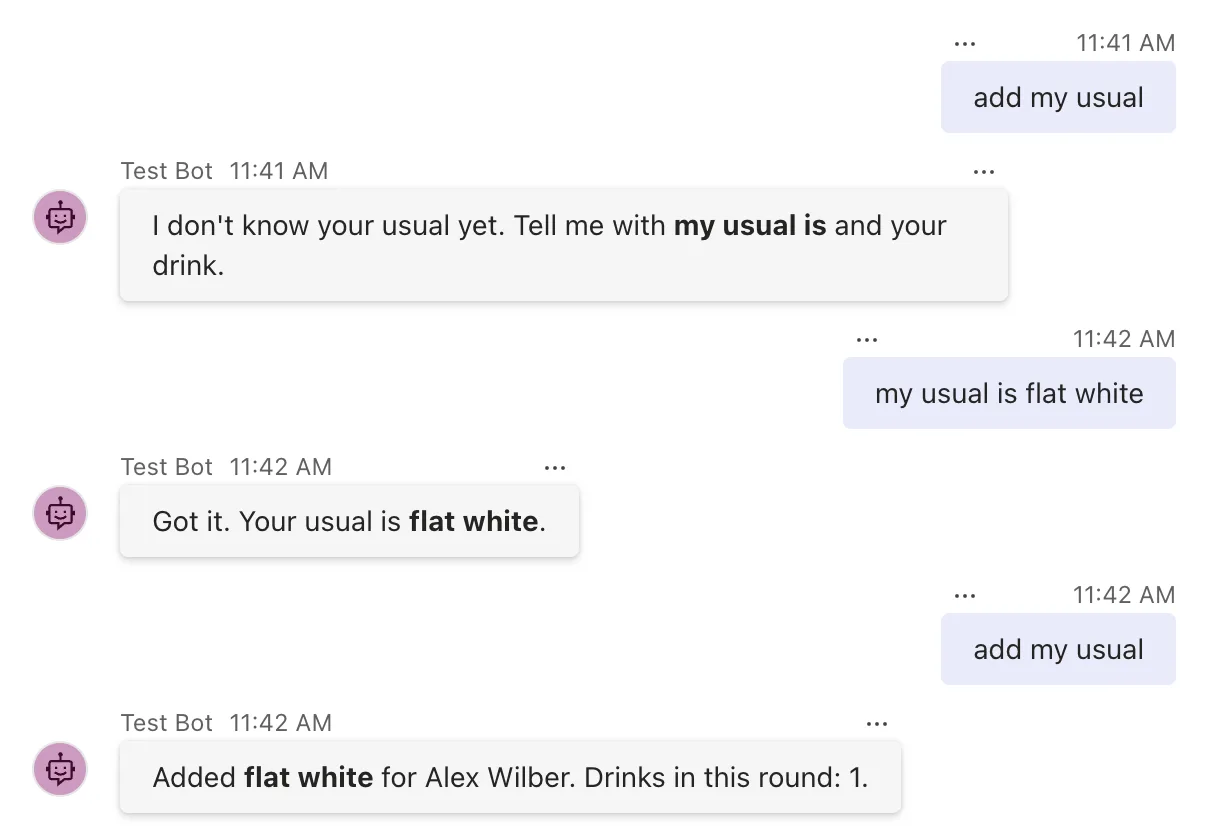
The round starts from one drink again, because stopping the agent emptied its storage. Step 8 shows why. Leave the agent running for the next step.
Step 5: See Who Shares Which State
So far there's been one chat and one person. A group chat, and a second person in it, show what the two scopes really mean.
In the Playground, select Group Chat in the list on the left. In a group chat, as in Teams, the agent only receives messages that mention it: type @, choose Test Bot from the list that opens, then type the command after it. Send round, then add my usual.
Now for a second person. The Playground sends everything you type as Alex Wilber, but its custom activity can send a message as anyone. Its built-in people include Megan Bowen, whose ID is user-id-1. Select Mock an Activity, then Custom activity. The dialog opens with an activity that's already addressed to your agent, in the conversation you have open; How to Send a Custom Activity from the Microsoft 365 Agents Playground walks through it in full. Change the from lines and the last line, so that the activity is a message from Megan:
  "from": {
    "id": "user-id-1",
    "name": "Megan Bowen"
  },
  "type": "message",
  "text": "add my usual"
Select Send activity. Then open Custom activity again and send add tea from Megan the same way:
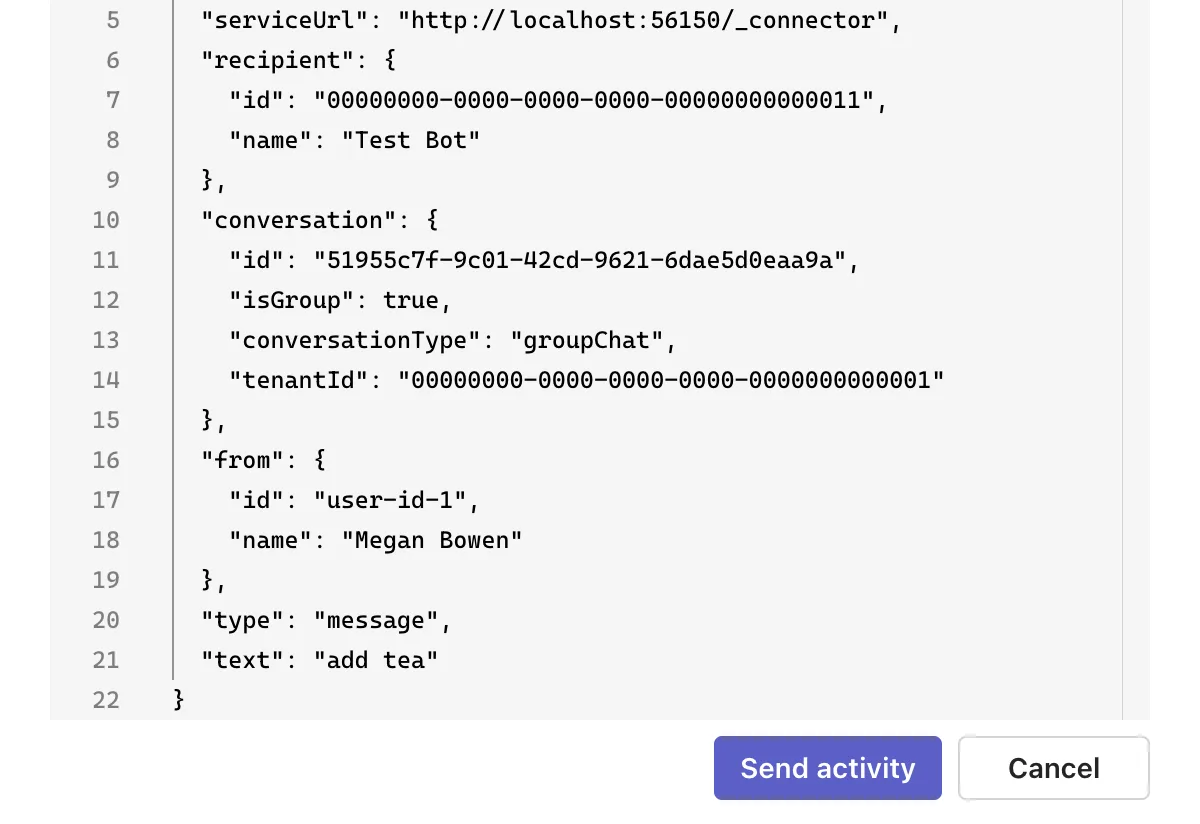
Last, as Alex, send round to the agent again. The group chat now shows:
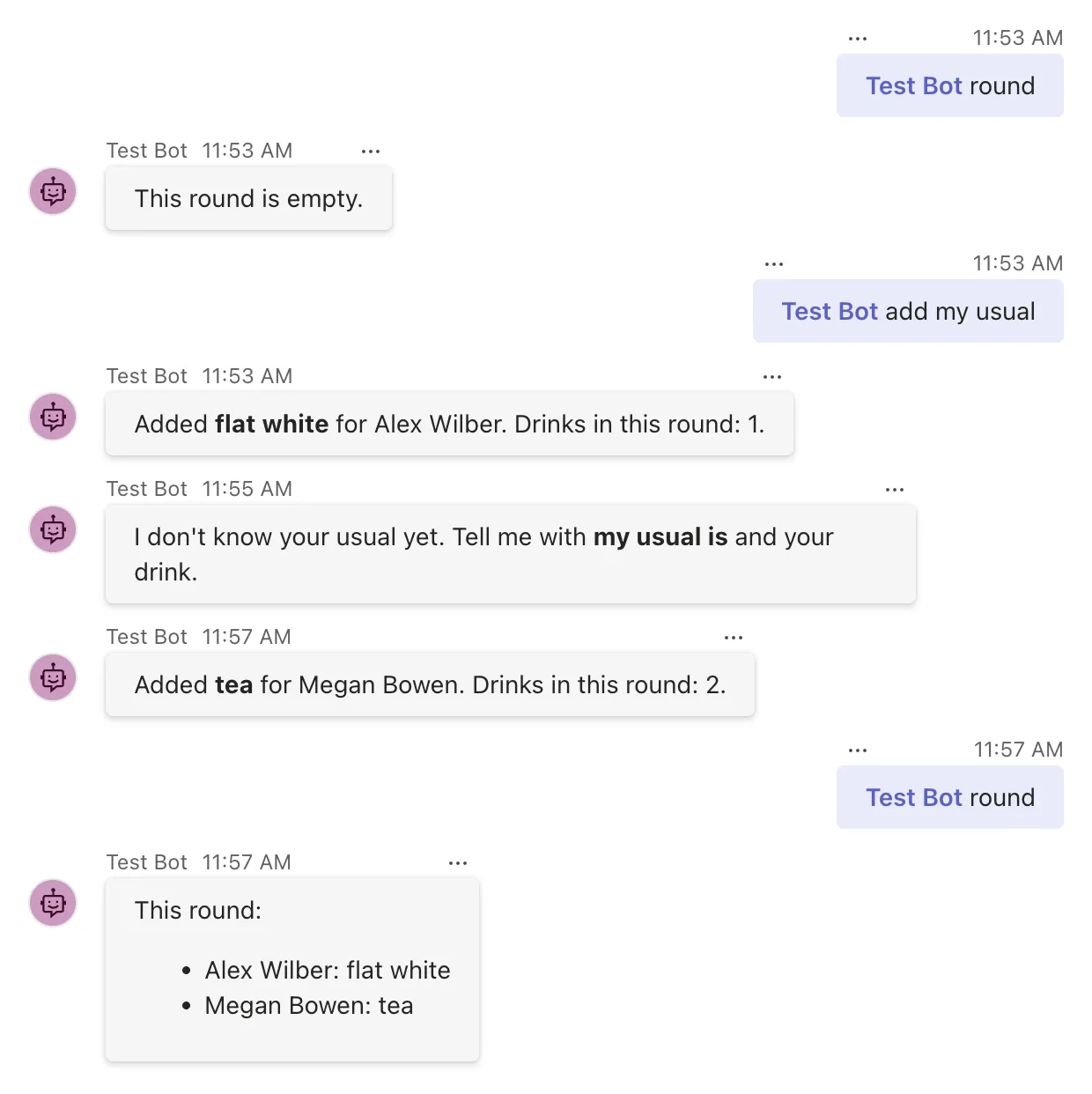
A custom activity doesn't show in the chat as a message, only the agent's answers to it do; the Log Panel on the right lists every activity that arrived. Read the answers from the top:
- The group chat's round started empty. Conversation state belongs to one conversation, and the group chat is a different conversation from the personal chat, whose round still holds Alex's flat white.
add my usualworked for Alex here. User state follows a person into every conversation they have with the agent.- Megan got I don't know your usual yet. User state belongs to one person, and Megan hasn't told the agent a usual drink yet.
- Megan's tea joined Alex's flat white. Everyone in a conversation shares its conversation state, so they built one round together.
Step 6: Hand a Value Between Handlers with Temp State
Some values are needed only while one turn runs: something a before-turn handler works out for the route, or a measurement that the after-turn handler finishes. They go in temp state, which is never loaded or saved: it starts empty in every turn and is thrown away at the end. Here, it times every turn.
Stop the agent. Give the agent a logger, as in Part 3, and register a before-turn and an after-turn handler. Add using System.Diagnostics; at the top of the file and a third name next to the others, then change the constructor:
    private const string TurnStartedKey = "turnStarted";

    private readonly ILogger<CoffeeRoundAgent> _logger;

    public CoffeeRoundAgent(AgentApplicationOptions options, ILogger<CoffeeRoundAgent> logger) : base(options)
    {
        _logger = logger;

        OnBeforeTurn(StartTimerAsync);
        OnAfterTurn(LogTurnTimeAsync);

        OnMessage(UsualPattern, SaveUsualAsync);
        OnMessage("add my usual", AddUsualAsync);
        OnMessage(AddPattern, AddDrinkAsync);
        OnMessage("round", ShowRoundAsync);
        OnActivity(ActivityTypes.Message, HelpAsync, rank: RouteRank.Last);
    }
Add the two handlers below the constructor:
    private Task<bool> StartTimerAsync(ITurnContext turnContext, ITurnState turnState, CancellationToken cancellationToken)
    {
        turnState.Temp.SetValue(TurnStartedKey, Stopwatch.GetTimestamp());
        return Task.FromResult(true);
    }

    private Task<bool> LogTurnTimeAsync(ITurnContext turnContext, ITurnState turnState, CancellationToken cancellationToken)
    {
        long started = turnState.Temp.GetValue<long>(TurnStartedKey);
        TimeSpan elapsed = Stopwatch.GetElapsedTime(started);

        _logger.LogInformation("The {ActivityType} turn took {Milliseconds} ms.", turnContext.Activity.Type, (int)elapsed.TotalMilliseconds);
        return Task.FromResult(true);
    }
turnState.Temp.SetValueputs the turn's start time where the after-turn handler of the same turn can find it, and nowhere else.Stopwatch.GetTimestamp()reads a high-resolution timer, andStopwatch.GetElapsedTime(started)turns the difference into aTimeSpan.- The SDK uses temp state too. When an agent is set up to download the files people attach to a message, they arrive in
turnState.Temp.InputFiles, which Part 14 uses.
Run the agent, reload the Playground's page in your browser, and send a few messages in the personal chat. The agent's own log lines show one measurement per turn, starting with the conversationUpdate the Playground sends when it connects:
info: CoffeeRound.CoffeeRoundAgent[0]
      The conversationUpdate turn took 0 ms.
info: CoffeeRound.CoffeeRoundAgent[0]
      The message turn took 74 ms.
info: CoffeeRound.CoffeeRoundAgent[0]
      The message turn took 6 ms.
info: CoffeeRound.CoffeeRoundAgent[0]
      The message turn took 7 ms.
Each turn's start time lived exactly as long as its turn. The next turn found an empty temp state and wrote its own.
turnState also has GetValue and SetValue of its own, which take a path such as "conversation.round": the part before the dot names the scope. A name without a dot goes to temp state. So turnState.SetValue("round", round) keeps the round for one turn and then loses it, without any error. Use turnState.Conversation, turnState.User and turnState.Temp, so the scope is always in plain sight.
Step 7: Start a New Round: Clear State
Once the coffee arrives, the round should start again. Stop the agent and register one more route in the constructor, after round:
OnMessage("new round", NewRoundAsync);
Then add its handler, and mention it in HelpAsync:
    private async Task NewRoundAsync(ITurnContext turnContext, ITurnState turnState, CancellationToken cancellationToken)
    {
        turnState.Conversation.DeleteValue(RoundKey);

        await turnContext.SendActivityAsync("New round started. The round is empty.", cancellationToken: cancellationToken);
    }
await turnContext.SendActivityAsync("Add a drink to the round, such as **add flat white**, or send **round** to see it. Tell me your usual with **my usual is** and your drink, and send **new round** to start again.", cancellationToken: cancellationToken);
DeleteValue removes one value from a scope. There are three ways to clear state, and they differ in how much they remove and when storage changes:
| Call | Removes | Storage changes |
|---|---|---|
turnState.Conversation.DeleteValue(RoundKey) | One value | When the turn ends |
turnState.Conversation.ClearState() | Every value in the scope | When the turn ends: the empty scope is saved |
await turnState.Conversation.DeleteStateAsync(turnContext, cancellationToken) | Every value, and the scope's record in storage | Straight away |
Run the agent, set your usual again and add a drink or two, then send new round, round and add my usual:
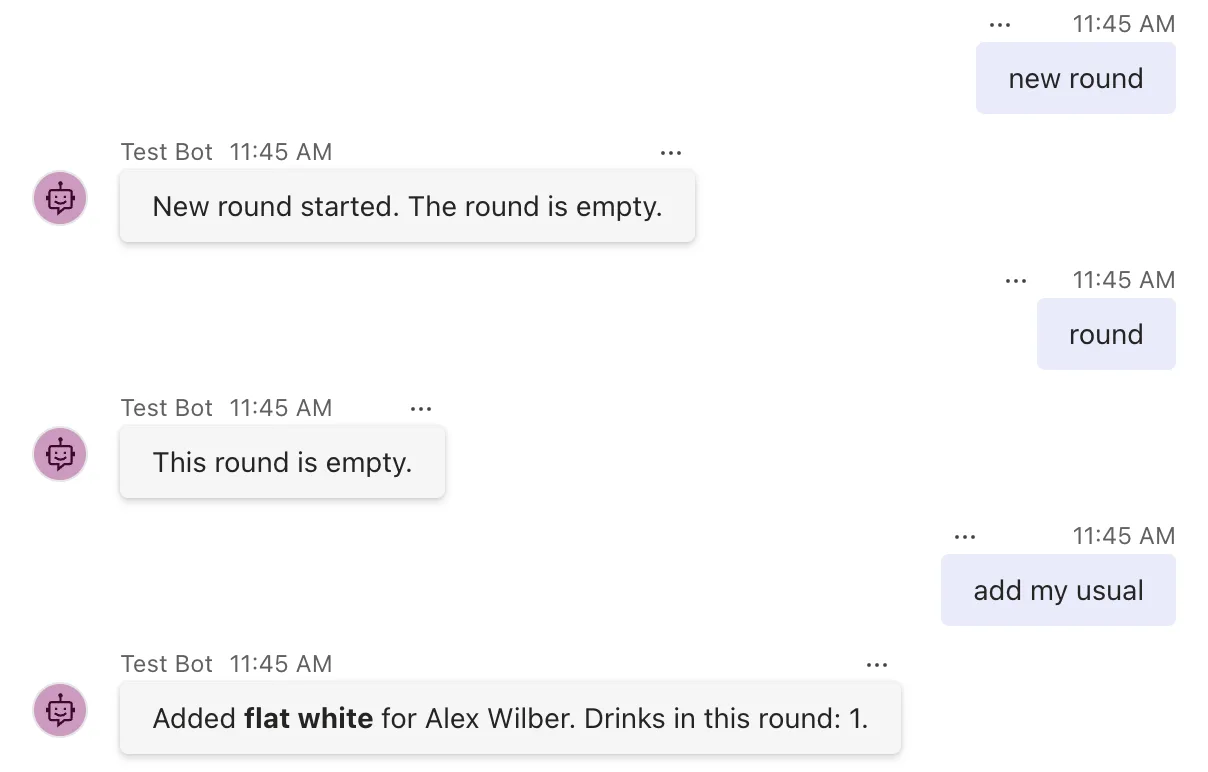
The round is empty and the usual drink is still there: clearing the conversation's state doesn't touch anybody's user state.
Step 8: Restart the Agent
Stop the agent with Ctrl+C and start it again with dotnet run, but leave the Playground open, in the same chat. Then send round and add my usual:
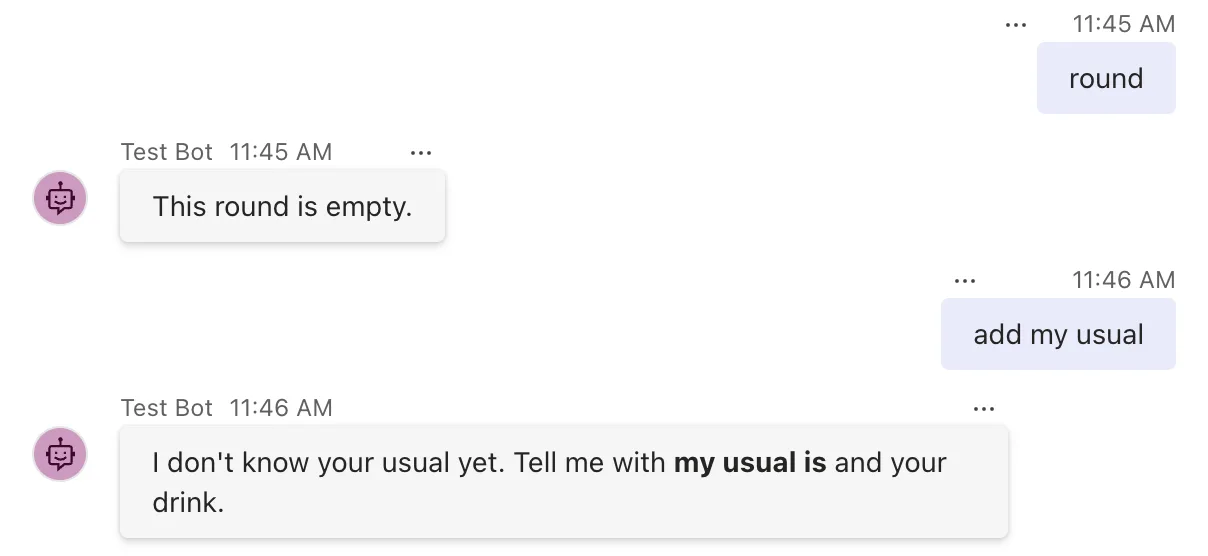
Both kinds of state are gone. This line in Program.cs is the reason:
builder.Services.AddSingleton<IStorage, MemoryStorage>();
It registers MemoryStorage as the agent's IStorage, one instance for the whole app. Every conversation's and every person's state lives in that object, in the agent's memory, so it survives from one turn to the next and disappears with the process. Microsoft's storage guide lists the other limit as well: memory storage data is only available on the web app instance, so it's unsuitable when running in a cluster. Two copies of the agent would each have state of their own.
If you remove the line, state still works: the SDK then creates a MemoryStorage of its own. Registering it yourself is how you choose where state is kept, and it's the one line Part 19 changes to keep state in Azure.
The Complete Code
Here's the finished CoffeeRoundAgent.cs:
using System.Diagnostics;
using System.Text.RegularExpressions;
using Microsoft.Agents.Builder;
using Microsoft.Agents.Builder.App;
using Microsoft.Agents.Builder.State;
using Microsoft.Agents.Core.Models;

namespace CoffeeRound;

public class CoffeeRoundAgent : AgentApplication
{
    private const string RoundKey = "round";
    private const string UsualKey = "usual";
    private const string TurnStartedKey = "turnStarted";

    private static readonly Regex AddPattern = new(@"^add\s+(.{1,40})$", RegexOptions.IgnoreCase);
    private static readonly Regex UsualPattern = new(@"^my usual is\s+(.{1,40})$", RegexOptions.IgnoreCase);

    private readonly ILogger<CoffeeRoundAgent> _logger;

    public CoffeeRoundAgent(AgentApplicationOptions options, ILogger<CoffeeRoundAgent> logger) : base(options)
    {
        _logger = logger;

        OnBeforeTurn(StartTimerAsync);
        OnAfterTurn(LogTurnTimeAsync);

        OnMessage(UsualPattern, SaveUsualAsync);
        OnMessage("add my usual", AddUsualAsync);
        OnMessage(AddPattern, AddDrinkAsync);
        OnMessage("round", ShowRoundAsync);
        OnMessage("new round", NewRoundAsync);
        OnActivity(ActivityTypes.Message, HelpAsync, rank: RouteRank.Last);
    }

    private Task<bool> StartTimerAsync(ITurnContext turnContext, ITurnState turnState, CancellationToken cancellationToken)
    {
        turnState.Temp.SetValue(TurnStartedKey, Stopwatch.GetTimestamp());
        return Task.FromResult(true);
    }

    private Task<bool> LogTurnTimeAsync(ITurnContext turnContext, ITurnState turnState, CancellationToken cancellationToken)
    {
        long started = turnState.Temp.GetValue<long>(TurnStartedKey);
        TimeSpan elapsed = Stopwatch.GetElapsedTime(started);

        _logger.LogInformation("The {ActivityType} turn took {Milliseconds} ms.", turnContext.Activity.Type, (int)elapsed.TotalMilliseconds);
        return Task.FromResult(true);
    }

    private async Task SaveUsualAsync(ITurnContext turnContext, ITurnState turnState, CancellationToken cancellationToken)
    {
        string drink = UsualPattern.Match(turnContext.Activity.Text).Groups[1].Value.Trim();

        turnState.User.SetValue(UsualKey, drink);

        await turnContext.SendActivityAsync($"Got it. Your usual is **{drink}**.", cancellationToken: cancellationToken);
    }

    private async Task AddUsualAsync(ITurnContext turnContext, ITurnState turnState, CancellationToken cancellationToken)
    {
        string? usual = turnState.User.GetValue<string>(UsualKey);

        if (usual is null)
        {
            await turnContext.SendActivityAsync("I don't know your usual yet. Tell me with **my usual is** and your drink.", cancellationToken: cancellationToken);
            return;
        }

        await AddToRoundAsync(turnContext, turnState, usual, cancellationToken);
    }

    private async Task AddDrinkAsync(ITurnContext turnContext, ITurnState turnState, CancellationToken cancellationToken)
    {
        string drink = AddPattern.Match(turnContext.Activity.Text).Groups[1].Value.Trim();

        await AddToRoundAsync(turnContext, turnState, drink, cancellationToken);
    }

    private static async Task AddToRoundAsync(ITurnContext turnContext, ITurnState turnState, string drink, CancellationToken cancellationToken)
    {
        string name = turnContext.Activity.From.Name ?? "Someone";

        List<CoffeeOrder> round = turnState.Conversation.GetValue<List<CoffeeOrder>>(RoundKey, () => []);
        round.Add(new CoffeeOrder(name, drink));
        turnState.Conversation.SetValue(RoundKey, round);

        await turnContext.SendActivityAsync($"Added **{drink}** for {name}. Drinks in this round: {round.Count}.", cancellationToken: cancellationToken);
    }

    private async Task ShowRoundAsync(ITurnContext turnContext, ITurnState turnState, CancellationToken cancellationToken)
    {
        List<CoffeeOrder> round = turnState.Conversation.GetValue<List<CoffeeOrder>>(RoundKey, () => []);

        if (round.Count == 0)
        {
            await turnContext.SendActivityAsync("This round is empty.", cancellationToken: cancellationToken);
            return;
        }

        string lines = string.Join("\n", round.Select(order => $"- {order.Name}: {order.Drink}"));
        await turnContext.SendActivityAsync($"This round:\n\n{lines}", cancellationToken: cancellationToken);
    }

    private async Task NewRoundAsync(ITurnContext turnContext, ITurnState turnState, CancellationToken cancellationToken)
    {
        turnState.Conversation.DeleteValue(RoundKey);

        await turnContext.SendActivityAsync("New round started. The round is empty.", cancellationToken: cancellationToken);
    }

    private async Task HelpAsync(ITurnContext turnContext, ITurnState turnState, CancellationToken cancellationToken)
    {
        await turnContext.SendActivityAsync("Add a drink to the round, such as **add flat white**, or send **round** to see it. Tell me your usual with **my usual is** and your drink, and send **new round** to start again.", cancellationToken: cancellationToken);
    }
}
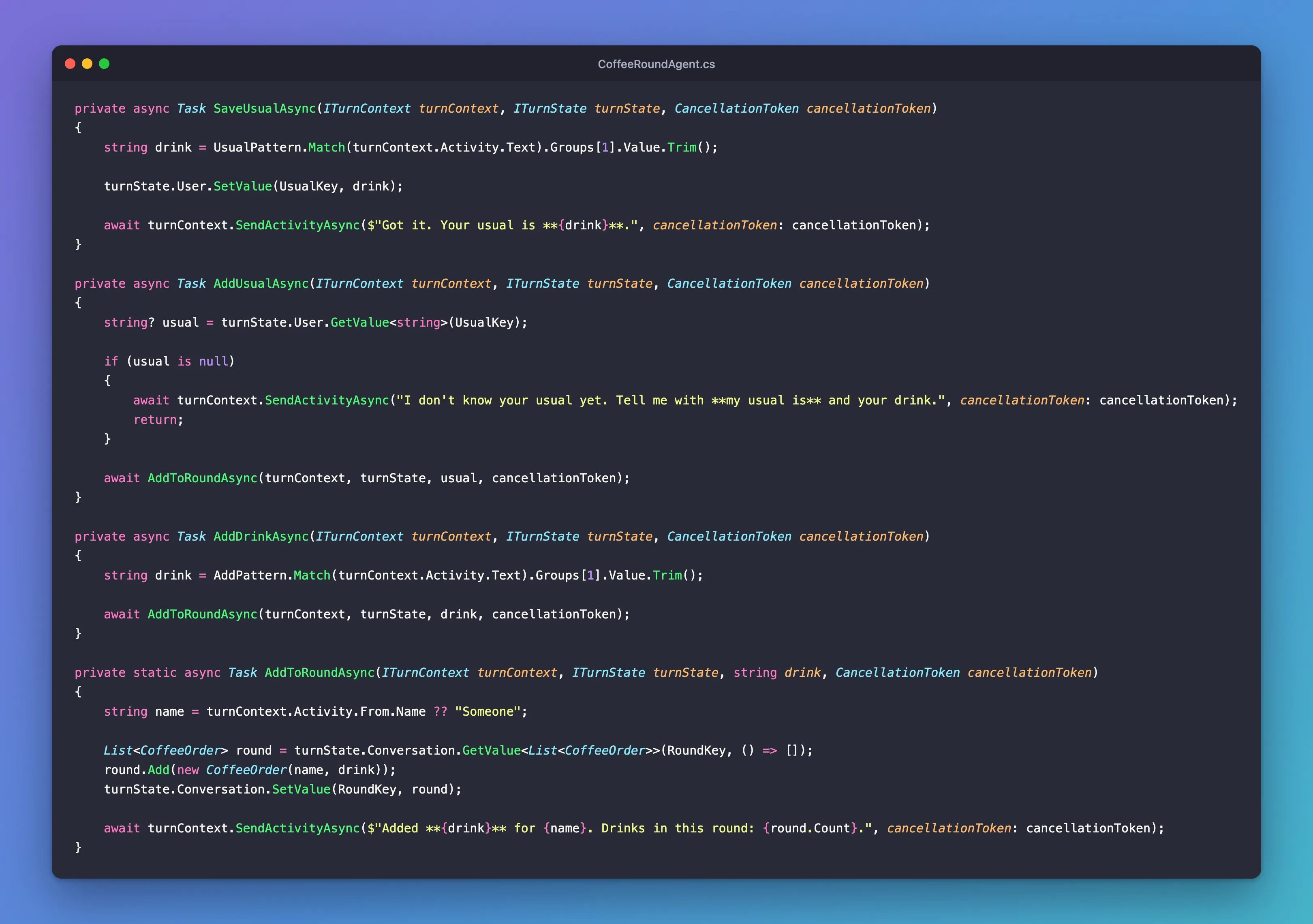
The heart of it is where each value lives: the usual drink in the person's state, the round in the conversation's:
CoffeeOrder.cs and Program.cs are unchanged from Step 2:
namespace CoffeeRound;

public record CoffeeOrder(string Name, string Drink);
using CoffeeRound;
using Microsoft.Agents.Hosting.AspNetCore;
using Microsoft.Agents.Storage;

var builder = WebApplication.CreateBuilder(args);

builder.AddAgentDefaults()
    .AddAgent<CoffeeRoundAgent>();
builder.Services.AddSingleton<IStorage, MemoryStorage>();

var app = builder.Build();

app.UseAgents();
app.MapDefaultAgentEndpoints();

app.Run();
Stop and Clean Up
Stop the agent and the Playground with Ctrl+C in their terminals. Nothing was created outside the project folder, and the agent's state only ever lived in its memory, so it went when the agent stopped. Delete the CoffeeRound folder if you don't want to keep it.
What You Can Do Now
- Keep values for a whole conversation with
turnState.Conversation, and for each person withturnState.User. - Hand a value from one handler to another within a turn with
turnState.Temp. - Tell which state each chat and each person shares, and test it with a second person in the Playground.
- Clear a single value, a whole scope, or the stored record.
- Explain where state is kept, what its storage keys look like, and why
MemoryStorageforgets everything when the agent restarts.
Common Mistakes
| Mistake | What happens | Do this instead |
|---|---|---|
| Keeping values in fields of the agent class | They're gone by the next message, because every activity gets a new agent | Keep them in conversation or user state |
Making the field static | One value for every conversation and person, lost on restart | Use the scope the value belongs to |
turnState.SetValue("round", round) without a scope | The value goes to temp state and is never saved | turnState.Conversation.SetValue(...), or the path "conversation.round" |
Registering the add pattern before add my usual | The pattern takes add my usual and adds a drink called my usual | Register the more specific route first |
Using turnState.Private without adding the scope | The turn fails with Scope 'T' not found | Add the private scope to the turn state first |
Keeping production state in MemoryStorage | Every restart loses it, and each server has its own | Durable storage, as in Part 19 |
Troubleshooting
| Symptom | Likely cause | Fix |
|---|---|---|
| The agent forgets between messages | The value is in a field, or was set without a scope | Store it with turnState.Conversation or turnState.User |
| The agent forgets after a restart | MemoryStorage keeps state only in memory | Expected; durable storage comes in Part 19 |
| A person's user state is missing | It's a different person, or the same person on another channel | User state belongs to one person on one channel |
| A change made in the turn wasn't kept | An after-turn handler returned false, or the turn threw an exception | Return true, and check the log for errors |
The answer is Scope 'T' not found | The code uses turnState.Private, which isn't there by default | Fixed: System.ArgumentException: Scope 'T' not found |
| An answer says AgentState 'conversation' could not save key | Two turns of the same conversation changed its state at once | Fixed: EtagException: AgentState could not save key |
FAQ
What happens when two messages arrive at the same time?
The SDK handles them at the same time, in two turns, and both start from the same saved state. When the conversation's state already has a saved record, the turn that saves second fails with an EtagException, and its changes are lost. If it had already answered, the person was told about something that never got saved. Fixed: EtagException: AgentState 'conversation' could not save key because another turn updated the state first shows it happening and how to handle it. It also shows the one case the check doesn't cover: a conversation's very first save.
What should I keep in state?
What the agent needs from one turn to the next: where a conversation stands, a person's settings, a short list like the round. Keep it small. Records that other systems use, or that have to last, belong in a database of their own; state is the agent's memory, not your system of record.
Can I store my own classes?
Yes. State is saved as JSON, so records, plain classes with public properties, lists and dictionaries all work, as List<CoffeeOrder> did here. GetValue<T> turns the saved JSON back into the type you ask for.
Is state saved when my code throws an exception?
No. The SDK saves the state at the end of a turn that finishes. When an exception leaves your handler, the turn's error handlers run and the changes from that turn are dropped.
Does user state follow a person from Teams to a website?
No. Every storage key starts with the channel, so the same person on two channels has two separate user states.
How do I keep something per person but only within one conversation?
That's the private conversation scope, which you add yourself: How to Use Private Conversation State in the Microsoft 365 Agents SDK in C#.
Conclusion
An agent class remembers nothing, because the SDK builds a new one for every activity. State is where its memory lives: conversation state for what a chat builds up together, user state for what a person tells the agent once, and temp state for values that only one turn needs. The SDK loads the first two before your handlers run and saves what changed after them, under keys built from the channel, the conversation and the person. With MemoryStorage, all of it lives in the agent's memory and ends with the process, which is fine on your machine and the first thing to change before production.
Next: Part 5: Send Adaptive Cards and Handle Their Actions. Your agents answer in plain text so far; Part 5 sends Adaptive Cards, with buttons and forms, and handles what people do with them.
Additional Resources
- Manage state — the storage layer, the state scopes and their storage keys.
- Use storage in your agent — memory storage, Azure Blob Storage and Azure Cosmos DB.
- AgentApplication in Microsoft 365 Agents SDK: Use turn state — the three scopes in code.
- TurnState class — the API reference for the scopes and their methods.
- Prepare an agent for production: Preserve state and handle concurrent writes — durable state and turns that change it at the same time.
